Dark Souls Remastered Visual Overhaul
⚪ Last updated 2023Preview
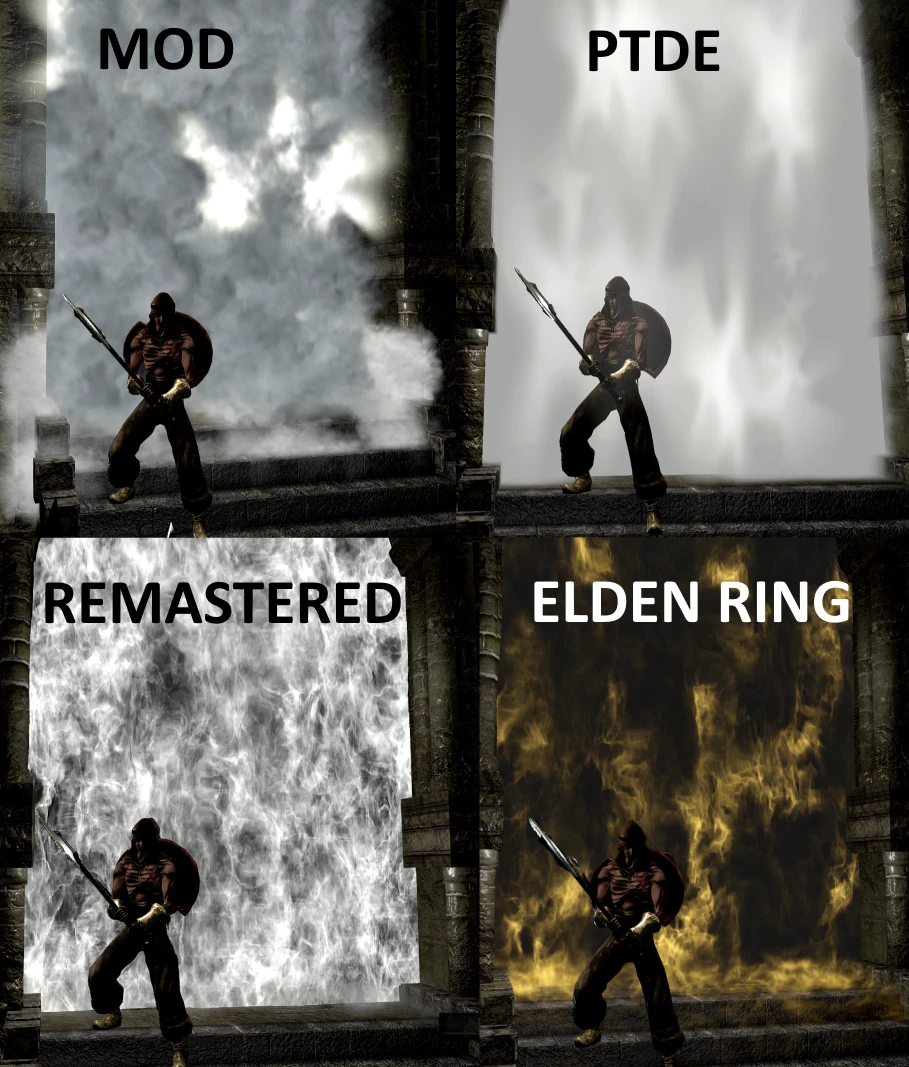
🔍 Analysis
- 👍 1.7% endorsement rate — high engagement, a strong quality signal
- 🏆 #4 of 304 Models and Textures mods in this game by downloads
📋 About This Mod
Translation (google)
As many DS1 fans know that the DSR version brought with it technical changes that many did not like, because of that I am making many changes to improve the visual aspect of the game
-
[]The images that I have uploaded are referential, it is better to try itin the game so that they understand what these changes in the textures are about
Brightness textures
This MOD adds Shine to certain textures that were lost in the REMASTERED, especially metalsInstallation:
DSR Texture Packer & Unpacker tool required
Unzip the MOD_RT_Complete.zip
Copy the contents of the Texture Override folder into the Texture Override folder of the DRS TPU tool
Open the DSR-TPUP.exe program
1.- In the Game Directoty option select the folder where the game is, forexample E: \ Dark Souls Remastered
2.- Then they click on the Repack tab and then press the Repack button
Water, Lava (correct excessive brightness) and Snow effects (optional, just to remove excessive noise from the original game):
You must download the file water_effect.zip, unzip it and paste the content in the MTD folder where the game is installed, previously make a backup copy
Improves resolution through FidelityFX technology and removes excess shine a bit
Unzip the content of the FidelityFX_1. 0.zip file and copy the files that are inside the FidelityFX folder along with the game's DarkSoulsRemastered.exe executable
If you want to keep the original brightness, simply in the game press the Lock / Scroll key and deactivate the "Level" effect.
1.- This MOD is not compatible with DSR 2020 Textures, however an adaptation could be made but it requires work
2.- You might see messages like this when running the DSR tool
"Warning: chr\c2410\c2410_WP_M_1533_s.dds
└─ Expected format DXT1, got format BC7_UNORM."
Keep in mind that it is not an error
If you want to keep the original brightness, simply in the game press the Lock / Scroll key and deactivate the "Level" effect
Bonfire Classic MOD
Installation:
Download and unzip the zip file
Copy the
.dcx file to the sfx folder of the game (make a backup copy)Note: this work is not 100% mine, the Port of the sfx files was made by a modder called Dropoff on the Dark Souls discord server and after talking with him he told me that he had no intention, for now, to individualize them for download , The original port has some bugs and cannot be installed individually, however I received your authorization to be able, based on your work, to be able to port the classic bonfire of the PTDE version by myself, using debug tools and modification of dcx files I was able to finish this MOD which I'm sure some of you will likeNew particle effects - Alpha (Demo)
I'm tweaking
Dark Souls Remastered Visual Overhaul is a texture and model enhancement mod that adds brightness, reflections, and improved water effects to the game. With 701 endorsements and 41,947 downloads, it's a popular choice for players seeking a visual upgrade without changing gameplay.
✨ Key Features
📊 Pros & Cons
✅ Pros
- Community favorite with 701 endorsements and over 41k downloads.
- Simple visual upgrade that makes the game look better without altering gameplay.
- Focuses on key areas like water and reflections for a noticeable improvement.
⚠️ Cons
- Last updated in October 2023, so may not be compatible with the latest game patches.
- Visual overhauls can sometimes cause performance hits on lower-end systems.
- Potential conflicts with other texture mods that alter the same files.
For Dark Souls Remastered players who want a quick visual facelift without messing with gameplay balance. If you're a purist who wants the original look, skip this. But if you're okay with enhanced reflections and water, this is a solid pick.
💡 Beginner Tips
- Make sure to back up your original game files before installing any texture mod.
- If you're using other visual mods, check load order to avoid conflicts.
- Test in different areas to see the water and reflection changes.
📊 Mod Details
- Game
- Darksoulsremastered Mods
- Author
- Oscar Spray
- Version
- 1.8
- Downloads
- 41,947
- Endorsements
- 701
- Category
- Models and Textures
- Created
- 2/15/2021
- Updated
- 10/4/2023
🔧 How to Install Dark Souls Remastered Mods
Download from Nexus Mods.
📖 Full step-by-step install guide for Dark Souls Remastered →
Visit the official mod page for specific installation instructions for this mod.
🎮 Need cheat codes or console commands? Check ur gaming wiki for Dark Souls Remastered commands, item IDs, and more.
Keep browsing — more Dark Souls Remastered mods await