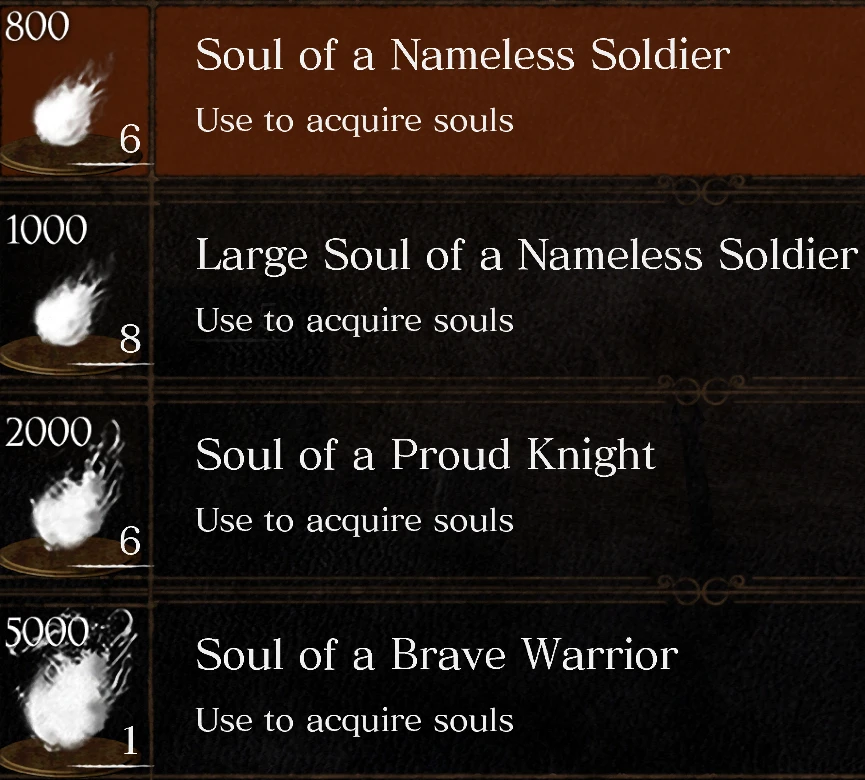
Clean Soul Item Amount Indicator
⚪ Last updated 2019Preview
🔍 Analysis
- 👍 5.7% endorsement rate — high engagement, a strong quality signal
- 🏆 #24 of 304 Models and Textures mods in this game by downloads
📋 About This Mod
Inserts a clean looking tooltip above the soul items to indicate their value when used.
Required Mods: DSR Texture Packer and Unpacker
This mod inserts a clean looking tooltip above the soul items to indicate their value when used.
How to install:
1. Download the DSR Texture Packer and Unpacker.
2. Move the Texture Override folder in the Clean Soul Item Amount Indicator folder to the DSR Texture Packer and Unpacker folder, merging with the Texture Override folder in there.
3. Start DSR-TPUP.exe and input your game directory in the Game Directory field.
4. Navigate to the Repack tab in the .exe and press the Repack button.
5. All done! Start Dark Souls Remastered and revel in your newfound knowledge!
📊 Mod Details
- Game
- Darksoulsremastered Mods
- Author
- echo778
- Version
- 1.0.0
- Downloads
- 4,010
- Endorsements
- 227
- Category
- Models and Textures
- Created
- 11/20/2019
- Updated
- 11/20/2019
🔧 How to Install Dark Souls Remastered Mods
Download from Nexus Mods.
📖 Full step-by-step install guide for Dark Souls Remastered →
Visit the official mod page for specific installation instructions for this mod.
🎮 Need cheat codes or console commands? Check ur gaming wiki for Dark Souls Remastered commands, item IDs, and more.
Keep browsing — more Dark Souls Remastered mods await