DS3 Quick Save
⚪ Last updated 2017⚠️ Install Order · 1 step
Install in this order, then this mod last — most mods fail to load without their framework and dependencies in place.
Preview
🔍 Analysis
- 👍 3.9% endorsement rate — high engagement, a strong quality signal
- 🏆 #30 of 69 Utilities mods in this game by downloads
📋 About This Mod
What it does:
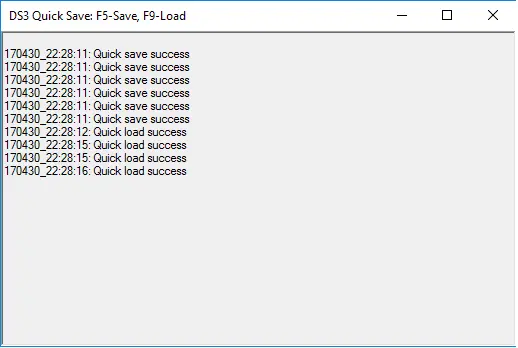
Simple tool to copy save file with global key hook, so you can press these two keys while still in Dark Souls 3 screen - F5 (quick save): copy current file to quick save file. Ideally after the game saved to it's files (the fire icon in the top right corner screen of the game shown and vanished) - F9 (quick load): restore quick save file (if exist) to Dark Souls 3 Save file "DS30000.sl2". Mostly when you at main menu or when the game hasn't started.More info: Dark Souls 3 automatically saves you game all the time to single file (when you press ESC, pick up object, travel, quit ....), this program back up and restore this file with 2 hot keys (It works with the file only, so not really quick save and quick load in game). Simple scenario: before try something, save (F5), I you failed, quit the game to main menu, reload the save file (F9) and choose "Continue" in game menu.
How to use: 1. First edit CopySaveForm.exe.config with you text editor: - SavePath(Must edit): Dark Souls 3 Save directory(contain file DS30000.sl2) usually: C:\Users\windowAccountName\AppData\Roaming\DarkSoulsIII\0110000100000666 - NumberOfSaveKeep: each time you save (F5) the tool will create a back up with time stamped name, when the number of save files exceed this number, the tool will delete oldest file. 2. Start the program when you want to use it 3. If you mispressed the key and overridden your save files, don't worry, open the save directory and choose one of the back up to manually restore the save file.
Note:
- If you start the game with Administrator privilege (Run as Administrator), please do the same with this tool - This tool backup and restore save file, only use it if you know what it is and know what you are doing - Require Microsoft . Net 4. 5 - Most important: please don't use it, just git gud.Tips:
- Press ESC, the game will start to save - The game will save when you choose to quit from menu, so if you want to load save file (F9), quit to main menu first and then load.Credits:
- I saw "Dark Souls 3 Save Game Backup Tool by svaalbard" (http://www.nexusmods.com/darksouls3/mods/16/?), but it doesn't work the way I want (being a cheating noob), so I write this - Global key hook: https://github.com/gmamaladze/globalmousekeyhookDS3 Quick Save is a lightweight utility that lets you copy your Dark Souls 3 save file with global hotkeys F5 and F9, providing quick save and load functionality. It's a simple tool for players who want manual save backups without leaving the game. With 154 endorsements and last updated in 2017, it remains a niche but functional option.
✨ Key Features
📊 Pros & Cons
✅ Pros
- Handy for backing up saves before tough boss fights or invasions (154 endorsements)
- Global hotkeys work even when game is in focus, no alt-tabbing needed
- Lightweight utility that does exactly what it says
⚠️ Cons
- Last updated in 2017 — may not work with current game versions or anti-cheat updates
- No instructions or documentation provided by the author
- Limited to manual save copying; no auto-save scheduling or multiple slots
For Dark Souls 3 players who want a quick way to backup saves before risky encounters or to experiment with different builds. If you're a completionist or like to try risky strategies without permanent consequences, this is for you. Skip if you expect advanced save management features or if you're on a newer game version that might break compatibility.
💡 Beginner Tips
- Make sure to run the tool as administrator if you have save file permission issues.
- Test F5 and F9 in the main menu first to ensure the hotkeys are working before relying on them in combat.
- Keep the tool running in the background while playing; it hooks globally, so it works even if the game is in fullscreen.
📊 Mod Details
- Game
- Dark Souls 3 Mods
- Author
- bloo
- Version
- 0.91
- Downloads
- 3,944
- Endorsements
- 154
- Category
- Utilities
- Created
- 4/30/2017
- Updated
- 4/30/2017
🔧 How to Install Dark Souls 3 Mods
Download from Nexus.
📖 Full step-by-step install guide for Dark Souls 3 →
Visit the official mod page for specific installation instructions for this mod.
🎮 Need cheat codes or console commands? Check ur gaming wiki for Dark Souls 3 commands, item IDs, and more.
Keep browsing — more Dark Souls 3 mods await