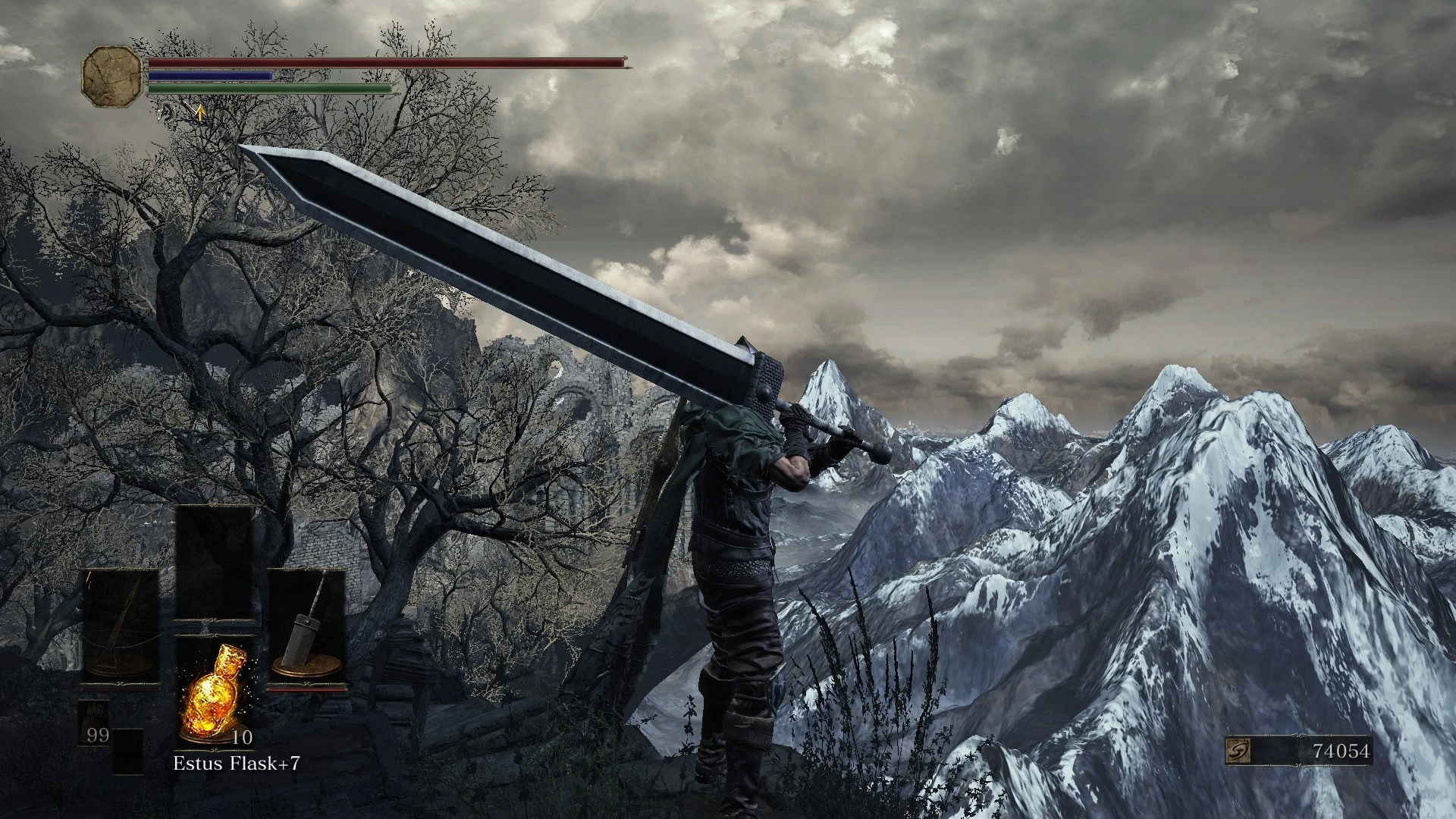
Dragonslayer Greatsword Retexture V2
⚪ Last updated 2016⚠️ Install Order · 1 step
Install in this order, then this mod last — most mods fail to load without their framework and dependencies in place.
Preview
🔍 Analysis
- 👍 5.7% endorsement rate — high engagement, a strong quality signal
- 🏆 #15 of 154 Weapons mods in this game by downloads
📋 About This Mod
"It was much too big to be called a sword. Massive, thick, heavy, and far too rough. Indeed, it was like a heap of raw iron."
Changes the way the Greatsword looks to resemble the Dragonslayer from Berserk, even more than it already does. Requires iGP11.
To install, put the .dds files into your tex_override folder(which by default is in your game's directory), and run Dark Souls 3 through iGP11.
Edit: I fiddled with it a little more. The black spine across the blade is slightly thinner, to emphasize the blade's edges, and it has a better normal map.
Edit 2: Check out EvilDeadAsh34's Dragonslayer Greatsword if this one doesn't quite cut it!
A cosmetic retexture for the Dragonslayer Greatsword, making it resemble the iconic weapon from Berserk more closely. With 162 endorsements and 2,854 downloads, it's a niche but appreciated mod for fans of the anime. Last updated in 2016, so compatibility with current game versions may be uncertain.
✨ Key Features
📊 Pros & Cons
✅ Pros
- Community-approved with 162 endorsements and nearly 3,000 downloads.
- Perfect for Berserk fans who want that iconic look on their weapon.
- Simple cosmetic change that doesn't affect game balance.
⚠️ Cons
- Last updated in 2016 — might not work with the latest game patches.
- Only affects the Greatsword's appearance, so if you're not a fan of that weapon, it's useless.
- No screenshots or detailed description provided, so you're flying blind on the exact look.
For Berserk fans who want their Greatsword to look like Guts' Dragonslayer. Also for players who enjoy cosmetic tweaks without gameplay changes. Skip if you're not into the anime or don't use the Greatsword.
💡 Beginner Tips
- Since it's a retexture, make sure you place the files in the correct texture folder for your game (e.g., Data\Textures).
- If you're using a mod manager, let it handle the installation to avoid overwriting other texture mods.
- Check if the mod is compatible with your game version before installing, as it's from 2016.
📊 Mod Details
- Game
- Dark Souls 3 Mods
- Author
- Thracca
- Version
- v2
- Downloads
- 2,854
- Endorsements
- 162
- Category
- Weapons
- Created
- 7/27/2016
- Updated
- 7/28/2016
🔧 How to Install Dark Souls 3 Mods
Download from Nexus.
📖 Full step-by-step install guide for Dark Souls 3 →
Visit the official mod page for specific installation instructions for this mod.
🎮 Need cheat codes or console commands? Check ur gaming wiki for Dark Souls 3 commands, item IDs, and more.
Keep browsing — more Dark Souls 3 mods await