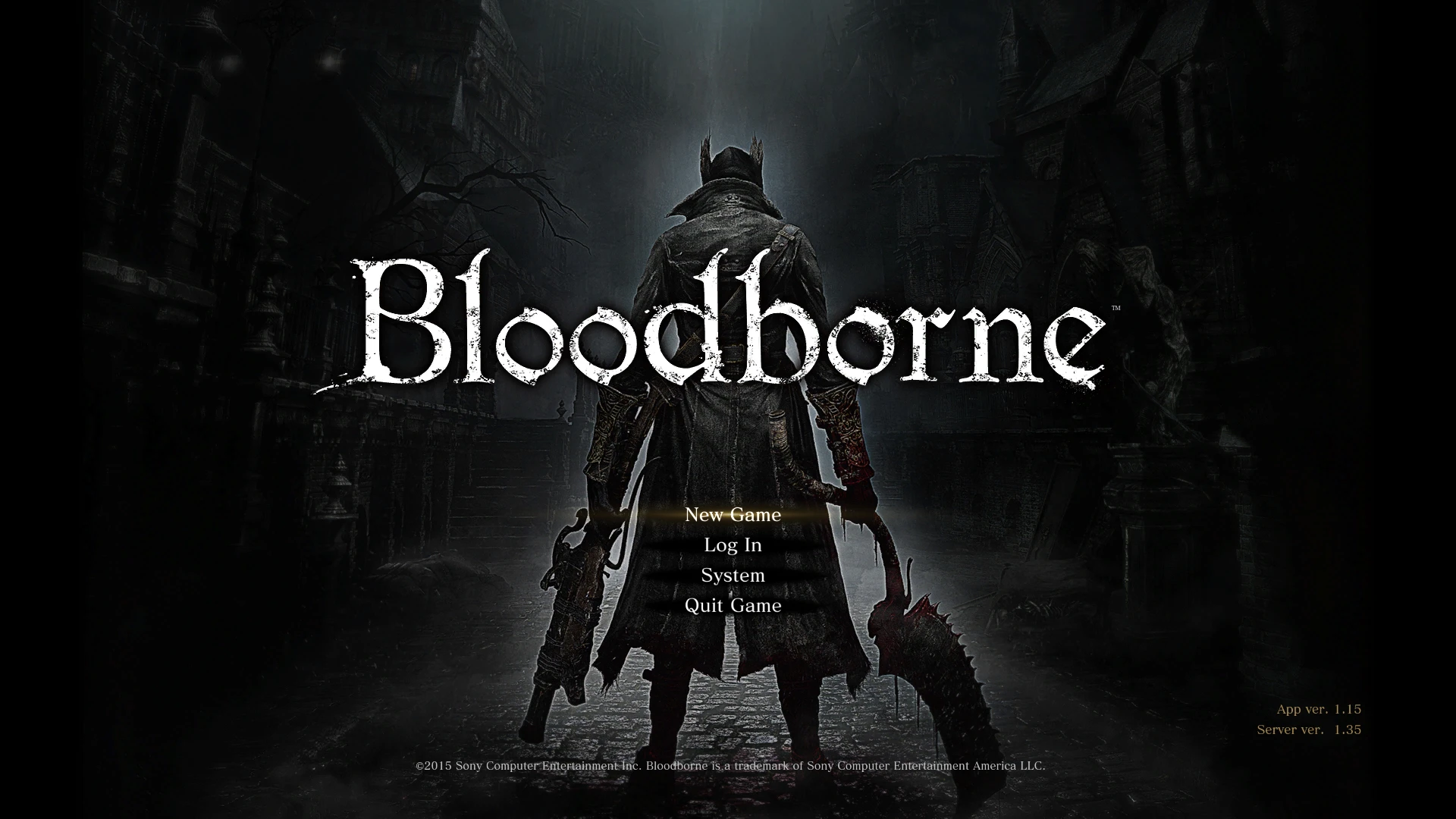
Bloodborne HUD and menus
⚪ Last updated 2021⚠️ Install Order · 1 step
Install in this order, then this mod last — most mods fail to load without their framework and dependencies in place.
Preview
🔍 Analysis
- 👍 3.1% endorsement rate — high engagement, a strong quality signal
- 🏆 #21 of 255 Gameplay Changes mods in this game by downloads
📋 About This Mod
Version 1. 3. 1 Changelog:
- Corrects some text placements
- Fixes banners showing cutted in the bottom
- (optional) Changes the quicksilver bullet counter to display Focus Points (the FP are divided by 10 and rounded to fit better the two digit counter)
________________________________________________________________________
Version 1. 3 Changelog:
- Adds fully functional character creation menu
- Adds new game camera and brightness menu
- Adds summon phantom menu
- Further improves title menu
- Adds miscellaneous menus at the start
- Fixes/improvements to some existing menus
________________________________________________________________________
Version 1. 2 Changelog:
- Adds character select (load game) menu
- Adds almost all bloodborne ingame menus
- Weapons are able to be both handed again
- Improves quality in the menu title screen
________________________________________________________________________
Version 1. 1. 2 Changelog:
- Adds full support for all the languages available in Dark Souls 3
________________________________________________________________________
Version 1. 1 Changelog:
- Fixes summoned phantoms names
- Adds Bloodborne Gestures Menus
- Adds Bloodborne Loading Screens
________________________________________________________________________
This mod isn't a simple texture replacement mod as others, I managed to adapt the original Bloodborne Hud with almost all its functionalities (except insight and bloodvials, but just for now) and some menus (currently i'll upload the title menu) to Dark Souls 3, also I replaced some items with their equivalents on BB.
________________________________________________________________________
Installation:
Mod Engine method:
1. Install and configure Mod Engine (https://www.nexusmods.com/darksouls3/mods/332) as described on its page
2. Extract the .rar file on the mod directory
UXM method:
1. Unpack with UXM (https://www.nexusmods.com/sekiro/mods/26) (don't worry if it takes you to the sekiro modding page, UXM works with DS2, SotFS, DS3 as well)
2. Back up the original "Data0.bdt" file, and "menu" and "msg" folders. (optional)
3. Overwrite the "Data0.bdt" file, and "menu" and "msg" folders with the ones inside the .rar file
4. Before starting the game, make a backup of your savedata.
Disclaimer: The "Data0.bdt" file is used in this mod for functionalities purposes, such as proper quicksilver bullets quantity display, separating weapon into right and left hand groups, etc, and using it online will probably ban you, if you want to use this mod online, just don't extract "Data0.bdt" from the .rar in
Replaces the Dark Souls 3 HUD and menus with an adapted version of Bloodborne's UI. A popular cosmetic overhaul with 827 endorsements and over 26,000 downloads, last updated in 2021.
✨ Key Features
📊 Pros & Cons
✅ Pros
- Community favorite with 827 endorsements and 26k downloads.
- Gives your game a fresh Bloodborne aesthetic without changing gameplay.
- Simple concept, likely easy to install and use.
⚠️ Cons
- Last updated in 2021 — may not be compatible with the latest game patches.
- Purely cosmetic — if you want gameplay changes, this isn't for you.
For Dark Souls 3 players who love Bloodborne's UI and want that gothic, minimalist look in their game. Perfect for veterans looking to spice up their HUD without altering gameplay. Skip if you prefer the original DS3 interface or want functional changes.
💡 Beginner Tips
- Make a backup of your original HUD files before replacing them, so you can revert if needed.
- Check the mod's comments section for any compatibility notes with the latest game version.
- If you use a mod manager, install this mod through it to keep track of file changes.
📊 Mod Details
- Game
- Dark Souls 3 Mods
- Author
- Lenox548
- Version
- 1.3.1
- Downloads
- 26,817
- Endorsements
- 827
- Category
- Gameplay Changes
- Created
- 4/14/2020
- Updated
- 3/29/2021
🔧 How to Install Dark Souls 3 Mods
Download from Nexus.
📖 Full step-by-step install guide for Dark Souls 3 →
Visit the official mod page for specific installation instructions for this mod.
🎮 Need cheat codes or console commands? Check ur gaming wiki for Dark Souls 3 commands, item IDs, and more.
Keep browsing — more Dark Souls 3 mods await