World Tooltips
⚪ Last updated 2022Preview
🔍 Analysis
- 👍 2.9% endorsement rate — high engagement, a strong quality signal
- 🏆 #8 of 142 User Interface mods in this game by downloads
📋 About This Mod
World Tooltips
Updated 1/26/2022, v1. 1 (DFU 0. 13. 4)
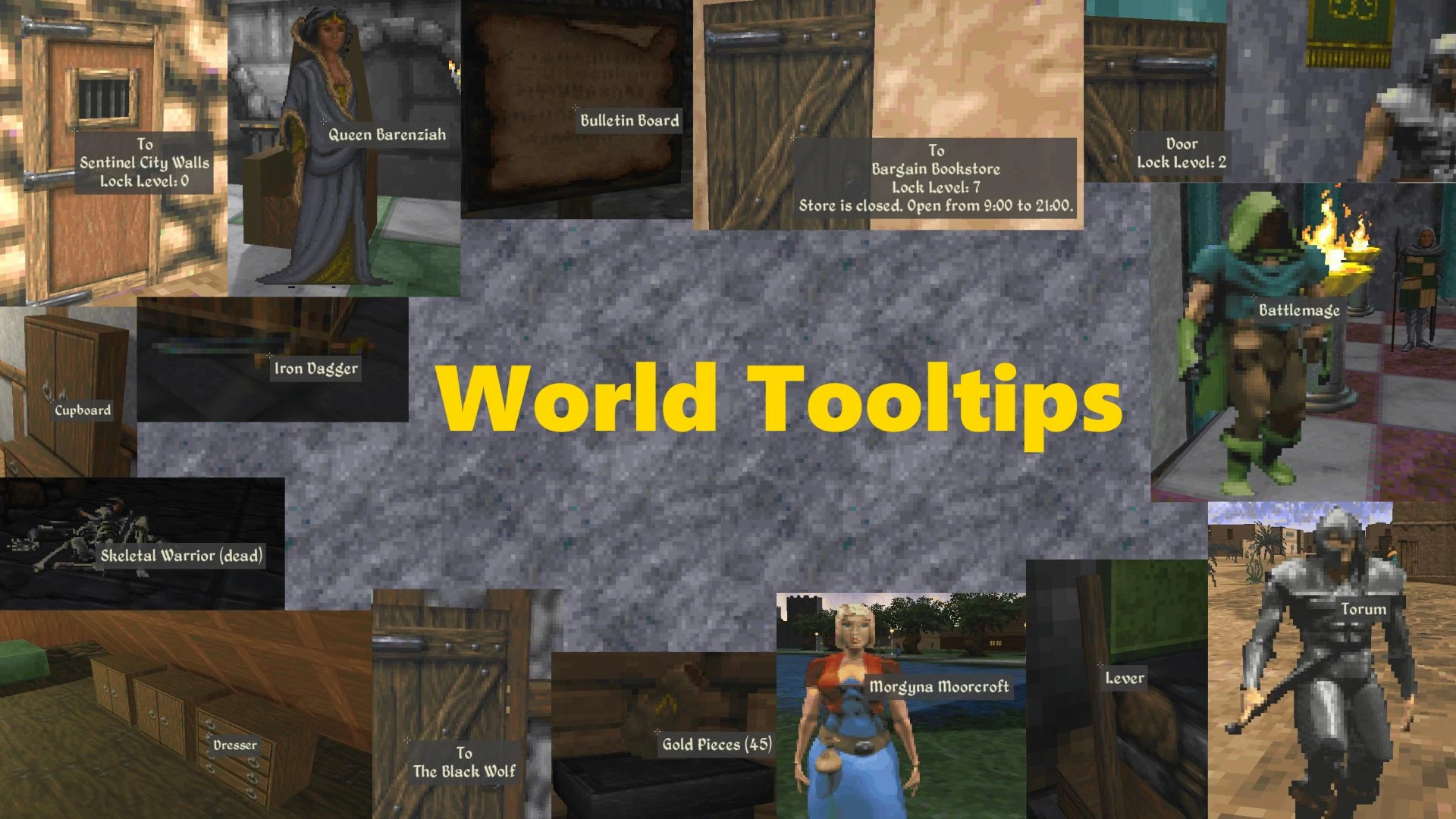
One of the most taken-for-granted features of any first-person video game has now arrived to Iliac Bay. This mod adds first-person tooltips that display information about interactable objects upon hovering over it, in a style that is partly influenced by Morrowind. Since writing and using this mod, I can't even go back to playing Daggerfall without it — it feels almost as if the mod is missing from the base game.
-
[]Fix tooltip centering for different aspect ratios and resolutions
[
]Fix a bug tooltip doesn't show on some furniture like wardrobe and cupboard especially when hand painted model is installed (thanks CaptainRay1993!)[]Show Palace open/close times
World Tooltips displays multiple pieces of information without needing to interact with it:
-
[] For friendly (non-hostile) and static NPCs, it will display their name
[] Static doors on named buildings will display information such as its name, lock level, and hours available (if closed). In fact, simply hovering over the door will discover the building for you without needing to go inside or switch to Info Mode. In dungeons, it will display the dungeon name on the exterior and the region or town name from the interior.
[] Single-dropped items will display its name, while ones with multiple items will be called "Loot Pile"
[] Corpses will display their names if they have inventory
[] Animated doors can display its lock level if it is locked
[] House containers that have storage will also be accompanied by their furniture name (named to the best of my ability)
[] Bulletin boards, ladders, levers, turnable wheels, bookshelves, and shop shelves are named
[] A non-exhaustive list of special quest items/objects are also named
[] Any other objects that are interactable will simply be named "<Interact>". If you feel this that this takes too much away from secret triggers (e.g. opening hidden doors, teleporting), you can disable this behavior in the mod settings.
My list may not be complete, and there might be other edge case interactables in some dungeons or in quests. If you find something that is interactable but isn't highlighted by a tooltip, or is named incorrectly, please let me know on the forums and I'll try and patch it.
-
[] For friendly (non-hostile) and static NPCs, it will display their name
World Tooltips modernizes Skyrim's UI by adding first-person tooltips that display information about NPCs, buildings, doors, items, and other interactable objects when you hover over them. This quality-of-life mod enhances exploration and interaction clarity, making it easier to identify targets and objects at a glance. With 1,588 endorsements and 55,178 downloads, it's a well-received UI improvement for players seeking a more informative HUD.
✨ Key Features
📊 Pros & Cons
✅ Pros
- Community favorite with 1,588 endorsements and over 55k downloads.
- Makes identifying NPCs and objects way easier without opening menus.
- Lightweight UI tweak that doesn't overhaul your whole HUD.
⚠️ Cons
- Last updated in 2022, so it might not be fully compatible with the latest Skyrim patches or DLC.
- Potential conflicts with other UI mods that alter tooltips or interaction prompts.
- Tooltips might clutter the screen if you're hovering over many objects at once.
For Skyrim players who want a more informative HUD without a full UI overhaul. If you're tired of squinting to see what you're looking at, this is for you. Skip if you prefer a minimalist interface or use heavy UI mods that might conflict.
💡 Beginner Tips
- If you use a mod manager like Vortex, just download and install; it's a simple drop-in.
- Check your load order to ensure World Tooltips loads after other UI mods to avoid conflicts.
- Test in a crowded area like Whiterun to see how tooltips behave with many objects.
📊 Mod Details
- Game
- Daggerfallunity Mods
- Author
- jefetienne
- Version
- 1.1
- Downloads
- 55,178
- Endorsements
- 1,588
- Category
- User Interface
- Created
- 10/24/2020
- Updated
- 6/15/2022
🧩 Commonly Used Together
Users add these mods to the same collections — a real compatibility signal, not an AI guess.
🔧 How to Install Daggerfall Unity Mods
Download from Nexus Mods.
📖 Full step-by-step install guide for Daggerfall Unity →
Visit the official mod page for specific installation instructions for this mod.
🎮 Need cheat codes or console commands? Check ur gaming wiki for Daggerfall Unity commands, item IDs, and more.
Keep browsing — more Daggerfall Unity mods await