Location based effects
⚪ Last updated 2022Preview
🔍 Analysis
- 👍 2.8% endorsement rate — high engagement, a strong quality signal
- 🏆 #52 of 98 Visuals and Graphics mods in this game by downloads
📋 About This Mod
This is probably not something most people would find a use for, but I really love playing with the post processing effects.
Installation:
Simply copy the dfmod to your mods folder.
Current state:
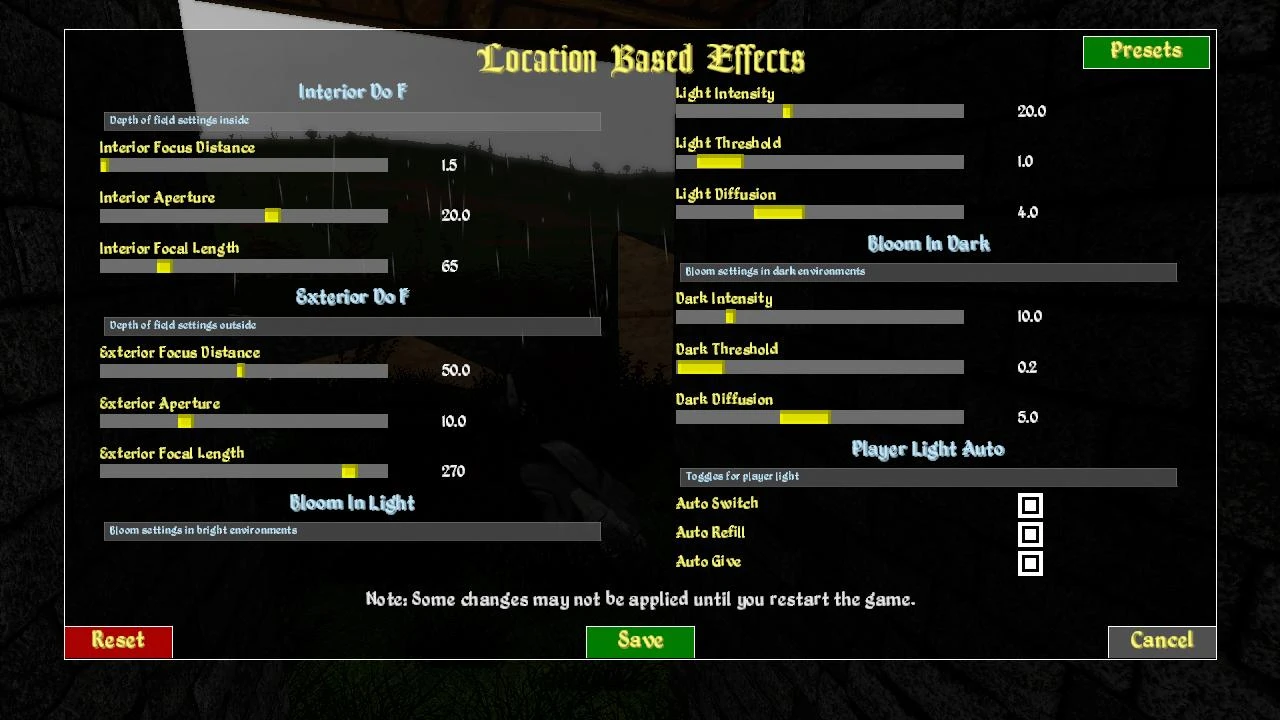
Depth of Field
For depth of field, values for interior/exterior can be set.
Bloom
Bloom has a setting for dark and bright environments.
Dark is used:
- In dungeons
- After 7PM until 6AM when outside
Bright is used:
- In other interior
- From 6AM to 7PM when outside
Player light
Requires the "Player based light" setting of DFU
Be aware that I override the range values for Torches and Lanterns to 10 and 50. The thought here is, that while outside a lantern is being used during travels while in dungeons a torch is carried.
While I realize, this may not be optimal, I wasn't able to figure out how to make custom items recognized as light source.
While the range values are fix for now, all other behavior can be toggled. So far I am unsure wether or not I tested all playstyle scenarios, but I hope I got everyone covered.
Auto switch
This automatically switches between torch, lantern or none.
- Torch when in dungeons
- Lantern when outside and time is between 5PM and 8AM (just like city lights)
- None in other interiors or during the day when outside
Auto refill
This keeps the light source condition between 0 and 3. While I could have set the condition to an incredible high value, I prefer the flickering that should normally signalize the last seconds of usability. (If you didn't get the items from setting three, their condition will probably display as useless, due to the low condition)
Auto give
This gives the player a light source if no torch or lantern is in the inventory at the first time it's use would be triggered. So when starting a new game, a torch should appear in the inventory and the lantern in the first night outside. The items are named as "Dungeon Torch" and "Travel Lantern". They have a max condition of 3 so when combined with auto refill the always show as slightly used.
Location based effects is a compact visual mod for Skyrim that dynamically adjusts Depth of Field and Bloom based on your location and time of day, with an optional feature to automate your player light. With 39 endorsements and 1,390 downloads, it's a niche utility for players seeking more immersive lighting without heavy overhauls.
✨ Key Features
📊 Pros & Cons
✅ Pros
- Tiny download size means it won't bloat your load order
- Automating the player light is a handy quality-of-life touch
- Adds subtle immersion without overhauling your whole game
⚠️ Cons
- Only 39 endorsements—this is a niche mod with a small following
- Last updated in 2022—might not be fully compatible with the latest Skyrim patches
For Skyrim players who want dynamic DoF and Bloom that react to where you are and what time it is, without installing a heavy ENB. Also great for those who want their torch or magelight to auto-toggle. Skip if you prefer full control over every visual setting or want a more comprehensive lighting overhaul.
💡 Beginner Tips
- Since it's a simple mod, just drop the files into your Data folder or use your mod manager—no need for complex patches.
- If you use other visual mods, test this one early in your load order to see how it interacts with your current setup.
- Check if the optional player light automation conflicts with your gameplay style—it might turn off your light when you don't expect it.
📊 Mod Details
- Game
- Daggerfallunity Mods
- Author
- Nachtkater
- Version
- 0.3
- Downloads
- 1,390
- Endorsements
- 39
- Category
- Visuals and Graphics
- Created
- 6/15/2022
- Updated
- 6/15/2022
🔧 How to Install Daggerfall Unity Mods
Download from Nexus Mods.
📖 Full step-by-step install guide for Daggerfall Unity →
Visit the official mod page for specific installation instructions for this mod.
🎮 Need cheat codes or console commands? Check ur gaming wiki for Daggerfall Unity commands, item IDs, and more.
Keep browsing — more Daggerfall Unity mods await