Wardrobe Courier - EquipmentEx Addon
🟡 Updated this year⚠️ Install Order · 7 steps
Install in this order, then this mod last — most mods fail to load without their framework and dependencies in place.
Preview
🔍 Analysis
- 👍 0.2% endorsement rate
- 🏆 #37 of 525 Appearance mods in this game by downloads
📋 About This Mod
>>DESCRIPTION
====================
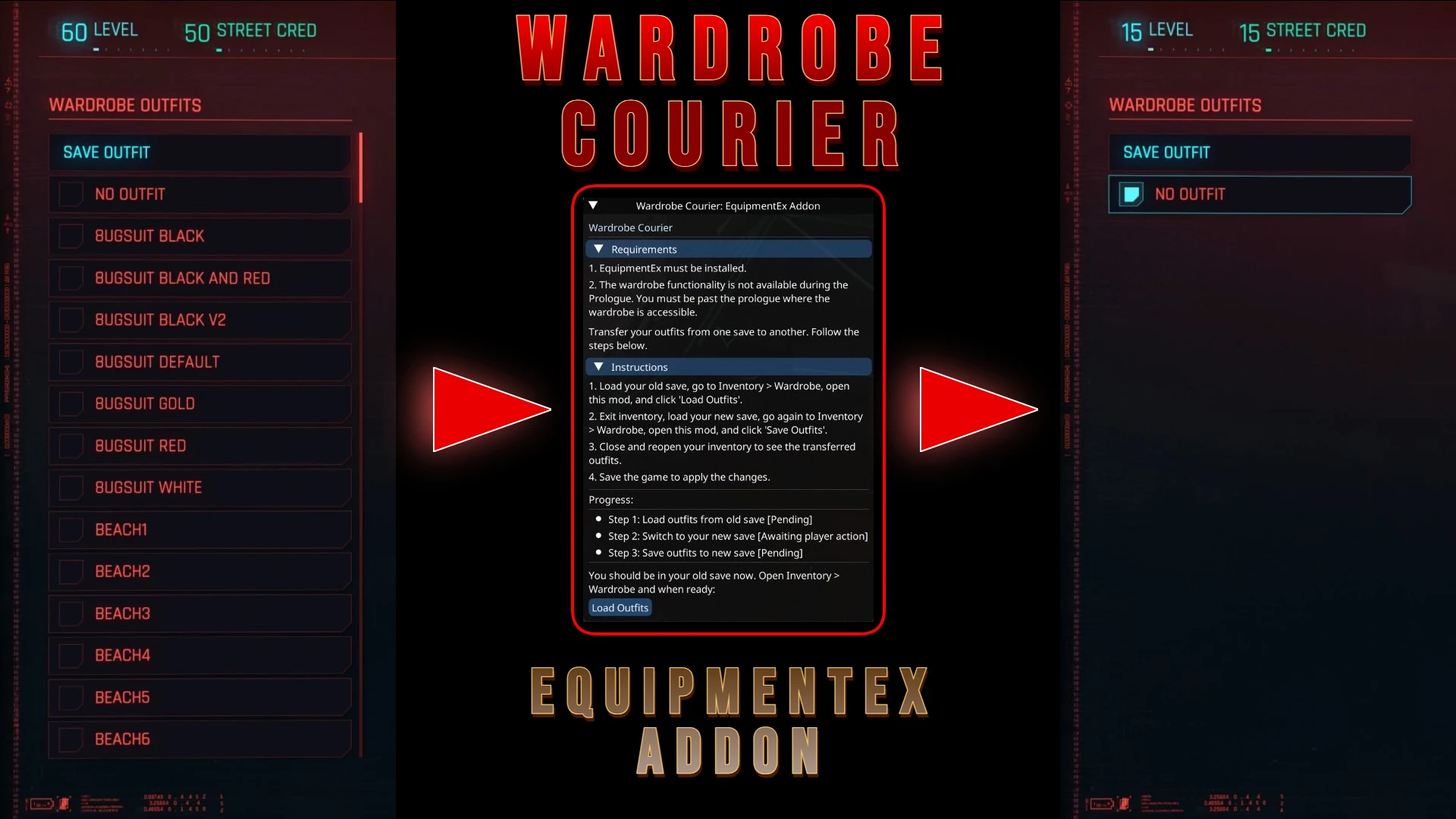
Wardrobe Courier: EquipmentEx Addon helps you preserve and manage your EquipmentEx wardrobe across playthroughs.
Version 2. 0 keeps the original save-to-save outfit transfer workflow and adds a new Export feature. You can now generate:
-
[]A readable JSON export of all currently loaded outfits, including slot names, item names, archive paths, entity names, appearance names, and equip areas.
[
]A TXT summary report showing how many outfits you have, which archives are used, which outfits depend on each archive, and which archives belong to modded items versus base-game items.This makes the mod useful not only for transferring outfits, but also for checking outfit dependencies, auditing modded wardrobe pieces, and keeping a clean record of your current wardrobe setup.
>>FEATURES
====================
-
[]Transfer EquipmentEx outfits from one save to another.
[
]Export loaded outfits to a formatted JSON file.[]Export a compact TXT summary of outfit and archive usage.
[]Detect outfits that mix modded items and base-game items.
[]Save export files with a timestamped filename for easy organization.
[]Keep transfer and export workflows separate with dedicated buttons and status messages.
>>INSTALL
====================
Manual Installation:
-
[]Download the mod archive.
[
]Extract the contents to your game installation directory:[]Steam:
\SteamLibrary\steamapps\common\Cyberpunk 2077
[]GOG:
\GOGLibrary\Games\Cyberpunk 2077
[]Epic:
\EpicLibrary\Cyberpunk 2077
[]Enable the mod in your launcher or mod manager if needed.
Using a Mod Manager (Vortex):
-
[]Download the mod with the "Mod manager download" button.
[
]Install and activate it through your mod manager.>>UNINSTALL
====================
Manual Uninstallation:
-
[]Delete the wardrobe_courier folder from:
Cyberpunk 2077\bin\x64\plugins\cyber_engine_tweaks\mods\
Cyberpunk 2077\r6\scripts\wardrobe_courier\
Cyberpunk 2077\red4ext\plugins\WardrobeCourierAPI\
Using a Mod Manager:
- [
- Verify that the mod files were removed from the game directory.
-
[]Delete the wardrobe_courier folder from:
-
[]Download the mod with the "Mod manager download" button.
-
[]Download the mod archive.
-
[]Transfer EquipmentEx outfits from one save to another.
Wardrobe Courier: EquipmentEx Addon transfers EquipmentEx wardrobe outfits between Cyberpunk 2077 saves and exports readable JSON or TXT reports of loaded outfits, item details, and archive usage. With 212 endorsements and 94,422 downloads, this utility is essential for players who want to manage their fashion setups across multiple playthroughs.
✨ Key Features
📊 Pros & Cons
✅ Pros
- Huge download count (94,422) shows it's a go-to for save transfer needs
- Solves a real problem: moving your carefully crafted outfits between saves without rebuilding them
- The report export is a nice bonus for tracking your gear and mods
⚠️ Cons
- Requires EquipmentEx as a dependency, so you need that mod installed first
- Only 212 endorsements compared to downloads—maybe not everyone's talking about it, but it works
- No detailed instructions in the description, so you might need to figure out the setup on your own
For Cyberpunk 2077 players who use EquipmentEx and want to carry their outfits across multiple playthroughs or backup their style. Also useful for fashion-focused players who like to keep a record of their loadouts. Skip if you don't use EquipmentEx or don't care about save transfer.
💡 Beginner Tips
- Make sure EquipmentEx is installed and working before adding this addon, or the transfer won't work.
- Use the JSON/TXT export to keep a backup of your outfits outside the game—handy if you're reinstalling.
- Check the mod's page for any load order notes, but typically addons like this just need to be placed in the right folder.
📊 Mod Details
- Game
- Cyberpunk 2077 Mods
- Author
- KramRul
- Version
- 2.0
- Downloads
- 94,422
- Endorsements
- 212
- Category
- Appearance
- Created
- 12/20/2024
- Updated
- 3/17/2026
🔧 How to Install Cyberpunk 2077 Mods
Download from Nexus.
📖 Full step-by-step install guide for Cyberpunk 2077 →
Visit the official mod page for specific installation instructions for this mod.
🎮 Need cheat codes or console commands? Check ur gaming wiki for Cyberpunk 2077 commands, item IDs, and more.
Keep browsing — more Cyberpunk 2077 mods await