Update clothing mods to max
⚪ Last updated 2021⚠️ Install Order · 6 steps
Install in this order, then this mod last — most mods fail to load without their framework and dependencies in place.
Preview
🔍 Analysis
- 👍 5.8% endorsement rate — high engagement, a strong quality signal
- 🏆 #2 of 13 Crafting mods in this game by downloads
📋 About This Mod
Requires CET 1. 9+
If you're running lots of mods through CET, you should absolutely consider the CET Mod Manager
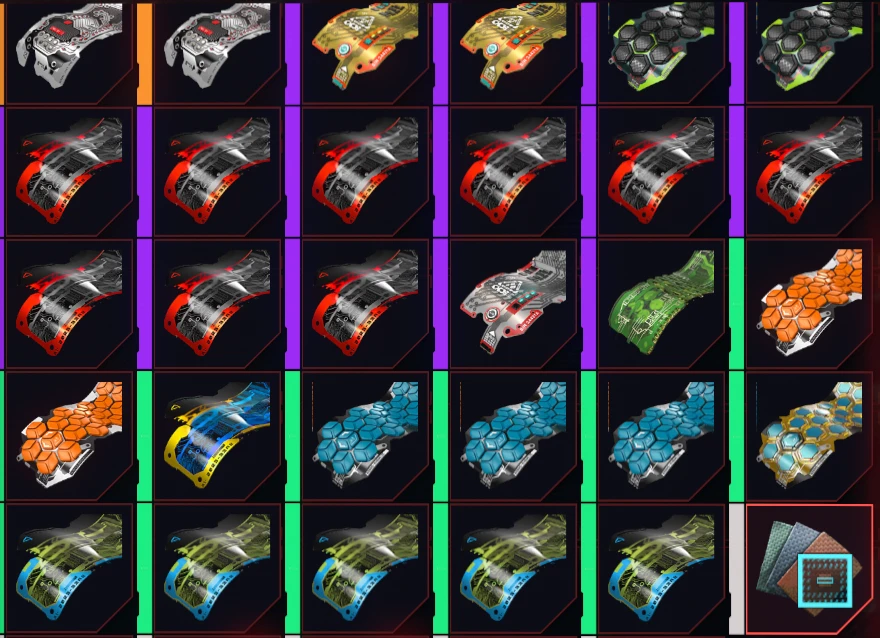
This will upgrade all basic clothing mods, weapon mods and scopes in your inventory to purples. v1. 4 includes melee thanks to DragonLux
To run the mod, download the script, unzip it, and put it in the mods folder in CET. Start the game and you should see "Loaded UZ". To run it, paste this into the console
GetMod("upgradezero").upgrade()
Dofile will no longer work.
If you want to break the game, you can edit the quality (e.g. make them all legendary). Look for these lines near the top
local defaultQual = 3. 0 -- 1. 0 for green, 2. 0 for blue, 3. 0 for purple, 4. 0 for orange.
local zeroQual = 1. 0 -- Zero Drag goes green
local scopeQual = 3. 0 -- Legendary scopes are apparently all kinds of borked so keep this at 1, 2 or 3.
-- Thanks to LuxDragon for spotting this.
This won't create new mods (you need to craft or find them) or change their level. It will just upgrade their quality (which improves their stats).
If you're looking at the mods when you run it, they won't visually update. Exit the inventory and go back to see changes.
Credits: Arsenic_Touch for the legendary mod and Yamashi for CET. DragonLux for some improvements
This crafting utility upgrades all low-quality clothing mods and scopes in your inventory to max quality without changing their level. It saves you from manually sorting through white and green items. With 460 endorsements and 7,933 downloads, it's a popular QoL tool for Fallout 76 players.
✨ Key Features
📊 Pros & Cons
✅ Pros
- Huge time-saver for inventory management (7,933 downloads)
- Community-approved with 460 endorsements
- Simple concept that does exactly what it says
⚠️ Cons
- Last updated in January 2021 — may not work with the latest game patches
- Only affects mods and scopes, not other gear types
- No detailed instructions or compatibility notes provided by the author
For Fallout 76 players who are tired of sifting through piles of white and green mods. If you're a hoarder who hates deleting potential upgrades, this is for you. Skip if you want a more comprehensive crafting overhaul — this only touches mods and scopes.
💡 Beginner Tips
- Make sure to place the mod file in your Fallout 76 Data folder, typically found in Documents\Games\Fallout 76.
- Since the mod doesn't change levels, use it on characters at max level to get the most benefit.
- If you're using a mod manager, enable the mod after launching the game to avoid conflicts with other inventory mods.
📊 Mod Details
- Game
- Cyberpunk 2077 Mods
- Author
- Zingfharn
- Version
- 1.4
- Downloads
- 7,933
- Endorsements
- 460
- Category
- Crafting
- Created
- 1/16/2021
- Updated
- 1/23/2021
🔧 How to Install Cyberpunk 2077 Mods
Download from Nexus.
📖 Full step-by-step install guide for Cyberpunk 2077 →
Visit the official mod page for specific installation instructions for this mod.
🎮 Need cheat codes or console commands? Check ur gaming wiki for Cyberpunk 2077 commands, item IDs, and more.
Keep browsing — more Cyberpunk 2077 mods await