Subtle Lip Colours
⚪ Last updated 2021⚠️ Install Order · 6 steps
Install in this order, then this mod last — most mods fail to load without their framework and dependencies in place.
Preview
🔍 Analysis
- 👍 4.6% endorsement rate — high engagement, a strong quality signal
- 🏆 #200 of 443 Appearance mods in this game by downloads
📋 About This Mod
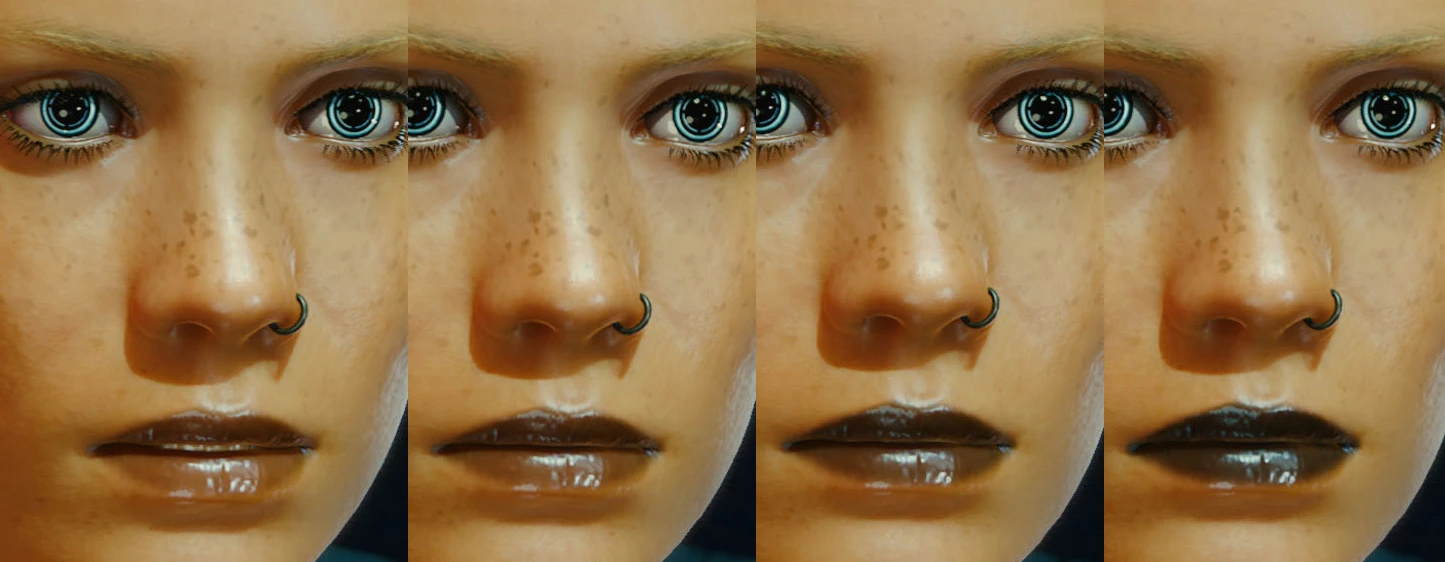
The mod replaces lip makeup slots 01 to 04 with translucent variants of the default lip makeup from slot 01. Works with all standard colours. See the gallery for screenshots of each colour/opacity variant.
Slot 01: 90% opacity
Slot 02: 80% opacity
Slot 03: 70% opacity
Slot 04: 60% opacity
60% is already pretty subtle in terms of how much colour remains visible, but I can do a 50% variant if there is any demand for it.
I have also included individual downloads of each of the individual opacities in slot 01 only. See the gallery for a preview of each opacity/colour combination if you're unsure which opacity you want but only want to replace the first slot.
Subtle Lip Colours replaces the default lip makeup slots 01 to 04 with translucent variants (90%, 80%, 70%, and 60% opacity) of the default slot 01 lip makeup, working with all colours. A simple cosmetic mod for players who want a more natural look.
✨ Key Features
📊 Pros & Cons
✅ Pros
- Community-approved with 742 endorsements and over 16k downloads.
- Gives a more natural, subtle look compared to the default lip makeup.
- Simple and lightweight—just replaces existing slots, no new items to manage.
⚠️ Cons
- Only affects slots 01 to 04; other lip makeup slots remain unchanged.
- No screenshots or detailed previews provided by the author.
- Last updated in 2021—may not be tested with the latest game patches.
For players who want a more natural lip colour without the heavy default look. Ideal for character creation enthusiasts who prefer subtle cosmetics. Skip if you want bold or new lip styles—this only tweaks opacity.
💡 Beginner Tips
- Since this mod replaces existing slots, it's compatible with other appearance mods that don't touch lip makeup slots.
- If you're using a mod manager, let it handle the file placement to avoid overwriting issues.
- Test in character creation to see the opacity difference—you can always revert by removing the mod files.
📊 Mod Details
- Game
- Cyberpunk 2077 Mods
- Author
- axefrog
- Version
- 1.0
- Downloads
- 16,142
- Endorsements
- 742
- Category
- Appearance
- Created
- 2/15/2021
- Updated
- 2/15/2021
🔧 How to Install Cyberpunk 2077 Mods
Download from Nexus.
📖 Full step-by-step install guide for Cyberpunk 2077 →
Visit the official mod page for specific installation instructions for this mod.
🎮 Need cheat codes or console commands? Check ur gaming wiki for Cyberpunk 2077 commands, item IDs, and more.
Keep browsing — more Cyberpunk 2077 mods await