Rogue's Eyes for V - Basic Set
⚪ Last updated 2024⚠️ Install Order · 6 steps
Install in this order, then this mod last — most mods fail to load without their framework and dependencies in place.
Preview
🔍 Analysis
- 👍 2.7% endorsement rate — high engagement, a strong quality signal
- 🏆 #21 of 527 Appearance mods in this game by downloads
📋 About This Mod
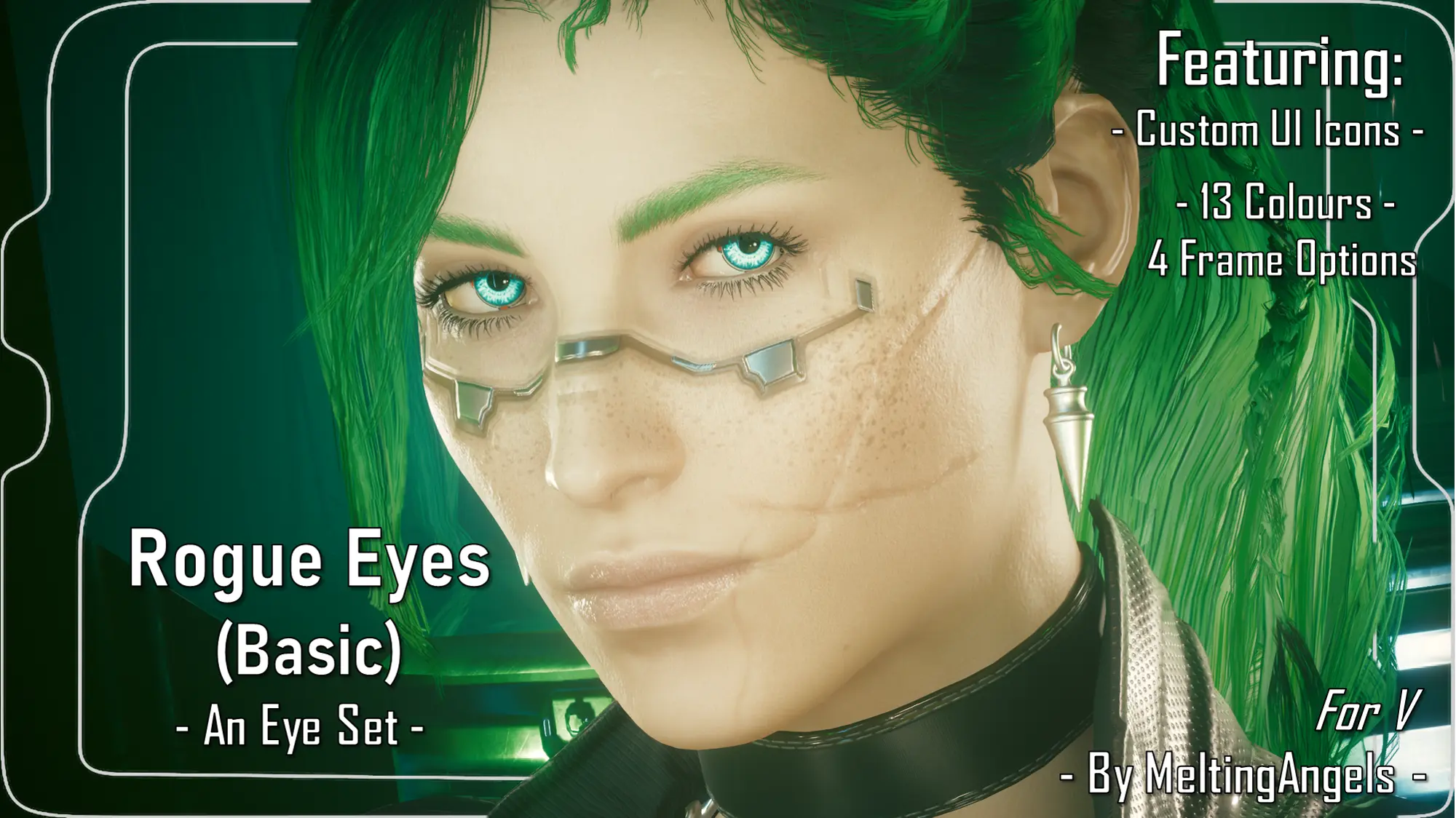
Here's Rogue's eyes for Both Vs, with a bunch of Eye Colour and Frame variations! :D No Cybernetic pieces; just 2D art versions :D
Hey choom! Thanks for clicking on the mod!
This is available for Both Vs!
Here's another of my Hiatus prepped mods! This time, it's Rogue's Eyes for Both Vs! I couldn't actually find her eye textures in Wolvenkit, so I had to take a bunch of closeup screenshots, and recreate them by hand! It took alot of time, but I'm really happy with how these turned out! Yeah, there's no actual Cybernetic eye pieces like Rogue has, but I haven't yet learned how to work with eye cyberware. I do want to learn in the future though! But even so, I think these eyes still look really cool.
Want to support my mods in an additional way? Consider checking out my Patreon page. There's a bunch of tiers, but you can join for absolutely free, which will open my entire modding catalogue to you! This includes around 40 mods that haven't yet been uploaded to Nexus; again for free. (I am slowly uploading those here though) So yeah, consider checking out MeltingAngels' Patreon. We also have a Patron exclusive Discord server, with a wonderful community being built. That's free as well!
Installation (Eyes):
1) Install the Unique Eyes core mod; go to the page linked and follow their install instructions- DOWNLOAD THE DEFAULT VERSION, NOT THE GRADIENT!!!
2) Download this eye mod.
3) Unzip the Zip file to somewhere on your desktop/PC.
4) Check the 'Read Me' note file.
5) Place the 'archive' file in your mod folder. On Steam, the folder path is as follows:
archive/pc/mod
6) Load up your game, and the eyes will appear for Both Vs!
(If for some reason, the eyes show up as black voids, try adding a ! to the file name, to bump it up to the top of your load order and above Unique Eyes)
Installation (Eye Icons):
1) Install the ICONIC UI framework by JSILVERHVND and its requirements.
2) You will have already downloaded this mod, and seen the Icons .archive file in that Zip file.
3) Place that Icons 'archive' file in your mod folder. On Steam, the folder path is as follows:
archive/pc/mod
4) Load up your game, and the custom eye icons will appear for Both Vs!
Please note I use Cyberlit/Otis Photomode tools, with a combination of Cyberlit and the charLi lighting mod, for my screenshots.
📊 Mod Details
- Game
- Cyberpunk 2077 Mods
- Author
- MeltingAngels
- Version
- 1
- Downloads
- 1,524
- Endorsements
- 41
- Category
- Appearance
- Created
- 3/18/2024
- Updated
- 3/18/2024
🔧 How to Install Cyberpunk 2077 Mods
Download from Nexus.
📖 Full step-by-step install guide for Cyberpunk 2077 →
Visit the official mod page for specific installation instructions for this mod.
🎮 Need cheat codes or console commands? Check ur gaming wiki for Cyberpunk 2077 commands, item IDs, and more.
Keep browsing — more Cyberpunk 2077 mods await