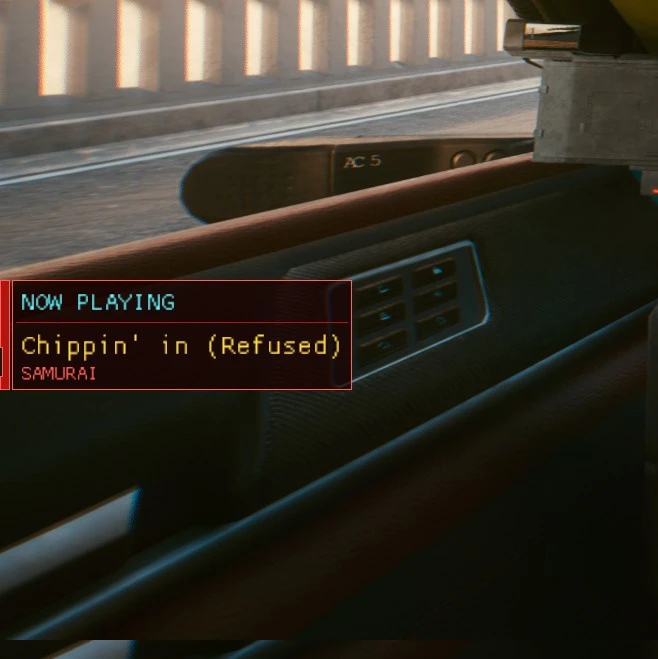
Now Playing
⚪ Last updated 2021⚠️ Install Order · 6 steps
Install in this order, then this mod last — most mods fail to load without their framework and dependencies in place.
Preview
🔍 Analysis
- 👍 3.7% endorsement rate — high engagement, a strong quality signal
- 🏆 #34 of 64 User Interface mods in this game by downloads
📋 About This Mod
@Deprecated
This mod requires Cyberpunk Engine Tweaks in order to work!
Now with settings. You can customize:
- vertical position
- scale (smaller/bigger), but it just scaling font itself. Might be useful, but meh
- time (including option to show song info forever)
To open settings just open CET overlay - settings will be opened alongside other mods settings. I can't figure out how to make it more comfortable for now.
Known issues:
How to install manually:
Step 1: Make sure you have Cyberpunk Engine Tweaks (how to install it)
Step 2: Download the mod content
Step 3: Extract the content in "PATH TO CYBERPUNK\Cyberpunk 2077\bin\x64\plugins\cyber_engine_tweaks\mods\" so that you have the following structure: "PATH TO CYBERPUNK\Cyberpunk 2077\bin\x64\plugins\cyber_engine_tweaks\mods\now_playing\init.lua"
How to uninstall:
Step 1: Delete folder "PATH TO CYBERPUNK\Cyberpunk 2077\bin\x64\plugins\cyber_engine_tweaks\mods\now_playing"
Special thanks to:
- Creators of such a great tool Cyberpunk Engine Tweaks
- Open Sesame Mod for inspiring me and some code and modding examples
- CITY H4CK for some modding example
- CP77 Modding Discord for everything
- TetrisArcade for awesome idea and description example = )
- WillyJL - code fix and optimization suggestions
- zbx2501 - optimization tip
- Improved Radio - check out this awesome mod! Skipping and playlist was extremely handy for me
- Adularescence - identified and corrected some songs. They know what I went through = )
- Separate FPS Limits for In-game and Menus and GTA Travel - settings saving
- LachlanStowe - found conflict with Improved Minimap Zoom mod
Notes:
- Song names were taken from CP77 Modding Discord: google spreadsheet doc
- Some radio stations has absolutely not recognizable genres (ex. Pacific Dreams or Radio Pebkac), so they have plenty of "Unidentified songs"
- Some songs I'm not sure about - they marked as (NOT SURE) - there are just a few of them
- I'm not sure how it will work with future (or past) game updates - I'll try to stay it tuned
- This is a handwork, so there might be some inconsiste
Now Playing is a simple UI mod that displays the name and artist of the current radio song in Fallout 4. With 1,863 endorsements and nearly 50,000 downloads, it's a popular quality-of-life addition for players who want to know what track is playing. Last updated in 2021, it remains a straightforward tool for radio enthusiasts.
✨ Key Features
📊 Pros & Cons
✅ Pros
- Tiny mod that does exactly what it says—no bloat.
- 1,863 endorsements show the community trusts it.
- 49,904 downloads prove it's widely used and stable.
⚠️ Cons
- Last updated in 2021, so it may not be compatible with the latest game patches.
- No detailed description means you'll have to test it to see how it looks.
- Potential conflicts with other UI mods that alter the HUD.
This is for Fallout 4 players who love listening to the radio and want to know what song is playing without opening the pip-boy. It's also great for modders who want a simple, unobtrusive UI addition.
💡 Beginner Tips
- Make sure you have the radio on in-game to see the mod in action.
- If you use other HUD mods, load Now Playing after them to avoid conflicts.
- Check the mod's comments section for any user-reported issues with specific radio mods.
📊 Mod Details
- Game
- Cyberpunk 2077 Mods
- Author
- Anb2rw
- Version
- 0.7
- Downloads
- 49,904
- Endorsements
- 1,863
- Category
- User Interface
- Created
- 1/22/2021
- Updated
- 8/27/2021
🔧 How to Install Cyberpunk 2077 Mods
Download from Nexus.
📖 Full step-by-step install guide for Cyberpunk 2077 →
Visit the official mod page for specific installation instructions for this mod.
🎮 Need cheat codes or console commands? Check ur gaming wiki for Cyberpunk 2077 commands, item IDs, and more.
Keep browsing — more Cyberpunk 2077 mods await