INI settings and EXE parameters list
⚪ Last updated 2023⚠️ Install Order · 6 steps
Install in this order, then this mod last — most mods fail to load without their framework and dependencies in place.
Preview
🔍 Analysis
- 👍 3.9% endorsement rate — high engagement, a strong quality signal
- 🏆 #7 of 18 Modders Resources mods in this game by downloads
📋 About This Mod
Updated for 2. 0 Phantom Liberty - many thanks to CET maintainers for the fast update!
Update: good news, Cyber Engine Tweaks v1. 4. 2 has a new feature that allows changing these INI settings at runtime through the console, so you can test out the changes instantly without needing to restart your game!
This should make it a lot easier to see if a change is actually taking effect or not, maybe this can help us figure out what some of the more oddly-named settings actually do too.
A list of the commands for this can be found on the commit page that added this feature: https://github.com/yamashi/CyberEngineTweaks/pull/192
As an example, this shows how to toggle the DRS/Enable setting off/on (something dynamic-resolution-related? which is always turned on):
GameOptions. Toggle("DRS", "Enable")
or to change an integer setting (changing Vehicle/WeightTransferMode to -1)
GameOptions. Set("Vehicle", "WeightTransferMode", "-1")You can also dump a list of all the setting names & their current values into the log file via
GameOptions. Dump()
------------
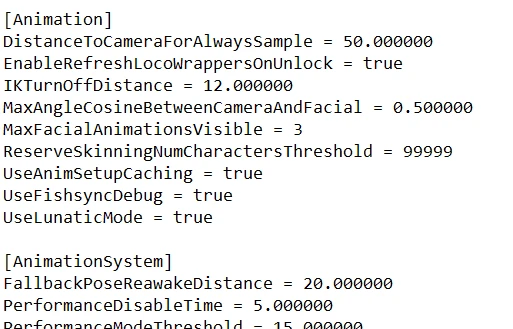
Here's a list of mostly all the INI settings used by v1. 05 and their default values, originally dumped by my friend Infogram on PCGamingWiki: https://www.pcgamingwiki.com/wiki/Topic:Vzhialkw8toyk3pq
(I've been given permission to post them here)
Infogram also found how to change the value of these settings without needing EXE patches, just follow the instructions given at the beginning of the list:
create/open the "engine\config\platform\pc\user.ini" file & add the section name + setting name/value inside it.(user.ini can be any filename you like, as long as it ends with .ini and is inside the correct folder)
Some of the tweaker/patcher tools already available let you change a small number of these variables, but now you can edit all ~1107 variables as you like, without needing to modify your game EXE - hopefully allowing your changes to persist between any game updates.
For example instead of patching your EXE or using a tool to disable TAA, you can just add the following to the engine\config\platform\pc\user.ini file instead:
Antialiasing = false
No descriptions are provided for any of these besides their names, but if you find any interesting settings please let us know about them in the Posts section!
Feel free to reuse this list in any mod/tool that you wish to create too!
Though if you do release any modded INIs pleaseuse a different filename than user.ini - the game will read any file inside "engine\config\platform\pc\" as long as it ends with .ini, meaning that the game can "merge" different INI mods together for us auto
A comprehensive reference list of 1,448 hidden INI settings with default values and 113 EXE parameters for the game, updated for version 2.0PL. Essential for modders and advanced players seeking to tweak game behavior beyond standard options.
✨ Key Features
📊 Pros & Cons
✅ Pros
- Massive reference – 1,448 settings and 113 EXE parameters in one place
- Community-trusted with 710 endorsements and 18k+ downloads
- Updated for 2.0PL, so it's current for that version
⚠️ Cons
- Not a plug-and-play tweak – you'll need to edit INI files manually
- Last updated in 2023 – may not cover later game patches
For modders and power users who want to dig into the game's hidden settings and EXE parameters. If you're a casual player looking for quick tweaks, this is more of a reference than a ready-made solution.
💡 Beginner Tips
- Open the INI file with a text editor like Notepad++ to avoid formatting issues
- Search the list for keywords like 'fov' or 'gamma' to find relevant settings quickly
- Back up your INI file before making changes so you can revert if something breaks
📊 Mod Details
- Game
- Cyberpunk 2077 Mods
- Author
- emoose
- Version
- 2.0PL
- Downloads
- 18,424
- Endorsements
- 710
- Category
- Modders Resources
- Created
- 12/14/2020
- Updated
- 9/27/2023
🔧 How to Install Cyberpunk 2077 Mods
Download from Nexus.
📖 Full step-by-step install guide for Cyberpunk 2077 →
Visit the official mod page for specific installation instructions for this mod.
🎮 Need cheat codes or console commands? Check ur gaming wiki for Cyberpunk 2077 commands, item IDs, and more.
Keep browsing — more Cyberpunk 2077 mods await