Improved Radio
⚪ Last updated 2022⚠️ Install Order · 6 steps
Install in this order, then this mod last — most mods fail to load without their framework and dependencies in place.
Preview
🔍 Analysis
- 👍 1.5% endorsement rate — high engagement, a strong quality signal
- 🏆 #16 of 40 Audio mods in this game by downloads
📋 About This Mod
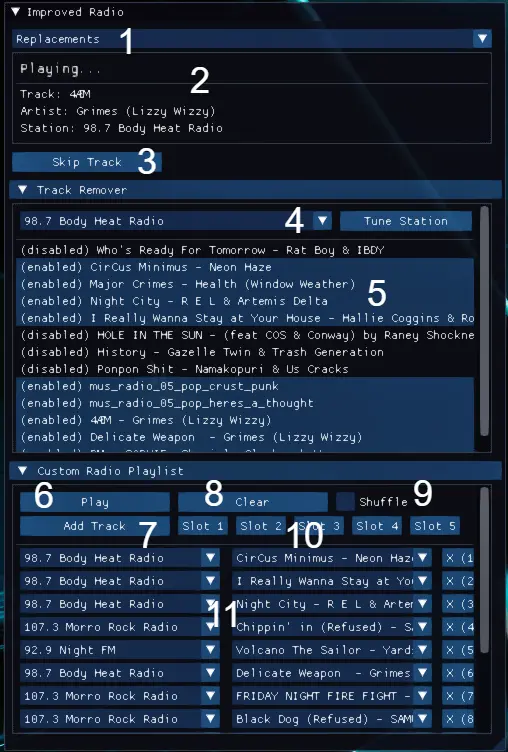
Update 1. 1. 0 brings support for radio replacement mods. This allows titles and artists of the tracks and stations included in a replacement mod to be displayed in Improved Radio. To use this feature, open the 'Replacements' drop-down (1 in image) and enable a replacement mod. Metadata for the Synthwave Radio mod is included, if you would like to see any other replacement mods supported please let me know!
Alternatively, if you would like to add custom metadata for your own replacement mod, I've put together a short guide walking you through how to do this.
Tired of hearing Ponpon Sht each time you get in your car? Then this mod is for you. The Improved Radio mod allows you to extensively customise Cyberpunk 2077's radio system.
There are three main features:
-
[]Skip Track - Plays a randomly selected song (that is not disabled) on the current radio station. If a playlist is active, it skips to the next song on the playlist (or to a random playlist song if shuffled).
[]Track Remover - Allows the playlist of each radio station to be customised by enabling/disabling individual songs on the station.
[]Custom Radio Playlists - Allows users to create their own playlists of in-game radio songs, these can be from any radio station in the game. The playlists can be played in the order they were made or in a random order if shuffle is enabled. A playlist can be saved to one of five slots allowing it to be loaded again at a later time.
Thanks to Now Playing by Anb2rw for the track metadata and inspiration.
How To Install:
-
[]This mod requires Cyber Engine Tweaks
[
]Extract the 'bin' folder into the root of your Cyberpunk 2077 installation folder: <your installation path>\Cyberpunk 2077[]The final mod location should be: <your installation path>\Cyberpunk 2077\bin\x64\plugins\cyber_engine_tweaks\mods\improved_radio
How To Use:
-
[]The Improved Radio UI window can be viewed when the CyberEngineTweaks overlay is opened.
[]The currently playing track information is displayed at the top of the UI window (2 in image).
Track Remover:
-
[]To customise the tracks on a radio station, open the 'Track Remover' menu a select a radio station from the 'Station' drop-down (4 in image). A list of all tracks on that station is displayed (5 in image), each will initially be enabled. To disable a track, simply click on its entry in the list. Click again to re-enable it.
[]The 'Tune Station' button next to the drop-down allows the selected station to be tuned directly from the mod's UI.
[]The track states are automatically saved to the 'songsEnabled.ini' file.
Custom Radio Playlist:
[*]To create a custom playlist, open the 'Cust
-
[]To customise the tracks on a radio station, open the 'Track Remover' menu a select a radio station from the 'Station' drop-down (4 in image). A list of all tracks on that station is displayed (5 in image), each will initially be enabled. To disable a track, simply click on its entry in the list. Click again to re-enable it.
-
[]This mod requires Cyber Engine Tweaks
Improved Radio gives you full control over the in-game radio, letting you disable individual songs per station, skip tracks, and create custom playlists from any station with shuffle and save support. A popular audio mod with 942 endorsements, last updated in November 2022.
✨ Key Features
📊 Pros & Cons
✅ Pros
- Community favorite with 942 endorsements and over 64k downloads
- Lets you finally skip that one song you hate on every station
- Custom playlists across stations are a game-changer for long drives
⚠️ Cons
- Last updated in 2022 — may not work with the latest game patches
- Only affects radio functionality — no new songs or stations added
For players who spend a lot of time driving and want to curate their in-game soundtrack. Perfect if you're tired of hearing the same tracks or want to mix songs from different stations. Skip if you're looking for new music content — this mod only reorganizes what's already there.
💡 Beginner Tips
- Check if your game version is compatible since the mod hasn't been updated since 2022.
- If you use other radio mods, test them together to avoid conflicts.
- Use the custom playlist feature to mix your favorite tracks from all stations into one list.
📊 Mod Details
- Game
- Cyberpunk 2077 Mods
- Author
- Seank23
- Version
- 1.1.3
- Downloads
- 64,726
- Endorsements
- 942
- Category
- Audio
- Created
- 4/13/2021
- Updated
- 11/10/2022
🔧 How to Install Cyberpunk 2077 Mods
Download from Nexus.
📖 Full step-by-step install guide for Cyberpunk 2077 →
Visit the official mod page for specific installation instructions for this mod.
🎮 Need cheat codes or console commands? Check ur gaming wiki for Cyberpunk 2077 commands, item IDs, and more.
Keep browsing — more Cyberpunk 2077 mods await