Heavily Customized Optimization
⚪ Last updated 2021⚠️ Install Order · 6 steps
Install in this order, then this mod last — most mods fail to load without their framework and dependencies in place.
Preview
🔍 Analysis
- 👍 2.6% endorsement rate — high engagement, a strong quality signal
- 🏆 #22 of 30 Utilities mods in this game by downloads
📋 About This Mod
The project has been closed.
After more than 59 hours of intensive experimenting and benchmarking, a few issues are to be addressed by CDPR that I'm unable to fix:
-
[]A lot of Depth Prepass (2. 3k) for each object within render range, excluding the rest of other DrawIndexedInstanced (3. 4k - 7. 2k), each pass takes 0. 0014 - 0. 005 ms, combined can reach from 5. 87 ms - 14. 7ms
[
]Areas like V's apartment is broken into smaller meshes (78 to be exact), DrawInstanced uses from 5. 76 ms to 9. 76 ms[]Texture decompression plays big role in fps usage
[]ExecuteIndirect uses 2. 35 ms to 3. 74 ms
Statistics:
7,277. 282 s from MSI Afterburner
20,487. 379 s from Fraps benchmark
27,764. 661 s / 7. 7124 hrs in total benchmarking
113 benchmarks done (looking outside V's Apartment > streets in night city > highway > streets > underground tunnel > streets with big buildings view > under bridge > end)
245. 7 s average benchmark duration
(Oodle Kraken BC5U) Texture Decompression time taken: roughly 7ms @ 7. 9 - 8. 1 million vertices (31. 2385 ms at the staircase of V's building facing the street)
Nvidia Nsight Graphics was used to profile a single frame render in Cyberpunk 2077 Ultra quality tweaked
Specs tested on:
i7-3770 4 Cores 8 Threads @ 3. 4Ghz
12GB DDR3 1600Mhz
ASUS dual GTX 1060 6GB (461. 40 driver) (not overclocked)
Windows 10 64 bit
Notes:
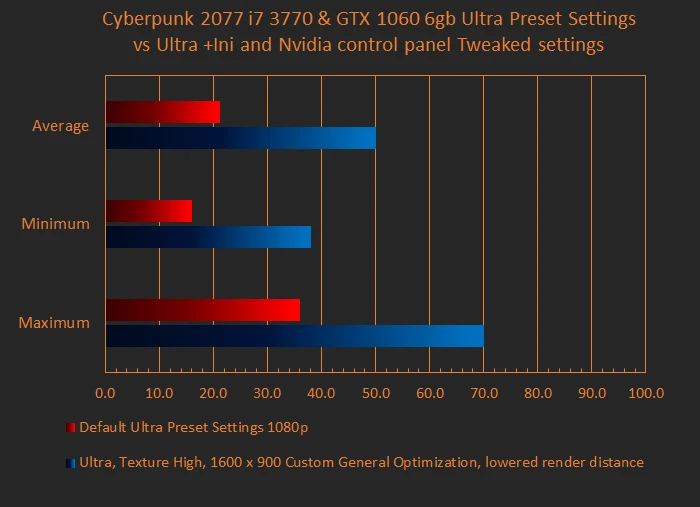
Use this in conjunction with NVIDIA Control Panel to give more fps for GPUs like GTX 1060 6GB or similar. If you are a AMD graphics user, I am currently investigating if users have a similar functionality that allows to tweak Anti-Aliasing, Texture Filtering, etc.
If you are GPU bound, it is highly advisable to switch to lower resolution like 1768 x 992 or 1600 x 900. This lets you push a bit more fps when not CPU bound. (or not if you want crisp quality)
This mod is used in conjunction with: (use instructions from individual pages to assist with installation)
Config Overhaul for Cyberpunk 2077 by derplayer123
What to select: Open the application and select "Optimized" and close.
NVIDIA Control Panel:
Go onto the desktop, right click > NVIDIA Control Panel > Manage 3D settings > switch from Global Settings to Program Settings (use Global if you want other games to adopt the tweaked settings) and under "1. Select a program to customize:", find cyberpunk2077.exe and redlauncher.exe, if it's not there, click "Add" and and click browse if the game doesn't appear under the "Add" pop-up window.
These are the settings to change:
Heavily Customized Optimization is a utility mod that modifies rendering distance and other settings to reduce CPU load and boost FPS, especially for older CPUs. With over 1,000 endorsements and 42,000 downloads, it's a popular choice for players seeking performance gains, though it hasn't been updated since March 2021.
✨ Key Features
📊 Pros & Cons
✅ Pros
- Community-approved with 1,085 endorsements and 42,534 downloads
- Specifically targets older CPUs to reduce load and boost FPS
- Simple utility mod that does one thing well
⚠️ Cons
- Last updated March 2021 — may be outdated for current game versions
- No detailed documentation on exactly which settings are changed
- Lowering rendering distance can reduce visual quality significantly
For players with older CPUs struggling to maintain playable FPS, especially at 1080p. If you're willing to trade visual fidelity for smoother performance, this mod is a solid choice. Skip if you have a modern system or prefer keeping high render distances.
💡 Beginner Tips
- Back up your original game files before replacing them with this mod.
- If you're using a mod manager, check if it supports this type of file replacement; otherwise, manual installation is straightforward.
- Test the mod in a demanding area to see the FPS improvement before committing.
📊 Mod Details
- Game
- Cyberpunk 2077 Mods
- Author
- Masahiro
- Version
- 15-Experimental-Release
- Downloads
- 42,534
- Endorsements
- 1,085
- Category
- Utilities
- Created
- 2/14/2021
- Updated
- 3/7/2021
🔧 How to Install Cyberpunk 2077 Mods
Download from Nexus.
📖 Full step-by-step install guide for Cyberpunk 2077 →
Visit the official mod page for specific installation instructions for this mod.
🎮 Need cheat codes or console commands? Check ur gaming wiki for Cyberpunk 2077 commands, item IDs, and more.
Keep browsing — more Cyberpunk 2077 mods await