Edgerunner Qhymera ReShade
🟠 Updated over a year ago⚠️ Install Order · 7 steps
Install in this order, then this mod last — most mods fail to load without their framework and dependencies in place.
Preview
🔍 Analysis
- 👍 2.6% endorsement rate — high engagement, a strong quality signal
- 🏆 #2 of 185 Visuals and Graphics mods in this game by downloads
📋 About This Mod
-
[]Download & Install the Reshade app
[
]Download this mod - Unpack this mod .ini where the .exe is >>> C:\Program Files (x86)\Steam\steamapps\common\Cyberpunk 2077\bin\x64
The Phantom Liberty DLC has darker parts than the base game, so there are some much darker places, I'll be trying to see if I can reduce the darkness without impacting the rest of the look. For now, I recommend taking a look at the Night Vision Mod, or just disabling and reactivating ReShade with a hotkey if it's difficult to see something.
I think i solved it.
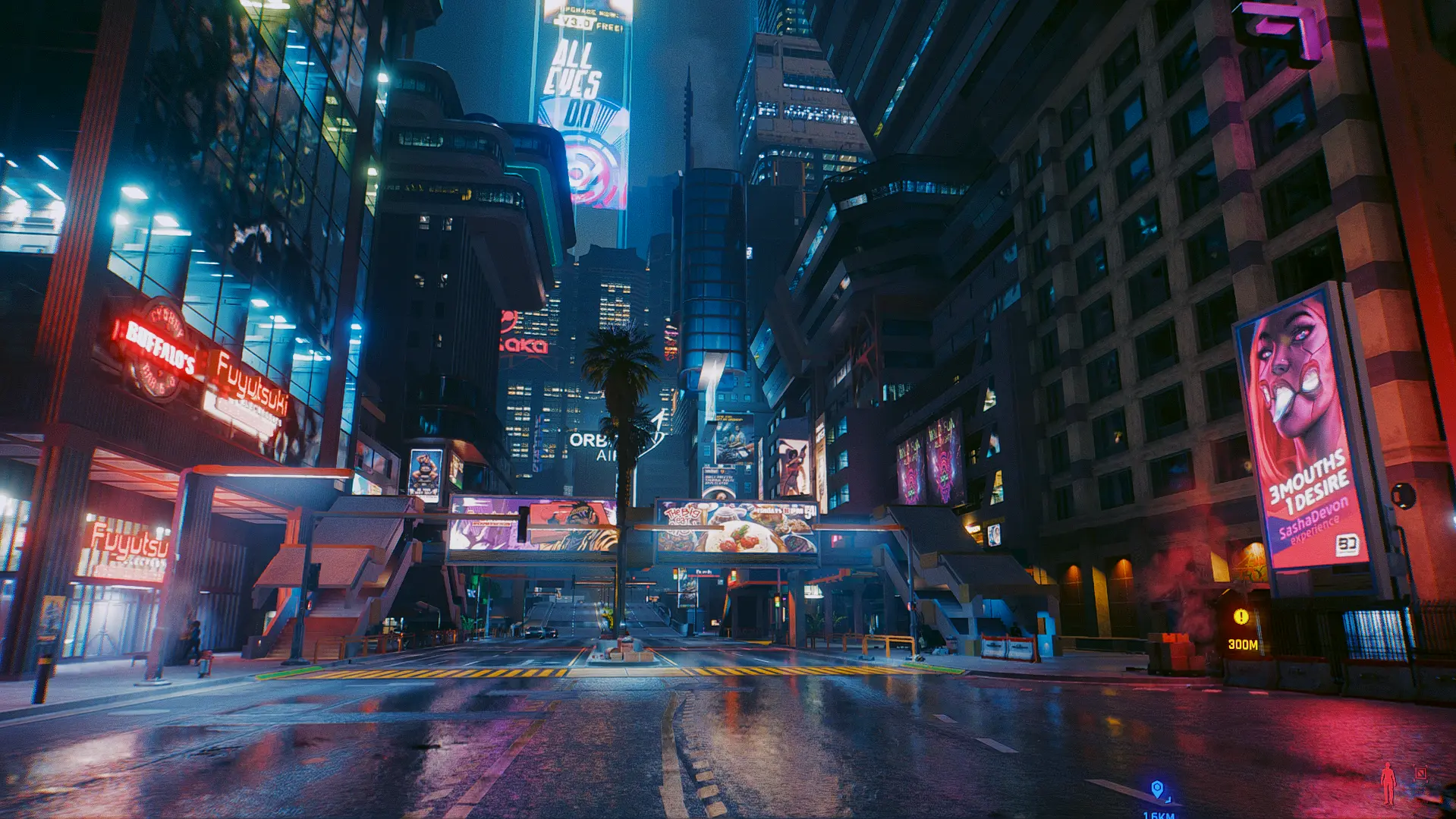
This is my AC Unity Reshade with a few tweaks to fit in Cyberpunk because i really liked the result in ACUnity and decided to bring that for my cyberpunk gameplay. At first i think "put a reshade made for game and put in game gonna be a mess haha...i'm gonna try it. What could go wrong?". I thinked that the difference betewen AC and Cyberpunk will gonna make a huge 'color mess' but in the end, at least for me, the result look pretty beauty.
Edgerunner Qhymera ReShade is a visual enhancement mod for Cyberpunk 2077 that makes neon lights more vivid, removes the green tint, and provides a natural, beautiful view. Designed for use with RTX Overdrive mode, it has 229 endorsements and was last updated in December 2024.
✨ Key Features
📊 Pros & Cons
✅ Pros
- Community-approved with 229 endorsements and over 8,600 downloads
- Targets the popular RTX Overdrive mode, enhancing the already impressive path tracing visuals
- Simple ReShade preset — easy to install and tweak
⚠️ Cons
- Requires ReShade and RTX Overdrive mode, so it's not for everyone
- No before/after screenshots or detailed settings provided in the description
- Last updated in December 2024 — may not be compatible with future game patches
For Cyberpunk 2077 players with RTX Overdrive enabled who want to boost neon vibrancy and fix the green tint. Skip if you don't use path tracing or prefer a more aggressive visual overhaul.
💡 Beginner Tips
- Make sure you have ReShade installed and set up for Cyberpunk 2077 before adding this preset.
- Enable RTX Overdrive (Path Tracing) in the game's graphics settings to get the intended effect.
- Use the ReShade in-game overlay to adjust intensity sliders if the effect feels too strong or too subtle.
📊 Mod Details
- Game
- Cyberpunk 2077 Mods
- Author
- KLHart
- Version
- 0.3
- Downloads
- 8,644
- Endorsements
- 229
- Category
- Visuals and Graphics
- Created
- 4/22/2023
- Updated
- 12/24/2024
🔧 How to Install Cyberpunk 2077 Mods
Download from Nexus.
📖 Full step-by-step install guide for Cyberpunk 2077 →
Visit the official mod page for specific installation instructions for this mod.
🎮 Need cheat codes or console commands? Check ur gaming wiki for Cyberpunk 2077 commands, item IDs, and more.
Keep browsing — more Cyberpunk 2077 mods await