Drive with gears - Don't drive like a cyberpsycho
⚪ Last updated 2022⚠️ Install Order · 6 steps
Install in this order, then this mod last — most mods fail to load without their framework and dependencies in place.
Preview
🔍 Analysis
- 👍 5.2% endorsement rate — high engagement, a strong quality signal
- 🏆 #197 of 407 Gameplay mods in this game by downloads
📋 About This Mod
Accelerate and drive around the city of NC in more reasonable speeds.
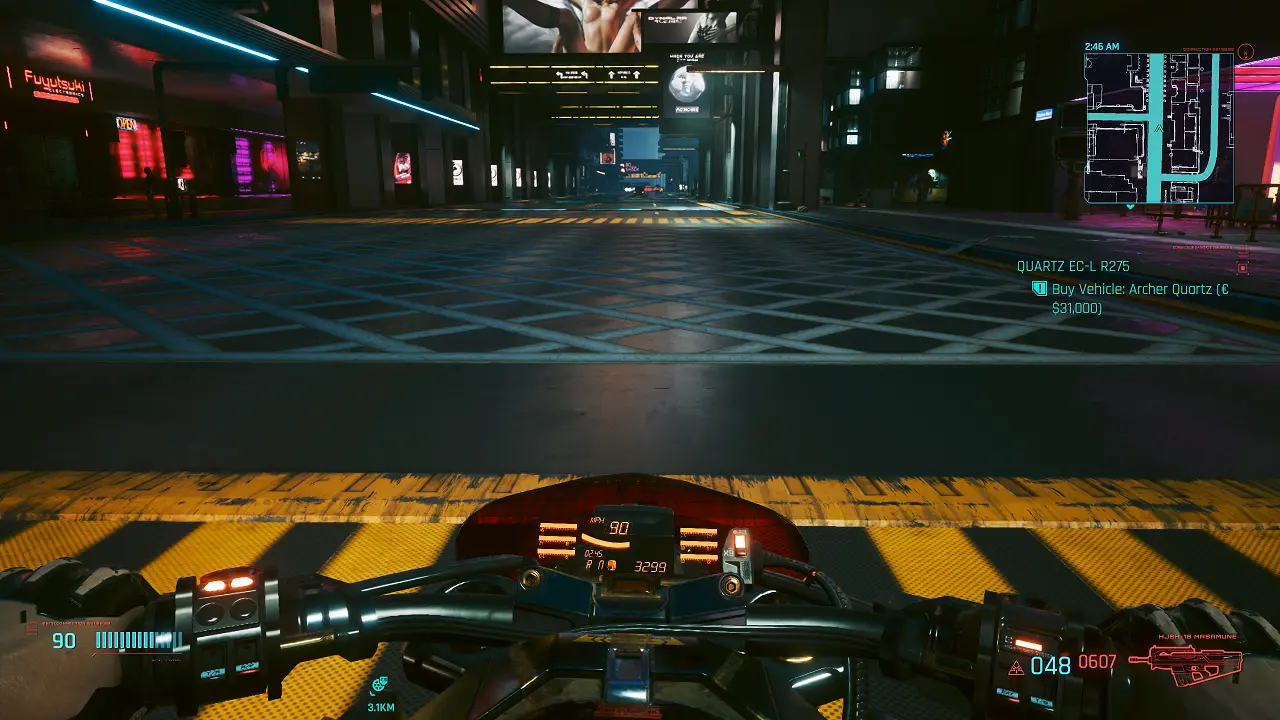
Does it bother you as much as me that your character is always putting the pedal to the metal like a cyberpsycho when driving? It's nice to actually having gears and seeing the current RPM, but then there should also be the option to hold your speed and gear.
Cyberpunk only looks good with wet streets and no rain at night. I love to drive around during that time in first person, enjoying the light show. But not being able to drive slower in a constant pace, I've made my personal fix of this little problem.
This little key setup offers two more keys that you can use to accelerate and control your max. speed to some extend.
The following key combination of gears/max speed is possible:
W - -> slowest speed (for sightseeing or to drive at speeds close to the AI)
LShift + W --> this is something between W and only shift
LShift --> accelerate and drive with about 42% of your vehicles total power
LShift + V --> again, this is a value between holding only LShift or V
V --> Full speed (vanilla behaviour)
I tried to make the values as realistic as possible to work properly with all the vehicles I'm driving. But there's a drawback of this little "hack": Because max. acceleration and speed are equally affected, driving slow vehicles like trucks or those cars with the engine of a lawnmower, you might actually have to use LShift or even V to start moving in a decent manner until you reach your desired speed. Otherwise you'll need ages to haul your ass up a steep road.
You can easily adjust the key bindings and tweak values to your own liking by editing the gears.xml. Attached, there's also a .txt with an overview of the keys you can use.
REQUIREMENTS
Input Loader
INSTALLATION
Verify that you don't have another "mod" overwriting those controls. Check all .xml files in this location (Cyberpunk_install_dir\r6\input). If there are files that modify the same values, delete those <mappings> completely or at least adjust the key bindings. Otherwise things might get wonky.
Extract the gears.xml into your Cyberpunk game folder. (Cyberpunk_install_dir\r6\input).
Delete gears.xml in r6\input.
No thanks! Help yourself! I'm fighting an illness for more than 2 years now. I won't be able to help if there are questions. Ask around somewhere else please.
This format is made in October 2022 for the Cyberpunk 1. 6 patch. If there's an update required, you may message me. With luck, I'll be able to update the file to work with a new cyberpunk/r6 version. But I think it should work for many more versions to come.
📊 Mod Details
- Game
- Cyberpunk 2077 Mods
- Author
- StUffzEnra
- Version
- 1.6
- Downloads
- 2,381
- Endorsements
- 124
- Category
- Gameplay
- Created
- 10/9/2022
- Updated
- 10/9/2022
🔧 How to Install Cyberpunk 2077 Mods
Download from Nexus.
📖 Full step-by-step install guide for Cyberpunk 2077 →
Visit the official mod page for specific installation instructions for this mod.
🎮 Need cheat codes or console commands? Check ur gaming wiki for Cyberpunk 2077 commands, item IDs, and more.
Keep browsing — more Cyberpunk 2077 mods await