Disable Controller Photo Mode
🟠 Updated over a year ago⚠️ Install Order · 6 steps
Install in this order, then this mod last — most mods fail to load without their framework and dependencies in place.
Preview
🔍 Analysis
- 👍 4.7% endorsement rate — high engagement, a strong quality signal
- 🏆 #184 of 452 Gameplay mods in this game by downloads
📋 About This Mod
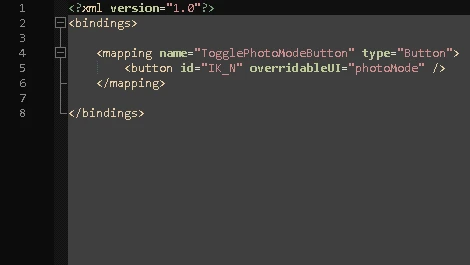
Simply disables the controller photo mode binding using Input Loader.
For controller users who enjoy sliding around, and anyone who would rather use Lstick+Rstick for something else. key still opens photo mode.
Installation
-
[]Ensure you have Input Loader and RED4ext installed
[
]Unpack the archive to the game's installation directory, or use a mod manager
-
[]Delete ...\Cyberpunk 2077\r6\input\Disable_Controller_Photo_Mode.xml
Compatibility
- [
If you wish to change the keybinding for photo mode to something other than you should do so in this mod's .xml file, not in game. Simply change "IK_N" in line 5 to a supported control name from this list.
Controller users, I recommend reWASD for binding MKB inputs to a controller. I bind (quick-save) to Start+Select, (quick-load) to hold_Start+Select, (Global Hotkey for Limited HUD) to Lstick+Rstick, (Untrack Quest Ultimate) to double-click_Lstick, and (Skip Radio Song) to double-click_Rstick. My personal reWASD controller config for Cyberpunk 2077 can be had here.
📊 Mod Details
- Game
- Cyberpunk 2077 Mods
- Author
- dabulldubs
- Version
- 1.1
- Downloads
- 516
- Endorsements
- 24
- Category
- Gameplay
- Created
- 1/13/2025
- Updated
- 2/19/2025
🔧 How to Install Cyberpunk 2077 Mods
Download from Nexus.
📖 Full step-by-step install guide for Cyberpunk 2077 →
Visit the official mod page for specific installation instructions for this mod.
🎮 Need cheat codes or console commands? Check ur gaming wiki for Cyberpunk 2077 commands, item IDs, and more.
Keep browsing — more Cyberpunk 2077 mods await