Clipping Gray Mesh Remover
⚪ Last updated 2021⚠️ Install Order · 6 steps
Install in this order, then this mod last — most mods fail to load without their framework and dependencies in place.
Preview
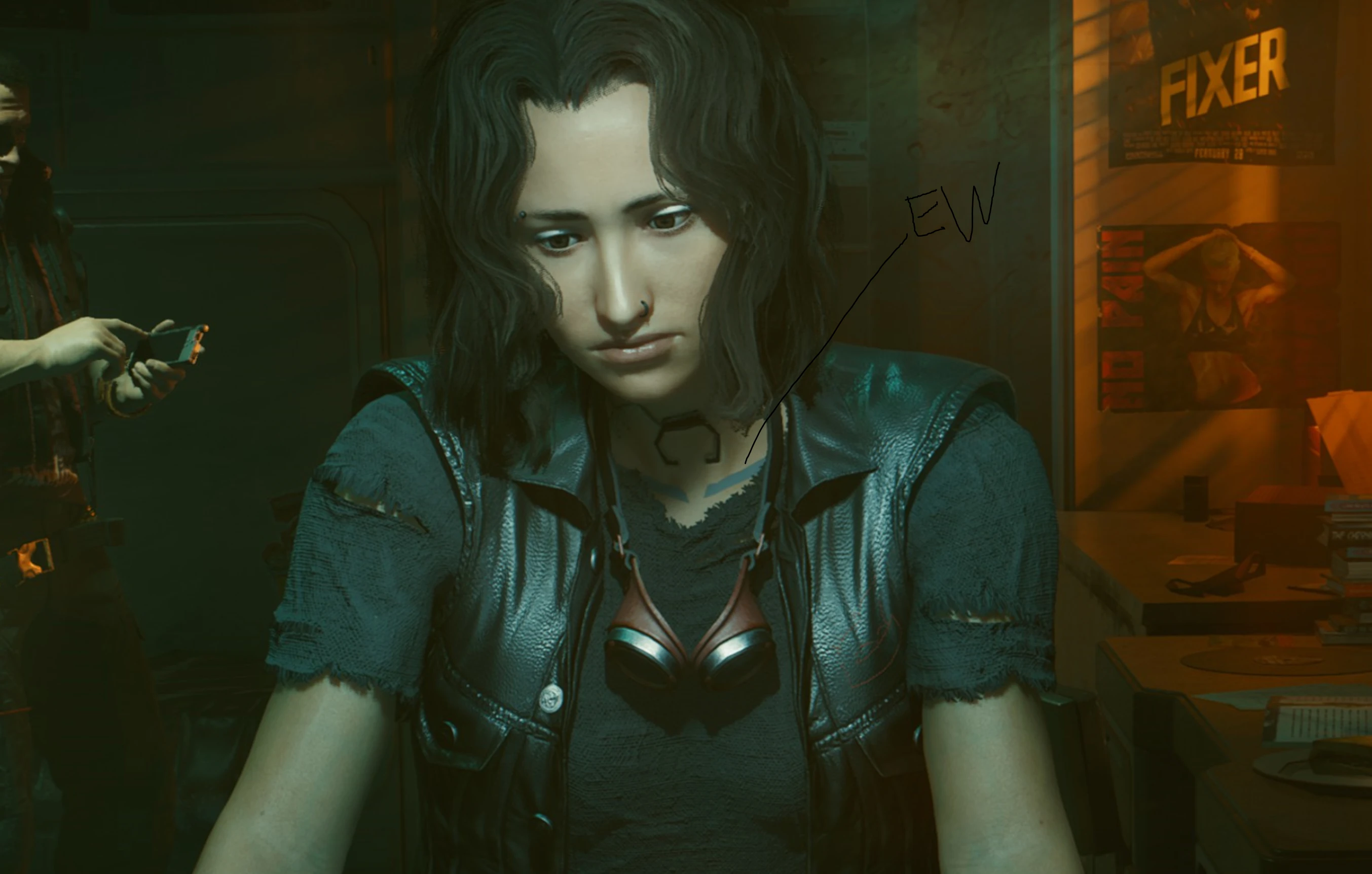
🔍 Analysis
- 👍 4.4% endorsement rate — high engagement, a strong quality signal
- 🏆 #489 of 525 Appearance mods in this game by downloads
📋 About This Mod
This mod deletes the gray mesh that's supposed to fix the seam issue with the neck/shoulders but many dislike. This mod as been added to JB - TPP MOD WIP third person awhile ago so it's mainly for people who don't have the aforementioned third person mod and were bothered by it in the photomode and inventory screen.
Installation:
-
[]Unzip
[
]Find your Cyberpunk 2077 folder[]Drop the new archive folder with existing archive folder (nothing should be overwritten here)
[]Play game
-
[]Go to Cyberpunk 2077 directory
[
]Go to Cyberpunk 2077\archive\pc\patch - Delete the patch folder or alternatively delete basegame_4_gamedata.archive file (make sure it's not some how the 7. 9gb one please)
Check out the awesome third person mod here:
https://www.nexusmods.com/cyberpunk2077/mods/669
This small cosmetic mod removes the gray mesh that clips through your character in photomode and third-person view, especially noticeable with the third person mod. It overrides the mesh without replacing any files, making it a safe and simple fix for visual polish.
✨ Key Features
📊 Pros & Cons
✅ Pros
- Community-approved with 1,373 endorsements and over 30k downloads.
- Simple, non-destructive fix that doesn't replace any game files.
- Targets a specific visual annoyance that many players notice in photomode.
⚠️ Cons
- Last updated in January 2021 — may not be compatible with the latest game patches.
- Only addresses the gray mesh issue; no other visual improvements included.
- Requires the third person mod to see the full benefit, which is an extra dependency.
For players who use photomode or the third person mod and are bothered by the gray mesh clipping through their character. It's a quick cosmetic fix for those who want cleaner screenshots. Skip if you don't use photomode or third person view.
💡 Beginner Tips
- Since the mod doesn't replace files, you can install it manually by dropping the files into the game's mod folder.
- If you're using a mod manager, just activate the mod and it should work without load order issues.
- Test in photomode or third person to see the effect immediately; no need to start a new game.
📊 Mod Details
- Game
- Cyberpunk 2077 Mods
- Author
- Moxxella
- Version
- 1.0
- Downloads
- 30,861
- Endorsements
- 1,373
- Category
- Appearance
- Created
- 1/6/2021
- Updated
- 1/6/2021
🔧 How to Install Cyberpunk 2077 Mods
Download from Nexus.
📖 Full step-by-step install guide for Cyberpunk 2077 →
Visit the official mod page for specific installation instructions for this mod.
🎮 Need cheat codes or console commands? Check ur gaming wiki for Cyberpunk 2077 commands, item IDs, and more.
Keep browsing — more Cyberpunk 2077 mods await