Certificate of Marriage Photo Frame of V and Judy - Panam - Kerry - River
🟠 Updated over a year ago⚠️ Install Order · 7 steps
Install in this order, then this mod last — most mods fail to load without their framework and dependencies in place.
Preview
🔍 Analysis
- 👍 2.1% endorsement rate — high engagement, a strong quality signal
- 🏆 #107 of 142 Miscellaneous mods in this game by downloads
📋 About This Mod
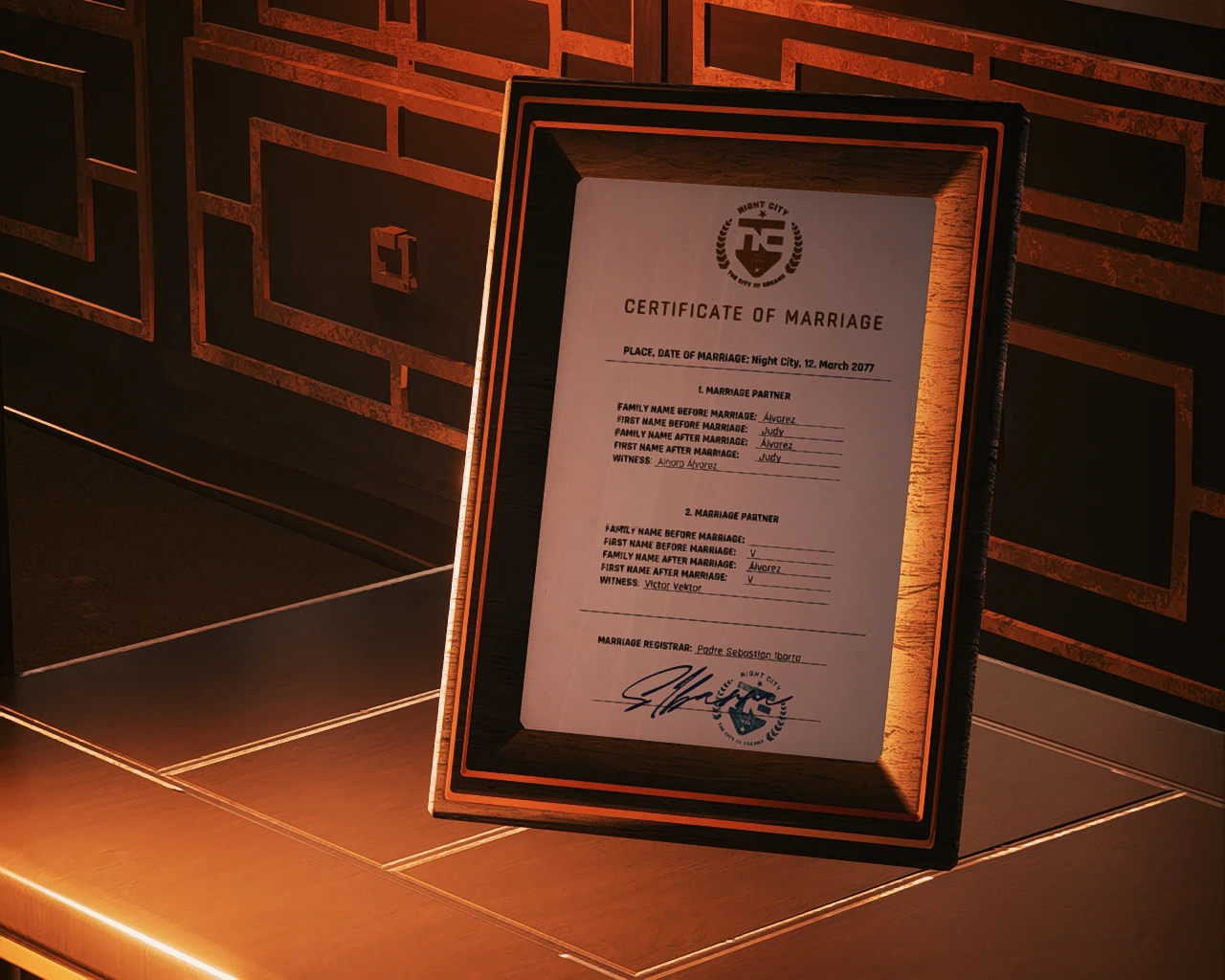
Here you can get a printed and framed version of my Certificate of Marriage shards.
It is a prop for AMM.
(Thanks to CatarasVrah for the suggestion)
It contains the certificates for V/Valerie/Vincent+Judy/Panam/Kerry/River.
Current supported languages are: English, German, Chinese, Spanish.
Ko-Fi link:
Do you like it?: Ko-Fi: downsource
A big thanks goes to shrimp1958 for providing the chinese translation!
And another big thanks goes to CoiledSand for providing the spanish translation!
Installation:
To install use Vortex or extract the zip file to the Cyberpunk 2077 base folder.
How to use this mod:
Open Appearance Menu Mod and navigate to the "Decor" tab:
If you don't want to position the object by yourself, you can click on "Presets" and then select the "CoM " (or the corresponding in your installed language) option.
This will place them in various places. (see screenshots):
To spawn it everywhere you want to, then in the "Spawn" tab either search within the categories or search by it's name and click on it.
Now open the "Tools" tab and click on "Open target tools"
There you can position it wherever you want.
You have the choice between two versions:
"Tabletop" and "Wall"
The Tabletop is intended for use on a desk or something else. The Wall is for hanging it on a wall.
When you're done close the Target tools and navigate back to the "Decor" tab.
In the list of spawned props click on save to have it saved and respawned on the next loading.
Uninstallation:
Just delete the files which are in the archive.
Also check out
myCertificate of marriage shards
my hand drawn tattoo V and Judy - Panam - Johnny - Kerry - River
and my mod for adding the love tattoos to Judy's body.
This AMM prop adds printed versions of the Certificates of Marriage for V and Judy, Panam, Kerry, and River. It's a cosmetic addition for Cyberpunk 2077 players who use AMM to decorate their apartments or photo scenes. With 87 endorsements and recent updates, it's a niche but appreciated prop mod.
✨ Key Features
📊 Pros & Cons
✅ Pros
- Community-approved with 87 endorsements and over 4,000 downloads.
- Adds a personal touch to in-game spaces for fans of these romances.
- Recently updated (May 2025), so it's likely compatible with current game versions.
⚠️ Cons
- Requires AMM (Appearance Menu Mod) to use, which is an extra dependency.
- Only adds props for the four listed romances—no other characters.
- No screenshots or detailed instructions provided, so you'll need to figure out placement yourself.
For Cyberpunk 2077 players who use AMM and want to decorate their apartments with romantic memorabilia. Also great for photo mode enthusiasts who want to stage scenes with V and their chosen partner. Skip if you don't use AMM or prefer gameplay-changing mods.
💡 Beginner Tips
- Make sure you have AMM installed and updated before adding this prop.
- Use AMM's prop placement menu to find the certificates under the appropriate category.
- If you're using photo mode, position the prop near a light source for better visibility.
📊 Mod Details
- Game
- Cyberpunk 2077 Mods
- Author
- downsource
- Version
- 1.0.1
- Downloads
- 4,186
- Endorsements
- 87
- Category
- Miscellaneous
- Created
- 8/24/2023
- Updated
- 5/22/2025
🔧 How to Install Cyberpunk 2077 Mods
Download from Nexus.
📖 Full step-by-step install guide for Cyberpunk 2077 →
Visit the official mod page for specific installation instructions for this mod.
🎮 Need cheat codes or console commands? Check ur gaming wiki for Cyberpunk 2077 commands, item IDs, and more.
Keep browsing — more Cyberpunk 2077 mods await