BMYC - A car theft mod
⚪ Last updated 2021⚠️ Install Order · 6 steps
Install in this order, then this mod last — most mods fail to load without their framework and dependencies in place.
Preview
🔍 Analysis
- 👍 4.1% endorsement rate — high engagement, a strong quality signal
- 🏆 #36 of 100 Vehicles mods in this game by downloads
📋 About This Mod
Find one out of 30+ car models and bring them to a random location to earn some eddies and receive some rare items. You can find your mission location on different ways, either by using the good old compass or by simply enabling and
BMYC (Bring me your car) - A car theft mod
A small mod to have an additional way to earn money and items in the game.
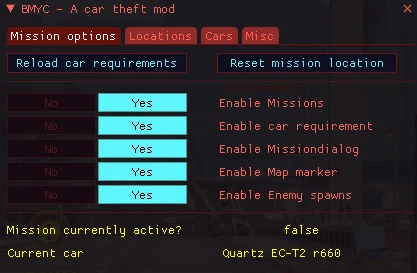
There are currently 40 random locations and 25+ different car models. This mod also includes a powerful menu to customize some options like adding new car models, editing their tier, adding new locations etc. For more information have a look at "Menu explaination".
Requirements
-
[]Version of 1. 11. 4 of CyberEngineTweaks or later
[
]Cyberpunk 2077 Patch 1. 12Installation
- []Use Vortex or manually extract it your Cyberpunk 2077 root directory (should look like this <Cyberpunk 2077>\bin\x64\plugins\cyber_engine_tweaks\mods\BMYC - A car theft mod)
-
[]Delete the following directory at <Cyberpunk 2077>\bin\x64\plugins\cyber_engine_tweaks\mods\BMYC - A car theft mod
-
[]Start the game and set in CET the hotkeys for "Accept", "Decline" and "Toggle Mission dialogs" (you can show/hide most of the popups with this key)
[
]enter any car and a quest dialog will appear (you can use your Accept/Decline hotkeys or use the arrow keys and space)[]if you accepted, a list of seven cars will appear on the right side
[]find one of these cars and break into it
[]another dialog appears, if you want to drive to the given location (it will show you the distance + district and subdistrict), press accept to start the mission
[]Drive to the location, leave the car and kill all the enemies (if enabled) to claim your reward
Usage (long version)
Hotkeys
There are three hotkeys you can assign (Yes/Accept | No/Cancel | Toggle Mission dialogs)
Yes/Accept - accept a mission etc.
No / Cancel - decline a mission or cancel an active one
Toggle Mission dialogs - Shows/hides the mission HUD
How to start
-
[]Get into any car (doesn't matter if you own it or not)
[
]A dialog in the middle of the screen appears, showing you 7 different car models. You can accept it or decline it. If you decline, there won't be anymore dialogs of my mod, until you reload it. This dialog can also be disabled in the menu, so it is like you always pressed on "Accept" (have a look at "Menu explanation" if you want to know more)I accepted, what now?
-
[]Get into any car (doesn't matter if you own it or not)
-
[]Start the game and set in CET the hotkeys for "Accept", "Decline" and "Toggle Mission dialogs" (you can show/hide most of the popups with this key)
📊 Mod Details
- Game
- Cyberpunk 2077 Mods
- Author
- Just
- Version
- 0.321
- Downloads
- 2,684
- Endorsements
- 109
- Category
- Vehicles
- Created
- 2/24/2021
- Updated
- 4/9/2021
🔧 How to Install Cyberpunk 2077 Mods
Download from Nexus.
📖 Full step-by-step install guide for Cyberpunk 2077 →
Visit the official mod page for specific installation instructions for this mod.
🎮 Need cheat codes or console commands? Check ur gaming wiki for Cyberpunk 2077 commands, item IDs, and more.
Keep browsing — more Cyberpunk 2077 mods await