All-Natural Enhancements (Reshade)
⚪ Last updated 2020⚠️ Install Order · 7 steps
Install in this order, then this mod last — most mods fail to load without their framework and dependencies in place.
Preview
🔍 Analysis
- 👍 3.6% endorsement rate — high engagement, a strong quality signal
- 🏆 #42 of 185 Visuals and Graphics mods in this game by downloads
📋 About This Mod
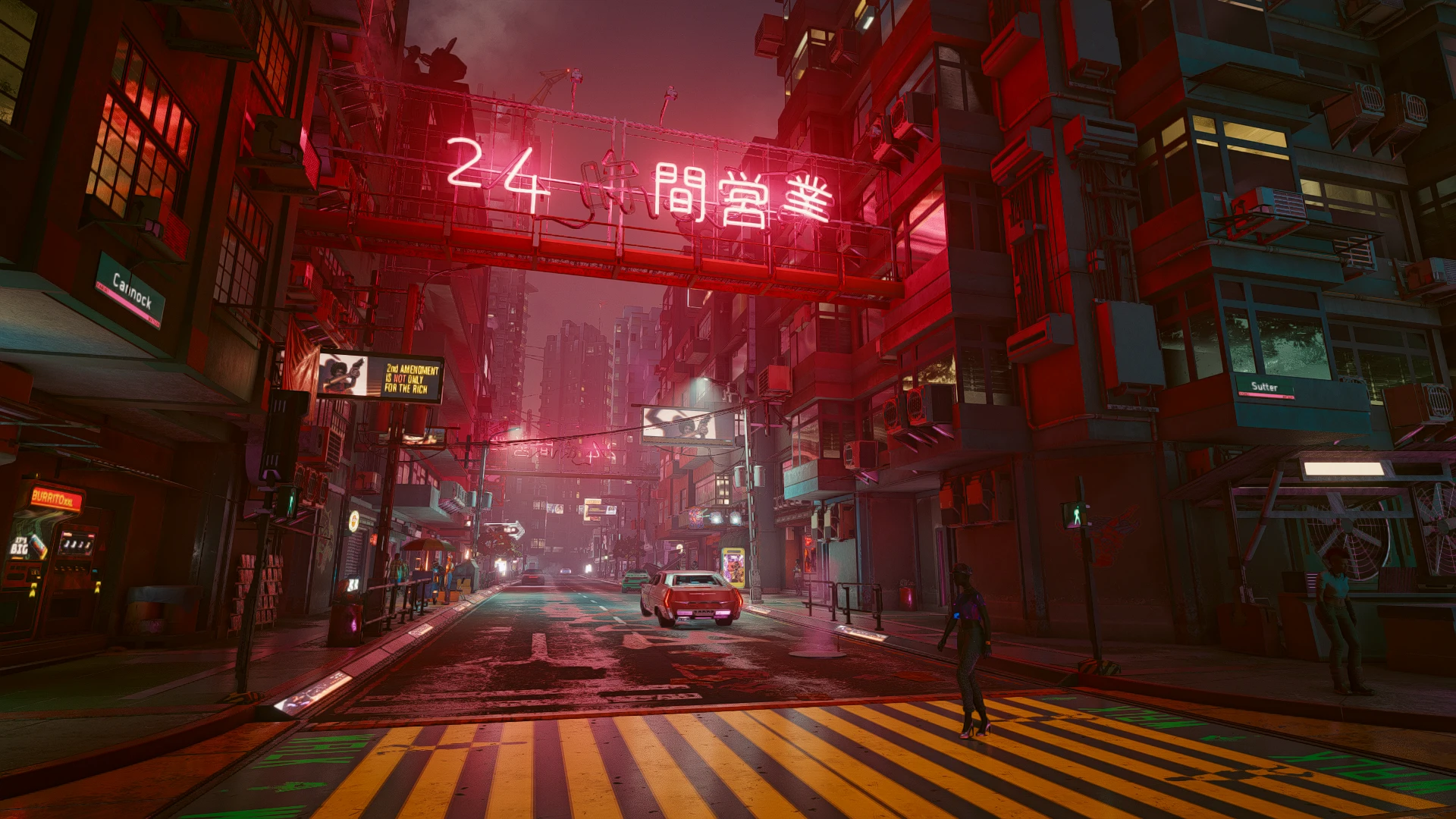
BEFORE AND AFTER COMPARISONS
Night in City, Judy Working, Apartment Building, Night Cityscape, Night Markets, Night Markets 2, Main Menu, Apartment Room, Apartment Room 2, 2nd Amendment, Grafitti, Outside Lizzie's, My Character in Mirror, Night in City 2, Night in City 3, Night in City 4, Midday in City, Inside Lizzie's, Dressing Room, Night Cityscape 2, Night in City 5, Night in City 6
EFFECTS
1. Made the colors a little richer.
2. Removed a slight reddish-green tint. Game is overall a little bit bluer which feels more natural.
3. Added a little extra shading on edges, giving the world a bit more depth.
4. Made textures a little sharper but not enough to make things too noisy.
5. (FULL Version Only) Added some extra anti-aliasing. By nature this adds blur to lines at sharp angles, but I think overall it's an improvement over janky edges. If you don't like this blur or you face performance issues, use the LITE version.
INSTRUCTIONS (PLEASE READ)
1. Download the latest version of Reshade (if you run into issues, try using Reshade 4. 82).
2. Install Reshade onto "Cyberpunk 2077\bin\x64\Cyberpunk2077.exe". It must be the game executable, NOT the launcher.
3. For Rendering API, choose Direct3D 10/11/12.
4. When it asks you what shaders you want to install, just click "OK", not skip so that it only installs the standard effects. You could install other ones if you want to tweak things yourself, but my download has all the shaders you should need. When it pops up asking which specific shaders you want just hit OK/Continue.
5. Download either the FULL or LITE version of this mod. The LITE version is the same as FULL except the AA effect is removed.
6. Move the downloaded zip into your "Cyberpunk 2077\bin\x64" folder and unzip everything into this folder (not into it's own folder), overwriting anything it asks you to.
7. Start the game and it should already be ready! You can press F8 to toggle the effects and see the difference yourself.
8. Performance impacts will vary by computer specs. On my computer, I can run the game at around 70fps with my settings without reshade. Using the FULL version of this mod, it drops to around 64. Using the LITE version the it is around 70.
9. If you want to look exactly like the screenshots, the last few images of the mod are my in-game settings.
COMPATIBILITY
This should work with any other mod that isn't another reshade preset. I have not tried any of the mods that remove TAA (Temporal Anti-Aliasing) so I can't speak to how it will look without that. If it looks strange with one of those mods, try the LITE version of this mod instead.
ABOUT
I love reshade, but most presets I find (for any game) tend to go a bit overboard. They boost saturati
All-Natural Enhancements is a Reshade preset for Skyrim Special Edition that improves visuals without going overboard. It has 246 endorsements and was last updated in December 2020. This is a lightweight option for players who want better graphics without a heavy performance hit.
✨ Key Features
📊 Pros & Cons
✅ Pros
- Community-approved with 246 endorsements and nearly 7k downloads.
- Aimed at players who want improved visuals without the 'overdone' look.
- Last updated in 2020, so it's been around and tested by the community.
⚠️ Cons
- Last updated in 2020 — may not be optimized for the latest Skyrim SE patches.
- Requires Reshade to be installed separately, which adds setup steps.
For Skyrim players who want a subtle visual upgrade without the performance hit of heavy ENBs. If you're after dramatic, fantasy-style graphics, this isn't it. Skip if you're not comfortable installing Reshade presets.
💡 Beginner Tips
- Make sure you have Reshade installed and set up before adding this preset.
- Test the preset in different weather and lighting conditions to see if it suits your taste.
- If you're using other visual mods, check for conflicts with lighting or weather overhauls.
📊 Mod Details
- Game
- Cyberpunk 2077 Mods
- Author
- SlowCircuit
- Version
- 1.0
- Downloads
- 6,795
- Endorsements
- 246
- Category
- Visuals and Graphics
- Created
- 12/16/2020
- Updated
- 12/17/2020
🔧 How to Install Cyberpunk 2077 Mods
Download from Nexus.
📖 Full step-by-step install guide for Cyberpunk 2077 →
Visit the official mod page for specific installation instructions for this mod.
🎮 Need cheat codes or console commands? Check ur gaming wiki for Cyberpunk 2077 commands, item IDs, and more.
Keep browsing — more Cyberpunk 2077 mods await