108.8 FM I2D1 Synthetica - Synthwave Radio
⚪ Last updated 2023⚠️ Install Order · 6 steps
Install in this order, then this mod last — most mods fail to load without their framework and dependencies in place.
Preview
🔍 Analysis
- 👍 2.4% endorsement rate — high engagement, a strong quality signal
- 🏆 #7 of 135 Audio mods in this game by downloads
📋 About This Mod
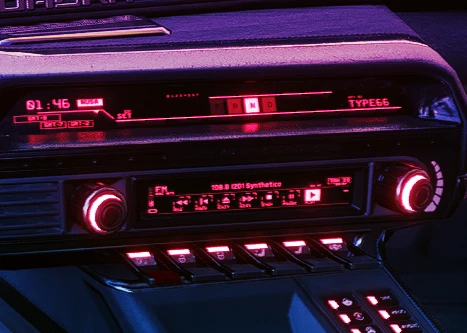
Mod that adds a new Synthwave & Retrowave music station to the game: I2D1 Synthetica.
Features:
• Frequency:
• Fully integrated within the game's radio UI thanks to Radio EXT.
• pure awe-inducing synthwave and retrowave tracks for night city navigation.
• All tracks are copyright free which means you can live stream while listening to this radio station.
• Music files are included in the main file.
• Filetype: mp3 - 320kbps.
Installation:
• Make sure you download and install the Radio EXT mod before you install mine because this won't work without Radio EXT.
• Download this mod and extract the .zip file.
• Copy the 'bin' folder to your Cyberpunk 2077 root folder.
• Done.
Credits to Karl Casey @ White Bat Audio for the music.
In-game Preview:
mUVYQepnPL0
Changelog:
• 1. 0[color=#00fff
Adds an authentic synthwave and retrowave music station to the game with seamless UI integration. For players who want a retro-futuristic soundtrack while driving or exploring. Stands out for its genre-specific music and polished UI integration.
✨ Key Features
📊 Pros & Cons
✅ Pros
- Solid community backing with 194 endorsements and over 8,000 downloads.
- Seamless UI integration means no clunky menus or immersion-breaking overlays.
- Perfect for synthwave fans who want that retro-futuristic vibe while playing.
⚠️ Cons
- Last updated in February 2023 — might not be compatible with the latest game patches.
- Only one station added — if you're not into synthwave, this mod won't change much.
For players who love synthwave and retrowave music and want to customize their in-game radio experience. Skip if you prefer other music genres or don't care about radio stations.
💡 Beginner Tips
- Check if the mod requires a mod manager or manual installation — the description doesn't specify, so read the mod page comments for guidance.
- Since it's an audio mod, make sure your game's audio settings are configured to allow custom radio stations.
- If you're using other audio mods, test for conflicts by enabling this mod last in your load order.
📊 Mod Details
- Game
- Cyberpunk 2077 Mods
- Author
- EthikMantis
- Version
- 1.1.2
- Downloads
- 8,105
- Endorsements
- 194
- Category
- Audio
- Created
- 12/29/2022
- Updated
- 2/13/2023
🔧 How to Install Cyberpunk 2077 Mods
Download from Nexus.
📖 Full step-by-step install guide for Cyberpunk 2077 →
Visit the official mod page for specific installation instructions for this mod.
🎮 Need cheat codes or console commands? Check ur gaming wiki for Cyberpunk 2077 commands, item IDs, and more.
Keep browsing — more Cyberpunk 2077 mods await