Cheat Map Editor
⚪ Last updated 2019Preview
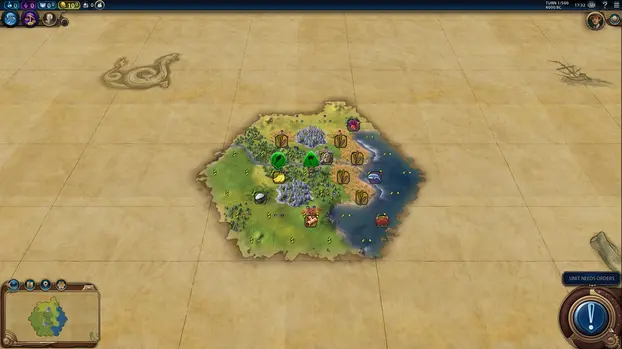
🔍 Analysis
- 👍 3.1% endorsement rate — high engagement, a strong quality signal
- 🏆 #1 of 30 Miscellaneous mods in this game by downloads
📋 About This Mod
Allows to change terrain type, features, improvements, roads and resources in game.
Accessible via new button in top right corner of the window near the Civilopedia button.
Works with GS.
Please note and FAQ
Crash safe mode. Does not allow you to make the changes that known to cause crashes. This only check known crash reasons so be reasonable while using this mod.
Safe mode. Validates game placement rules and disables the changes that are not allowed by game rules (for example you can't place crabs on land tiles, or marsh on desert tile etc.). It also disables resource and feature changes on tiles with improvements, cities, districts and wonders because it most probably break your game in some way. Game placement rules validation is a little bit paranoid so you can disable it for some changes if you are sure that it is valid. In general the game should not crash even if some invalid changes are done.
I don't see changes I've made.
You need to Save and Load game to update visuals and game data after some changes. This is game engine limitations.
Can I use this mod to place resource added by other mods?
Mod supports resources added by other mods (if the mod does not contain special logic for that resource and uses standard method to add resource into the game).
I can't remove some resource from the map.
For some reason the game does not allow to remove resources that are not revealed (required technology is not learned yet). In this case you can replace that resource with the revealed resource and after that remove it.
Is "Fix game data" safe to use and what does it do?
Yes it is safe to use in the latest mod version if Crash safe checkbox is checked. And even if crash safe checkbox is unchecked it will ask you before running crash unsafe fix. In crash safe mod it only forces the game to recalculate map areas which is required if you want to get lakes. In crash unsafe mod it additionally asks you if you want to run crash unsafe fix which is required if you want to settle on the terrain which was changed from impassable to passable (most probably you will not be able to finish your game after that due to the crash).
How can I add lake? When I try to place lake it's tiles are marked as coastal.
To add lake you have to add lake tiles as Coastal terrain and after that use "Fix game data" button and Save/Load the game.
There is no special lake terrain type in game the lakes are the coastal tiles. But game automatically detects the lakes and marks it tiles as the lake tiles internally. There is special function to force the game to launch lake checks again and it is called when you click "Fix game data button" (it is now pretty safe to use the crash unsafe part is not executed if the Crash safe checkbox is enabled).
How can I add cliff/river?
1. Cliffs and rivers are moved to the new tab. Click on Rivers/Cliffs button in top part of the mod window.
2. Panel has 3 lines that imitate the 3 sides of the map hex. By clicking on the line you change the river/cliff state on that hex side: unfilled line is no cliff/no river, filled line river/cliff. And river line also shows river flow direction on that side (the game may ignore flow direction by some internal logic). So you have to change river/cliff state on all 3 hex sides to what you need.
3. River panel allows to select River ID from existing IDs or create the new ID. River ID determines river name but there is no way to identify river name by River ID and to identify river ID of the existing rivers in the map tile so it's functionality is limited.
4. Apply the selected river/cliff pattern to the selected map hex by clicking Apply button or using paint mod checkbox and clicking on the map tiles.
5. To see changes you have to Save and Load the game.
* Mod button does not shown on the top panel anymore. This mod does not load when attempting to continue a game after steam/civ have been closed. Mod window does not appear when I click on top panel button.
I can't reproduce this issue but it may be related to some game internal issues with mod load order. This steps may help:
1. Go to in-game mod manager and disable ALL mods you have including DLCs and Expansions.
2. Exit the game and launch the game again.
3. Enable all DLCs, Expansions and mods.
About the crashes
The problem with crashes is that they happen on some turn later in game and it is not possible to continue the game because it will repeat on that turn no matter what you d
📊 Mod Details
- Game
- Civilisationvi Mods
- Author
- Zur13
- Version
- 21
- Downloads
- 49,327
- Endorsements
- 1,543
- Category
- Miscellaneous
- Created
- 2/16/2019
- Updated
- 10/15/2019
- Tags
- Cheating
🔧 How to Install Sid Meier's Civilization VI Mods
Install via a mod manager (Vortex or Mod Organizer 2). Most mods drop into the game folder.
📖 Full step-by-step install guide for Sid Meier's Civilization VI →
Visit the official mod page for specific installation instructions for this mod.
🎮 Need cheat codes or console commands? Check ur gaming wiki for Sid Meier's Civilization VI commands, item IDs, and more.
Keep browsing — more Sid Meier's Civilization VI mods await