Banner Color Persistence (now with BannerPaste)
🟡 Updated this year⚠️ Install Order · 1 step
Install in this order, then this mod last — most mods fail to load without their framework and dependencies in place.
Preview
🔍 Analysis
- 👍 1.4% endorsement rate — high engagement, a strong quality signal
- 🏆 #2 of 70 Miscellaneous mods in this game by downloads
📋 About This Mod
Description
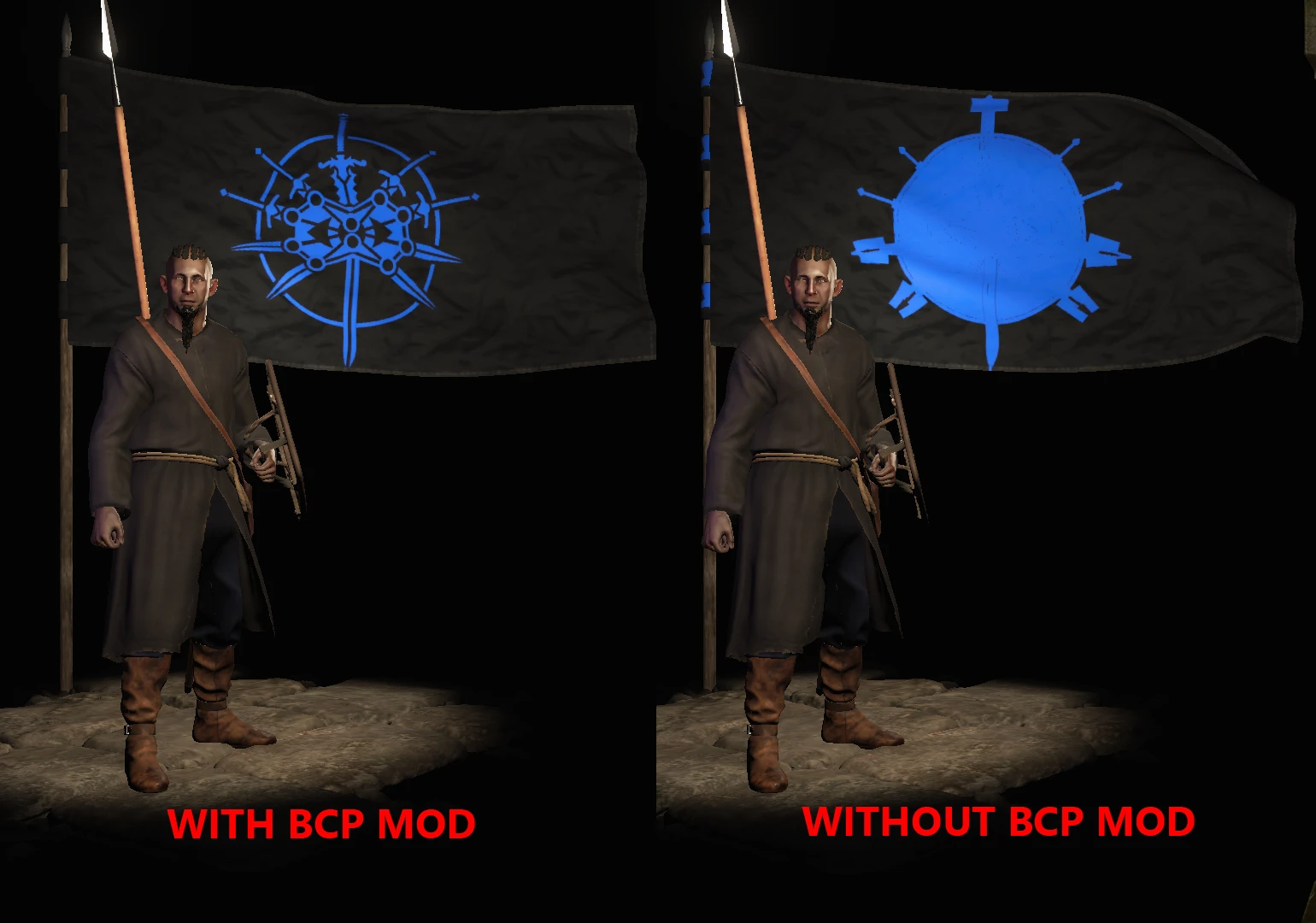
BannerColorPersistence was originally created to prevent one small issue with custom banners being broken on save/load. It has since expanded to resolve a variety of issues associated with custom banners in an attempt to keep our complex banners working as Bannerlord develops. If you have any issues with your custom banners, BannerColorPersistence seeks to fix them, including:
-
[]Banner icons changing to background color on load
[
]Banners being ruined by joining a kingdom[]Clothing/armor colors not aligning with your banner colors when in a kingdom
[]Crash to desktop when opening trade or inventory menu while using a banner with multiple icons
As of 1. 2. 5 BannerColorPersistence now includes BannerPaste logic!
Originally created by gooboon, BannerPaste has served the community well for many BL releases, but pre-release 1. 7. 2 included breaking changes. With gooboon's permission, I've included the original code in BCP as well as the fixes for those problems.
To use, simply copy a bannercode (such as one generated via bannerlord.party) and use Ctrl+V to paste the code into the game on the banner editor screen.
Requirements
Harmony is a required mod. Ensure it loads before BCPCustom Banner Info
In the context of this mod, a "custom banner" refers to a banner created with multiple icon layers to create a more detailed and complex design. These banners are largely created by using the web editor at https://bannerlord.party/banner/ and pasting the generated code in the in-game editor (CTRL+V) or via the xml files. Pasting the code in-game requires the BannerPaste functionality, which is now provided by BannerColorPersistence.Please visit the BannerlordBanners subreddit to see a wide array of custom banners created by the community and check out the pinned tutorial there as well.
Configuration
BannerColorPersistence includes a few configuration options for those who need it. For most users, these should be left to the default values. Config file is located: Modules\BannerColorPersistence\bin\Win64_Shipping_Client\config.jsonenableBannerColorPersistence - defaults to true. Set to false if you do not want the banner color persistence logic to be run. This will allow only the BannerPaste functionality and basic crash fixes to function. Use at your own risk.
preventNPCBannerColorChanges - defaults to false, should really only be set to true if you're running custom banners for your NPCs via some other mod such as CBU or POC
allowColorChangeOnIconsMatchingBackgroundColor - defaults to false. This one may work well for you or it may not. It's completely dependent upon your specific banner. The idea here is that if you're allowing background color changes on kingdom change, sometimes your custom banner uses icons in the same color as the background in order to block out and modify other icons. If you're only changing background color, those icons now become visible when they remain the original color and make your banner look wonky. This config option will attempt to change the color of those icons as well. BUT - and this is a very big but - the icons must match the background colors EXACTLY, and must match BOTH of the colors. Each background and icon have TWO colors associated to them and if both colors don't align, the change won't occur. This means that banners using multi-colored backgrounds probably won't change properly. It also means that if your banner was created without close attention to the secondary color of the icons, it also probably won't change properly. All that said, try this config out if you really want to see your banner changing with your kingdom change, but ignore it otherwise cause there's probably a pretty low chance of it actually working perfectly. Some people were asking for it though, so here it is.
Official support for War Sails DLC is now available!
Banner Color Persistence fixes custom banner issues in Mount & Blade II: Bannerlord, including color changes on save/load, kingdom joining, and crashes. It now includes BannerPaste for pasting banner codes. Requires Harmony. With 5,229 endorsements and 380,927 downloads, it's a popular utility for banner enthusiasts.
✨ Key Features
📊 Pros & Cons
✅ Pros
- Community favorite with 5,229 endorsements and 380,927 downloads
- Actively maintained, last updated December 2025
- Solves multiple annoying banner bugs in one mod
⚠️ Cons
- Requires Harmony, which adds an extra dependency
- Configuration options are risky for non-experts and could break banners
- BannerPaste feature may not work with all game versions despite fixes
For Bannerlord players who love creating complex custom banners and want them to survive save/load and kingdom politics. Also for anyone who wants the convenience of pasting banner codes directly. Skip if you never touch custom banners or prefer vanilla banner behavior.
💡 Beginner Tips
- Ensure Harmony loads before Banner Color Persistence in your mod manager to avoid conflicts.
- Use bannerlord.party to generate banner codes, then paste them in-game with Ctrl+V on the banner editor screen.
- If you're not sure about color change options, leave them default to prevent banner issues.
📊 Mod Details
- Game
- Bannerlord Mods
- Author
- quakank
- Version
- 1.5.0
- Downloads
- 380,927
- Endorsements
- 5,229
- Category
- Miscellaneous
- Created
- 1/21/2021
- Updated
- 12/18/2025
🧩 Commonly Used Together
Users add these mods to the same collections — a real compatibility signal, not an AI guess.
🔧 How to Install Bannerlord Mods
Use Vortex or manual. Enable mods in launcher. Harmony required.
📖 Full step-by-step install guide for Bannerlord →
Visit the official mod page for specific installation instructions for this mod.
🎮 Need cheat codes or console commands? Check ur gaming wiki for Bannerlord commands, item IDs, and more.
Keep browsing — more Bannerlord mods await