RTS CAMERA 1.2.8 - 1.2.12
🟠 Updated over a year agoPreview
🔍 Analysis
- 👍 0.8% endorsement rate
- 🏆 #14 of 60 Utilities mods in this game by downloads
📋 About This Mod
-
[]RTS Camera
[
]You can press F10 to switch to free camera and press again to switch back. Player character will be controlled by AI when switched to free camera.[]You can press L and check Use Free Camera By Default to automatically switch to free camera when entering a battle.
[]After your character dies, you can press FE to follow one of your soldiers and press FE again to control it and continue fighting. Soldiers in the same formation as player character will be considered first when deciding which soldier to control.
- []You can immediately control one of your soldiers to avoid all your formations been delegated to AI when your charater dies. Press L and check Control Ally After Death option to enable this feature. It's always enabled in free camera mode to ensure a smooth gaming experience.
- [
[]You can make the camera follow any hero by pressing L to open the menu and selecting a hero in Watch Another Hero drop-down list.
[]You can make the camera follow any character by pressing ; and clicking a character, then pressing FE.
[]You can press left/right mouse button to change the character that the camera is following.
[]If your character is injured in campaign map and you encounter an enemy party, you can still choose "Watch the battle" option to begin the battle. In this battle you can command your troops in free camera but cannot directly control a character and fighting.
[]Pause game ([) or adjust time speed (').
[]Toggle HUD by pressing ]. If you rebind the key and forget the key set for toggling HUD, you can always use HOME key to enable HUD.
[]Command System
-
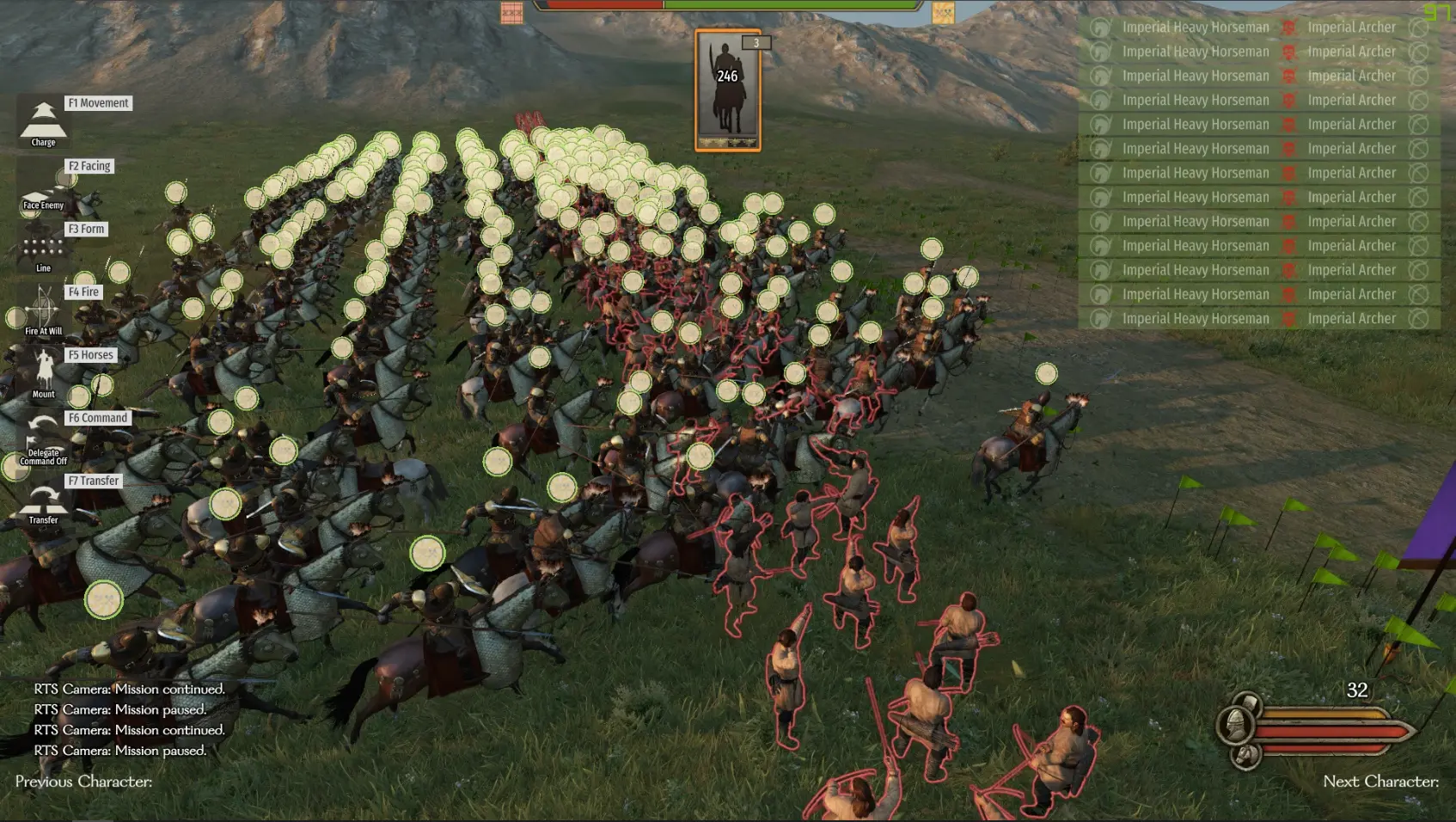
[]You can make your formation only charge to a specific enemy formation by clicking middle mouse button on the enemy formation, rather than charging to all enemies when you press F1 F3.
[]The target enemy formation that your selected troops are charging to will be highlighted with red outline when you open command panel.
[]AI formation will also have the ability to charge to a specific formation. Your formation targeted by the enemy formation will be highlighted with dark blue outline when you open command panel.
[]I didn't find a way to restrict range weapon's target to specific formation, so remember to hold fire when using this feature if they have javelins.
[]You can press L and uncheck Enable Attack Specific Formation to disable this feature.
- [
[]You can rebind hotkeys by pressing L and click Config Key.
[]Configuration will be automatically saved.
-
[]Press L to open menu of this mod when in a scene. You can adjust all the options of this mod in it.
[
]You can close the menu by pressing esc, left clicking outside the menu or right clicking.
- [
[]Use shift to speed up camera movement.
[]Move your mouse to rotate the camera, or when order panel is opened, drag right mouse button to rotate the camera.
[]Left click on the ground and drag to change the position, direction and width of the formation you selected.
[]Hold ctrl when dragging to arrange multiple formations vertically.
[]Hold ctrl and scroll mouse to adjust camera movement speed.
[]Hold ctrl and click middle mouse button to reset camera movement speed.
[*]Hold ctrl and drag middle mouse button vertically to adjust camera height.
RTS Camera is a utility mod for Mount & Blade II: Bannerlord that adds a free camera mode (F10) with AI-controlled player, allowing you to command troops from a strategic perspective. It includes features like following soldiers after death, watching heroes, and controlling allies. With 1,634 endorsements and 198,989 downloads, it's a popular tool for players who want RTS-style battles.
✨ Key Features
📊 Pros & Cons
✅ Pros
- Huge community trust with 1,634 endorsements and nearly 200k downloads.
- Adds a whole new way to play battles—RTS-style command without losing control.
- Active development: last updated January 2025, so it's current with recent game versions.
⚠️ Cons
- Requires learning multiple hotkeys (F10, FE, L, ;, Alt) which can be overwhelming at first.
- Free camera mode takes control away from your character, which might not suit players who prefer direct combat.
For Bannerlord players who want a strategic overview of battles, like commanding from a top-down perspective. Perfect for those who enjoy RTS games and want to micro-manage troops without being stuck in first-person. Skip if you prefer traditional action combat and never want to give up direct control.
💡 Beginner Tips
- Bind the keys to your liking in the mod's settings (L menu) before jumping into battle—defaults might not suit your playstyle.
- Use the 'Use Free Camera By Default' option if you always want to start battles in free camera, saving you a keypress.
- Test the 'Control Ally After Death' feature in a safe battle to get used to the FE key—it can save you from losing a fight after your character dies.
📊 Mod Details
- Game
- Bannerlord Mods
- Author
- LiZhenhuan1019
- Version
- 3.0
- Downloads
- 198,989
- Endorsements
- 1,634
- Category
- Utilities
- Created
- 1/23/2024
- Updated
- 1/9/2025
🧩 Commonly Used Together
Users add these mods to the same collections — a real compatibility signal, not an AI guess.
🔧 How to Install Bannerlord Mods
Use Vortex or manual. Enable mods in launcher. Harmony required.
📖 Full step-by-step install guide for Bannerlord →
Visit the official mod page for specific installation instructions for this mod.
🎮 Need cheat codes or console commands? Check ur gaming wiki for Bannerlord commands, item IDs, and more.
Keep browsing — more Bannerlord mods await