Character Export Import
⚪ Last updated 2020Preview
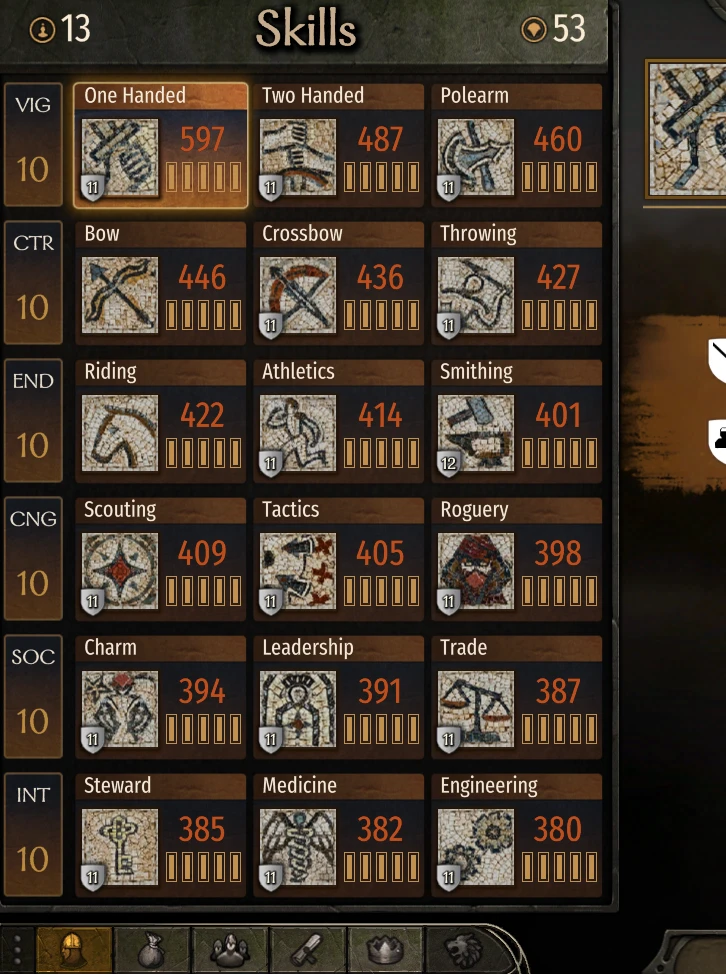
🔍 Analysis
- 👍 2.7% endorsement rate — high engagement, a strong quality signal
- 🏆 #11 of 60 Utilities mods in this game by downloads
📋 About This Mod
DISCLAIMER
I'm not responsible with your corrupted save files and game files, use at your own risk.
I recommend to use this with new campaign or at least back up your unmodded save file.
The game doesn't like large number for skill level, I tested with 1000 and the save file was broken.
I tried with 300 for each skills, so far I don't see any problem even with all perks unlocked.
Installation Instruction:
-
[]Use Vortex
[
]Activate the mod through Bannerlord launcherManual Installation Instruction:
-
[]Download the .zip file
[
]Go to your bannerlord modules folder (e.g. G:\SteamLibrary\steamapps\common\Mount & Blade II Bannerlord\Modules)[]Extract the zip inside Modules
[]Launch Bannerlord launcher and tick to enable the mod
[]The file structure should be like this:
G:\SteamLibrary\steamapps\common\Mount & Blade II Bannerlord\Modules\CharacterTrainer
G:\SteamLibrary\steamapps\common\Mount & Blade II Bannerlord\Modules\CharacterTrainer\SubModule.xml
G:\SteamLibrary\steamapps\common\Mount & Blade II Bannerlord\Modules\CharacterTrainer\bin
Installation Troubleshoot:
-
[]Unblock access permission for file
G:\SteamLibrary\steamapps\common\Mount & Blade II Bannerlord\Modules\CharacterTrainer\SubModule.xml
- G:\SteamLibrary\steamapps\common\Mount & Blade II Bannerlord\Modules\CharacterTrainer\bin\Win64_Shipping_Client\CharacterTrainer.dll
[]Or tell me what's inside C:\Users\(user)\Documents\Mount and Blade II Bannerlord\CharacterTrainer\CharacterTrainer_log.txt (If this file does not exist, probably you're still need to fix access permission)
How to use
-
[]Open party party screen.
[]Right click any character you want to export/import on troop list
[]Encyclopedia will be opened, and you can see 2 buttons on the bottom of the screen, Export and Import
[]If you choose to Export, a file will be created in C:\Users\(user)\Documents\Mount and Blade II Bannerlord\CharacterTrainer\(your character name)\(your character name).txt
[]Edit the values as you like
[]Click Import button to re-import your edited stats. Press Shift while clicking the button if you want to ignore exp.
[]Companion files will be named in this format (your companion name).(internal id).txt for example "Jim the Strong.lord_1_2.txt"
[]internal id added from v1. 0. 8 to avoid conflict, because I found many characters have same name. You don't have to worry about internal id, just export the character first, internal id will be in the filename. Also you don't need internal id for your main character (See step 4)
[]Classic Ctrl+K and Ctrl+L removed, use older version if you want that.
[]Appearance changes only applicable to your main character
-
[]Ctrl+L affects character exp and level
[]Ctrl+Shift+L ignores character exp and level
[]If decreasing skill level doesn't work I can do nothing for it, probably engine limitation that doesn't allow you to decrease it, my best bet is using the Ctrl+Shift+L to decrease as Ctrl+L naturally increases your exp
Version v1. 0. 12 (Only for e1. 4. 0 beta)
-
[]Fix crashes on e1. 4. 0 beta, I haven't test it thoroughly, use at your own risk until I have the time to test it myself.
Version v1. 0. 11 (Only for e1. 3. 0)
- [
Version v1. 0. 10
-
[]Restructure exported files. Files are moved to directory C:\Users\(user)\Documents\Mount and Blade II Bannerlord\CharacterTrainer\(your character name)\
[
]Read How to Use for detailed changesVersion v1. 0. 9
- []Added "Clear Unspent Points" button for those who want to import character to a new save without excess attribute points and focus points
[]Access Export and Import from UI! You can now
-
[]Fix crashes on e1. 4. 0 beta, I haven't test it thoroughly, use at your own risk until I have the time to test it myself.
-
[]Unblock access permission for file
-
[]Download the .zip file
Character Export Import is a utility mod for Mount & Blade II: Bannerlord that lets you export and import character data, including skills and perks. It has 9,596 endorsements and 356,443 downloads, last updated in May 2020. The author warns about save corruption risks and recommends using it with a new campaign.
✨ Key Features
📊 Pros & Cons
✅ Pros
- Huge community trust with 9,596 endorsements and 356,443 downloads.
- Simple to use: just export, tweak, and import your character.
- Active development until 2020, with clear installation instructions.
⚠️ Cons
- Author explicitly warns about save corruption risk—use at your own peril.
- Skill levels above 300 can break your save file, so you're limited in min-maxing.
- Last updated in 2020, so may not work with the latest game patches without community fixes.
For Bannerlord players who want to tweak their character's skills and perks without grinding. Perfect for testing builds or skipping the early game grind. Skip if you're on the latest game version and want guaranteed compatibility—this mod hasn't been updated in years.
💡 Beginner Tips
- Always back up your save before using the mod, and ideally start a new campaign to avoid corruption.
- Stick to skill levels around 300 to avoid breaking your save—the author tested this and it works with all perks.
- If the mod doesn't load, check file permissions on SubModule.xml and the DLL files as described in the troubleshooting section.
📊 Mod Details
- Game
- Bannerlord Mods
- Author
- Femos
- Version
- 1.0.12
- Downloads
- 356,443
- Endorsements
- 9,596
- Category
- Utilities
- Created
- 4/1/2020
- Updated
- 5/8/2020
🔧 How to Install Bannerlord Mods
Use Vortex or manual. Enable mods in launcher. Harmony required.
📖 Full step-by-step install guide for Bannerlord →
Visit the official mod page for specific installation instructions for this mod.
🎮 Need cheat codes or console commands? Check ur gaming wiki for Bannerlord commands, item IDs, and more.
Keep browsing — more Bannerlord mods await