S.O.G Prairie Fire - NextGen Vietnam
⚪ Last updated 2023This mod may not work until the author updates it. Check for an update, or see the rollback guide.
🖼️ Gallery (2 images)
🔍 Analysis
- 🏆 #15 of 59 Miscellaneous mods in this game by downloads
📋 About This Mod
I spent some time creating a decent reshade preset for SOG Prairie Fire, with focus to create a more immersive Vietnam experience.
S. O. G Prairie Fire has amazing close-view environments, but still lacks in long distance rendering of terrain.
This preset adds Cinematic DoF to enhance and obscure this fact in one go.
Also includes minor polish to color and tint, also with the aim to enhance the Vietnam experience.
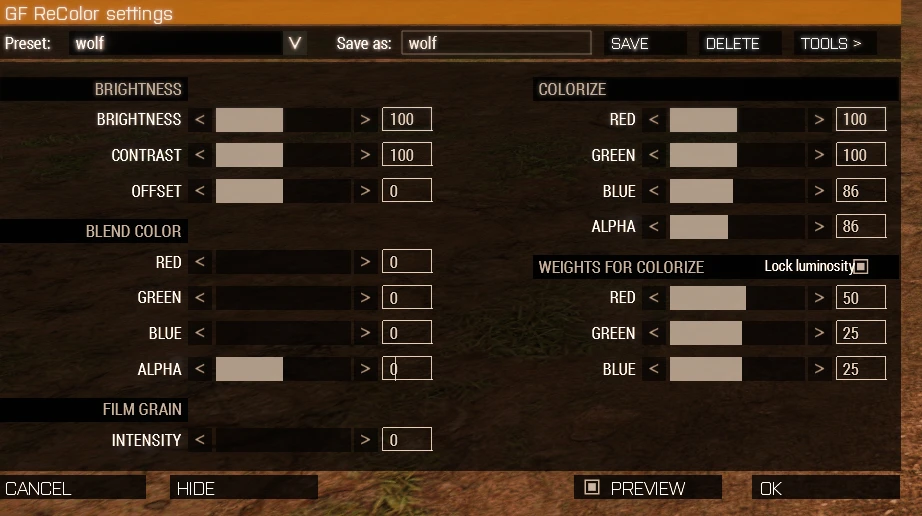
And a "Recolor" (Arma 3 mod) setting adjusted to this preset.
- Two presets to choose from, identical but with different DOF settings.
-- "sognormal.ini": blurs objects in the medium/far distant terrain. Suitable for medium/long distance combat.
-- "sogjungle.ini": blurs objects in the far near/medium/distant terrain. Suitable for closer combat in the jungle.
Installation:
0. Download this mod
1. install reshade for arma64, choose (DirextX 10/11)
2. In reshade install wizard, choose:
color effects by prod80
OtisFx by Otis Inf
3. Extract the files from this mod into the main Arma 3 installation folder (steam typically "C:\Program Files (x86)\Steam\steamapps\common\Arma 3")
4. Start Arma 3, then ingame use the following Recolor settings (Recolor is an Arma 3 mod)
5. In Arma 3 Video settings, set "Depth of Field" to "0"
6. Ingame, press HOME to access reshade settings/config
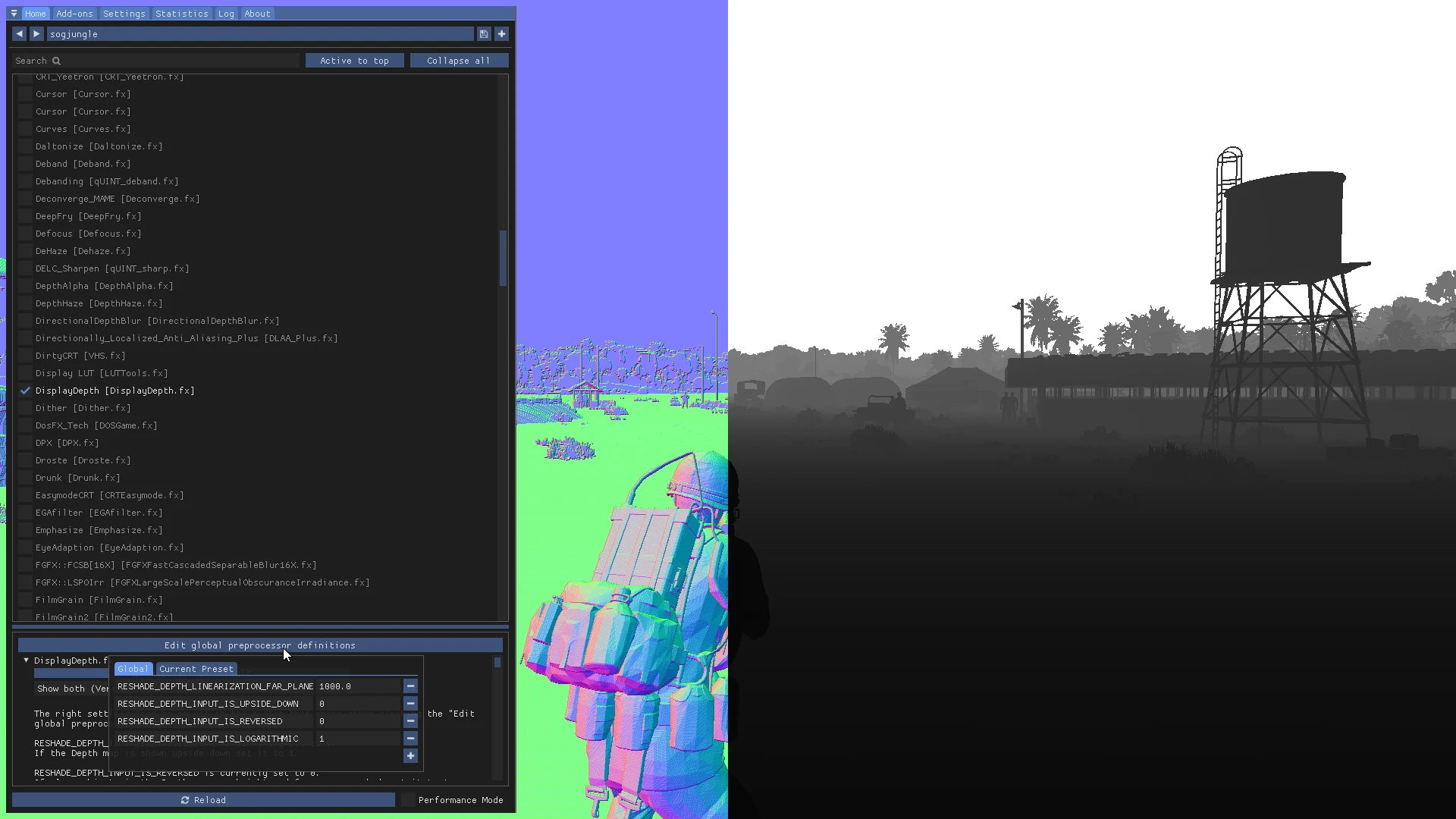
7. Enable "DisplayDepth.fx" temporarily, and then click (Edit global preprocessor...) and set
until settings and screen look like this, then confirm. Then untick Displaydepth.fx.
8. In Reshade, Choose "sognormal.ini" or "sogjungle.ini" as preset
9. Tick "Performance Mode" checkbox. Press HOME to hide reshade config window.
10. Done. Enjoy a more immersive SOG Prairie Fire experience
11. Optional: Use Arma 3 mod "Vile HUD" to completely hide the HUD to further enhance the experience. (as in the screenshots here)
This mod provides a ReShade preset for SOG Prairie Fire, enhancing the Vietnam experience with cinematic depth of field and color adjustments. It includes two presets for different combat ranges and requires manual installation of ReShade and additional mods. The mod has 7 endorsements and 421 downloads.
✨ Key Features
📊 Pros & Cons
✅ Pros
- 7 endorsements from the community
- 421 downloads indicate some interest
- Last updated in March 2023, showing recent maintenance
⚠️ Cons
- Requires manual installation of ReShade and additional mods
- Complex setup with multiple steps and settings adjustments
- Limited to SOG Prairie Fire, not a general-purpose mod
This mod is for players who want a more cinematic and immersive visual experience in SOG Prairie Fire, especially those who enjoy tweaking graphics settings. It is not for casual players who prefer a simple plug-and-play installation or who are not comfortable with manual configuration.
💡 Beginner Tips
- Ensure you install ReShade for arma64 and select DirectX 10/11 during installation.
- Follow the installation steps carefully, especially the Depth of Field setting and DisplayDepth.fx calibration.
- Use Performance Mode in ReShade to maintain good frame rates.
📊 Mod Details
- Game
- Arma 3 Mods
- Author
- wolfowitz
- Version
- 1
- Downloads
- 421
- Endorsements
- 7
- Category
- Miscellaneous
- Created
- 1/6/2023
- Updated
- 3/14/2023
🔧 How to Install ArmA 3 Mods
Subscribe on Steam Workshop. Enable mods in Arma 3 Launcher.
📖 Full step-by-step install guide for ArmA 3 →
Visit the official mod page for specific installation instructions for this mod.
🎮 Need cheat codes or console commands? Check ur gaming wiki for ArmA 3 commands, item IDs, and more.
Keep browsing — more ArmA 3 mods await