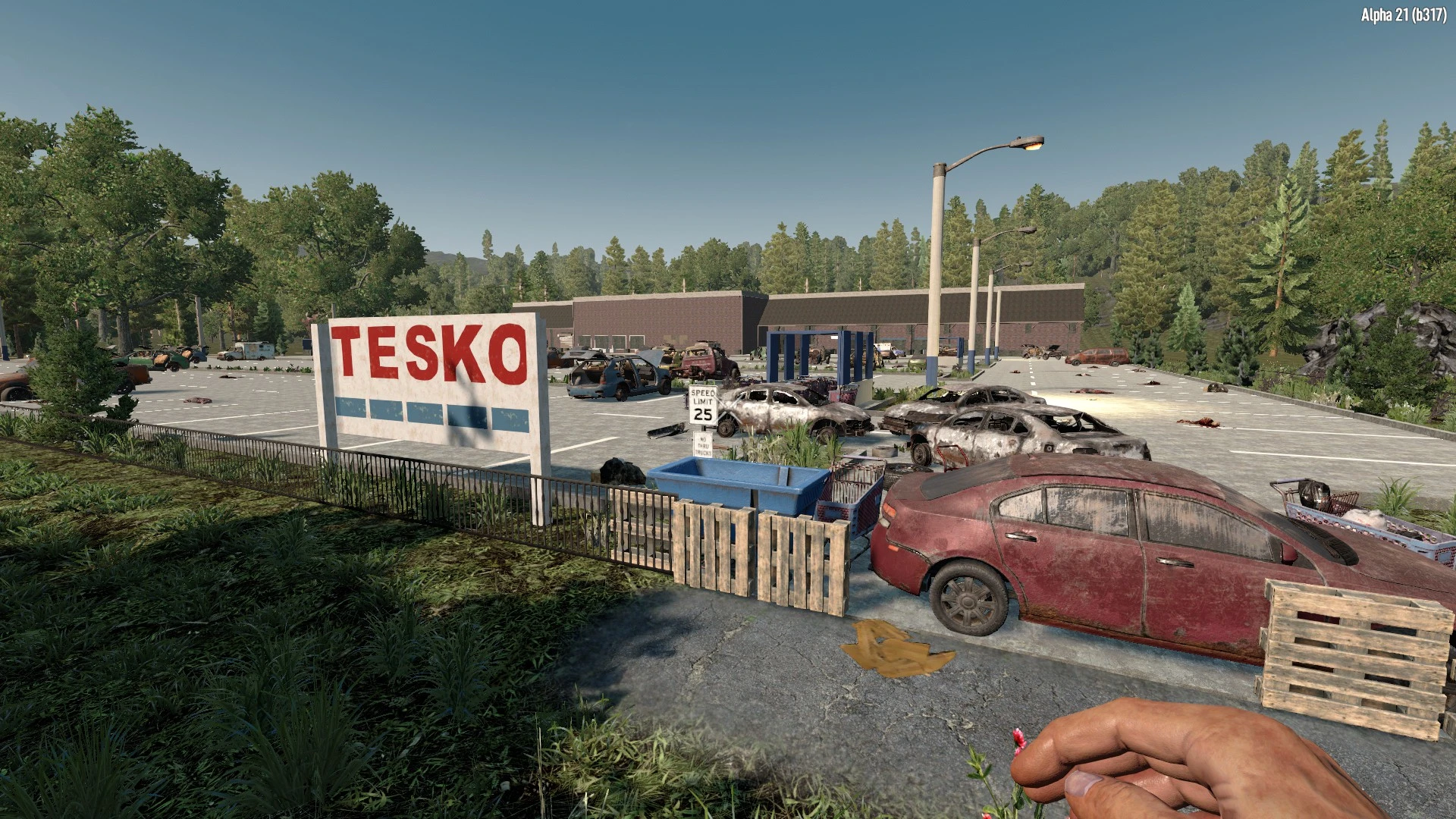
(V2.6 POI) Tesko Supermarket
🟡 Updated this yearPreview
🔍 Analysis
- 👍 1.8% endorsement rate — high engagement, a strong quality signal
- 🏆 #12 of 41 Prefabs mods in this game by downloads
📋 About This Mod
Explore through this HUGE supermarket/superstore, loot whatever goodies you might find still on the shelves, and learn about the stories of past survivors who may have once called this supermarket their home during the plight of the apocalypse.
Tesko supermarket offers a huge area to explore, featuring a whole heap of areas, tons of zombies to kill, and places of interest to venture through.
-
[]Difficulty Tier: 4[/]
[]Available Quests: Clear, Fetch[/]
[]Note: Due to the large size, this POI will only spawn in the Wilderness[/]
Author: Survivor Andy
7D2D Forums User: Andy Red
----------------------------------------
UPDATE HISTORY
10th April 2026 - Major Update
-
[]Updated for V2. 6 release build.[/]
[]Stability fix for the roof to prevent ceiling blocks collapsing.[/]
[]Added additional décor for a little extra detailing.
- []Converted for V1 release build.
- []Optimised lights and lighting for optimal performance.
-
[]Converted for Alpha 21. 0 experimental build.[/]
[]Incorporated new items from the A21. 0 release.[/]
[]More decor added for extra detail and realism.[/]
[]More zombies added for additional apocalyptic action.[/]
[]Screenshots updated to match A21. 0 release.
- []Converted for Alpha 20. 1 stable build.
-
[]Originally Released[/]
[]With thanks to Notti for helping me get this place finished and stock the shelves![/]
----------------------------------------
PREFAB INSTALLATION (MANUALLY FOR RANDOM GEN)
For 7 Days to Die V2. 6 Edition
Manually Download the Folder From NexusMods and Extract the Zip folder.
Select All Of The Files Within The Extracted Folder And Press Copy (Right Click Mouse > Copy or Ctrl+C).
(STEP THREE)
Paste (Right Click Mouse > Paste or Ctrl+V) All Of The Files Inside (not the folder itself) Into Your 7 Days to Die "LocalPrefabs" Folder
YOURDRIVE:\Users\YOURUSERNAME\AppData\Roaming\7DaysToDie\LocalPrefabs
If this is your first time adding a new a 7 Days To Die POI, you may need to manually create the new folder LocalPrefabs within the \7DaysToDie\ directory listed above.
(The folder AppData may be hidden originally, so you'll need to go to your folder explorer settings to activate 'show hidden items', you can do this through File Explore by opening the "Options" menu (usually 3 dots at the top right), then choose the "View" tab, and then select the option for "Show hidden files, folders and drives.")
(STEP FOUR)
Start A New Game World With A New Save - Explore The World And Find The Tesko Supermarket During Your Travels!
----------------------------------------
See My Other Prefabs:
-
[]Busty Beers Strip Club[/]
[]Apollon Bunker (Inspired by The Rain TV Series)[/]
[]Take Four: Film Studio[/]
[]DataDen: Data Centre Facility[/]
[]Ultra Scans: Ultrasound Clinic[/]
[]Greenhouse Haven: Log Cabin Homestead[/]
[]Big Blue Box: Storage Facility[/]
[]Airstrip: Runway, Hangar & Control Tower[/]
[]Espresso Yourself: Coffee Shop[/]
[]Malibu: Night Club (Inspired by GTA Vice City)[/]
[]Tesko: Extra Large Supermarket[/]
-
[]Busty Beers Strip Club[/]
-
[]Updated for V2. 6 release build.[/]
Tesko Supermarket is a large prefab POI for 7 Days to Die, offering a huge explorable supermarket with loot, zombies, and survivor stories. It features multiple areas, quests, and a difficulty tier of 4. Due to its size, it spawns only in the Wilderness. Updated for V2.6.
✨ Key Features
📊 Pros & Cons
✅ Pros
- 295 endorsements indicate community approval.
- 16,500 downloads show significant usage.
- Regular updates since 2021, including a major update for V2.6.
⚠️ Cons
- Large size may cause performance issues on lower-end systems.
- Only spawns in the Wilderness, limiting placement options.
- Manual installation required for random gen worlds.
This mod is for 7 Days to Die players who enjoy exploring large, detailed POIs with lots of loot and combat. It's ideal for those who want a challenging dungeon-like experience with quests. Players who prefer smaller, more compact POIs or have performance concerns might want to skip.
💡 Beginner Tips
- Ensure you have the correct version of 7 Days to Die (V2.6) before installing.
- Back up your save files before adding new prefabs to avoid corruption.
- Use the in-game prefab editor to place the POI if you want it in a specific location.
📊 Mod Details
- Game
- 7 Days To Die Mods
- Author
- Survivor Andy
- Version
- 2.6
- Downloads
- 16,500
- Endorsements
- 295
- Category
- Prefabs
- Created
- 5/10/2021
- Updated
- 4/10/2026
🧩 Commonly Used Together
Users add these mods to the same collections — a real compatibility signal, not an AI guess.
🔧 How to Install 7 Days to Die Mods
Use Vortex or manual. Most mods go in /Mods/ folder.
📖 Full step-by-step install guide for 7 Days to Die →
Visit the official mod page for specific installation instructions for this mod.
🎮 Need cheat codes or console commands? Check ur gaming wiki for 7 Days to Die commands, item IDs, and more.
Keep browsing — more 7 Days to Die mods await