Bigger Backpack
⚪ Last updated 2019This mod may not work until the author updates it. Check for an update, or see the rollback guide.
Preview
🔍 Analysis
- 👍 3.9% endorsement rate — high engagement, a strong quality signal
- 🏆 #11 of 66 User Interface mods in this game by downloads
📋 About This Mod
Bigger Backpack
About this Modlet:
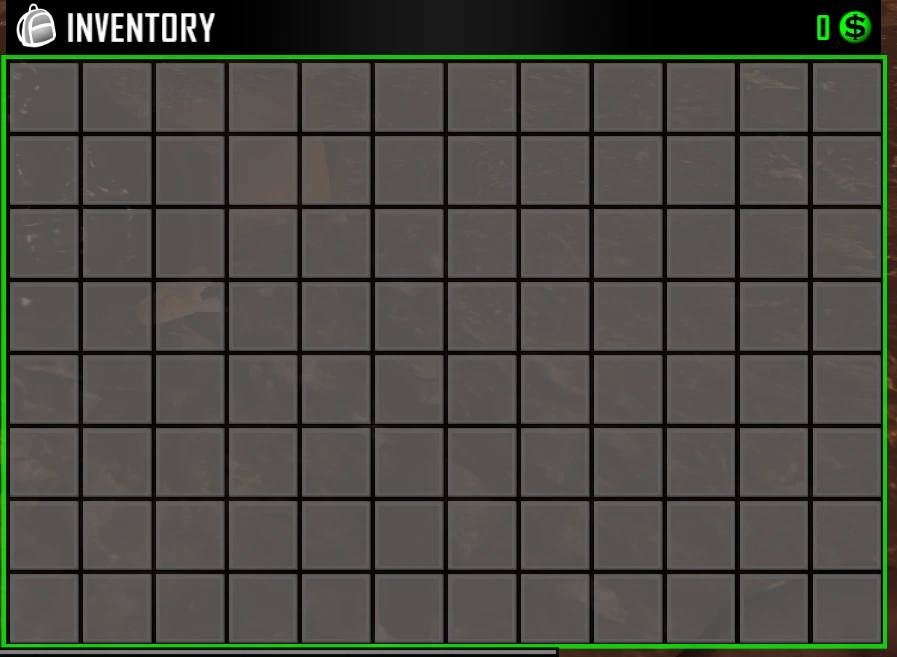
Adds a bigger UI to the backpack, giving you more slots. Original 5x9(45 slots) is now upgraded to a 6x13(78 slots).
Other changes:
-
[]Pack Mule perk has also been adjusted to unlock the correct around of slots.
[
]Backpacks dropped on death have also been slot adjusted to allow for the players full inventory to be picked up upon death.How to install:
-
[]Navagate to your 7 Days to Die Directory (default: C:/ProgramFiles86/Steam/Steamapps/Common/7DaystoDie)
[
]Right click anywhere in your MAIN directory (not Data/Configs, not 7DaysToDie_Data), and create New Folder[]Name New Folder: Mods. Our directory should look similar to something like this
[]Download entire mod pack via GitHub or other Trusted source (I only share via Discord, and GitHub. For my personal mods, do not trust any other source unless verified by me)
[]Drag and Drop Backpack modlet into 7 Days To Die/Mods folder. Our modlet named "Backpack" should show up under the mods directory like so
[]To confirm proper boot, upon loading into a map/server, press F1, and you should see our mod load with the following line:
`2018-12-28T22:36:15 2. 709 INF Loaded Mod: Backpack (1. 0)`
-
[]Navagate to your 7 Days to Die Directory (default: C:/ProgramFiles86/Steam/Steamapps/Common/7DaystoDie)
Bigger Backpack is a user interface mod for 7 Days to Die that expands the backpack UI from 45 slots to 78 slots, arranged in a 6x13 grid. It also adjusts the Pack Mule perk and death drop mechanics to accommodate the larger inventory. The mod is installed as a modlet in the game's Mods folder.
✨ Key Features
📊 Pros & Cons
✅ Pros
- High endorsement ratio (2,985 endorsements) indicates strong community approval.
- Substantial download count (75,997) shows widespread usage.
- Regular updates (last updated 2019-10-08) suggest ongoing maintenance.
⚠️ Cons
- Requires manual installation into the game directory, which may be complex for some users.
- Modifies core game mechanics (Pack Mule perk and death drops), which could conflict with other mods.
- No explicit compatibility information with other mods or game versions is provided.
This mod is ideal for 7 Days to Die players who find the default backpack too small and want more inventory space without using cheats. It is also suitable for modders who want to understand how to adjust UI and perk mechanics. Players who prefer vanilla gameplay or use many other mods might want to skip it due to potential conflicts.
💡 Beginner Tips
- Always back up your save files before installing mods to avoid data loss.
- Ensure you place the modlet in the correct Mods folder (not Data/Configs) to avoid load errors.
- Check the console (F1) after loading to confirm the mod is active.
📊 Mod Details
- Game
- 7 Days To Die Mods
- Author
- Mayic
- Version
- 18.0
- Downloads
- 75,997
- Endorsements
- 2,985
- Category
- User Interface
- Created
- 4/4/2019
- Updated
- 10/8/2019
🔧 How to Install 7 Days to Die Mods
Use Vortex or manual. Most mods go in /Mods/ folder.
📖 Full step-by-step install guide for 7 Days to Die →
Visit the official mod page for specific installation instructions for this mod.
🎮 Need cheat codes or console commands? Check ur gaming wiki for 7 Days to Die commands, item IDs, and more.
Keep browsing — more 7 Days to Die mods await