Mjs Mod Assistant
⚪ Last updated 2019Preview
🔍 Analysis
- 🏆 #25 of 43 Utilities mods in this game by downloads
📋 About This Mod
Standalone .exe program that handles wares.xml, content.xml and language file manipulation. Admin perms not needed.
Hello everyone,
Today I'll be releasing the alpha version of my Mod Assistant tool. The purpose behind this is to speed up the mod creation process, as well as debugging said mods. Currently, this program can handle creation of wares.xml, content.xml, and language file creation/manipulation.
- []Installation
-
[]Download the mod from the page
[]Extract the program and included image folder to your desktop or somewhere so it wont get lost.
[]Run the program
Attention: Please disregard the "X4 directory" text box, this is going to be used in future releases.
When the program runs for the first time, it will create a folder in your /user/Documents folder called "Mjs Mod Assistant". In this folder will be another folder called "bin". There will be a file called "settings.xml". Do not edit this file unless you know what your doing.
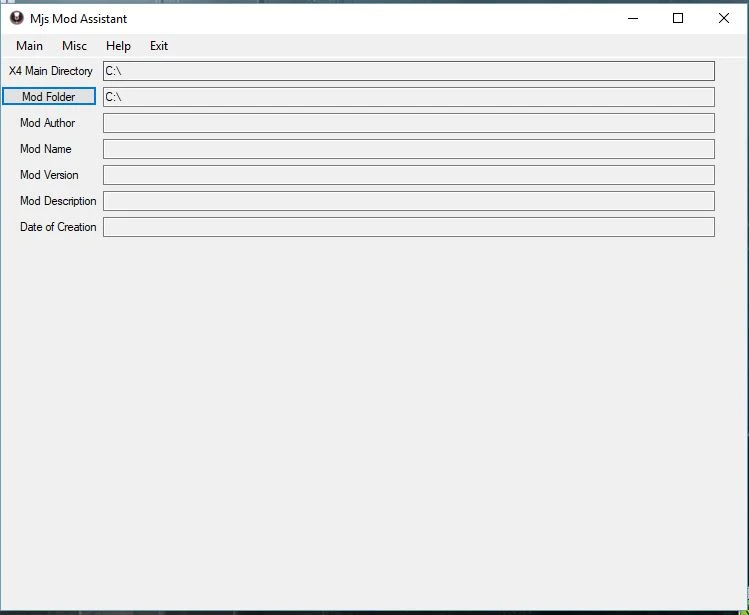
When you run the program, you will be greeted with a small window with some options and text boxes. (See image "Landing Screen"). To begin the process, go to the "Main" tab, (See "Tab_Main") and go to New Content File. You will see a new window with some text boxes, and 2 buttons. Disregard "Edit Content File" for now.
- []Content File Creation
- []Editing Content Files
- Wares.xml File Creation
📊 Mod Details
- Game
- X4foundations Mods
- Author
- mjr121
- Version
- v.4
- Downloads
- 374
- Endorsements
- 22
- Category
- Utilities
- Created
- 2/9/2019
- Updated
- 4/21/2019
🔧 How to Install X4: Foundations Mods
Download from Nexus Mods.
📖 Full step-by-step install guide for X4: Foundations →
Visit the official mod page for specific installation instructions for this mod.
🎮 Need cheat codes or console commands? Check ur gaming wiki for X4: Foundations commands, item IDs, and more.
Keep browsing — more X4: Foundations mods await