Requiem ENB
⚪ Last updated 2014Preview
🔍 Analysis
- 👍 3.9% endorsement rate — high engagement, a strong quality signal
- 🏆 #4 of 38 Visuals and Graphics mods in this game by downloads
📋 About This Mod
DESCRIPTION~
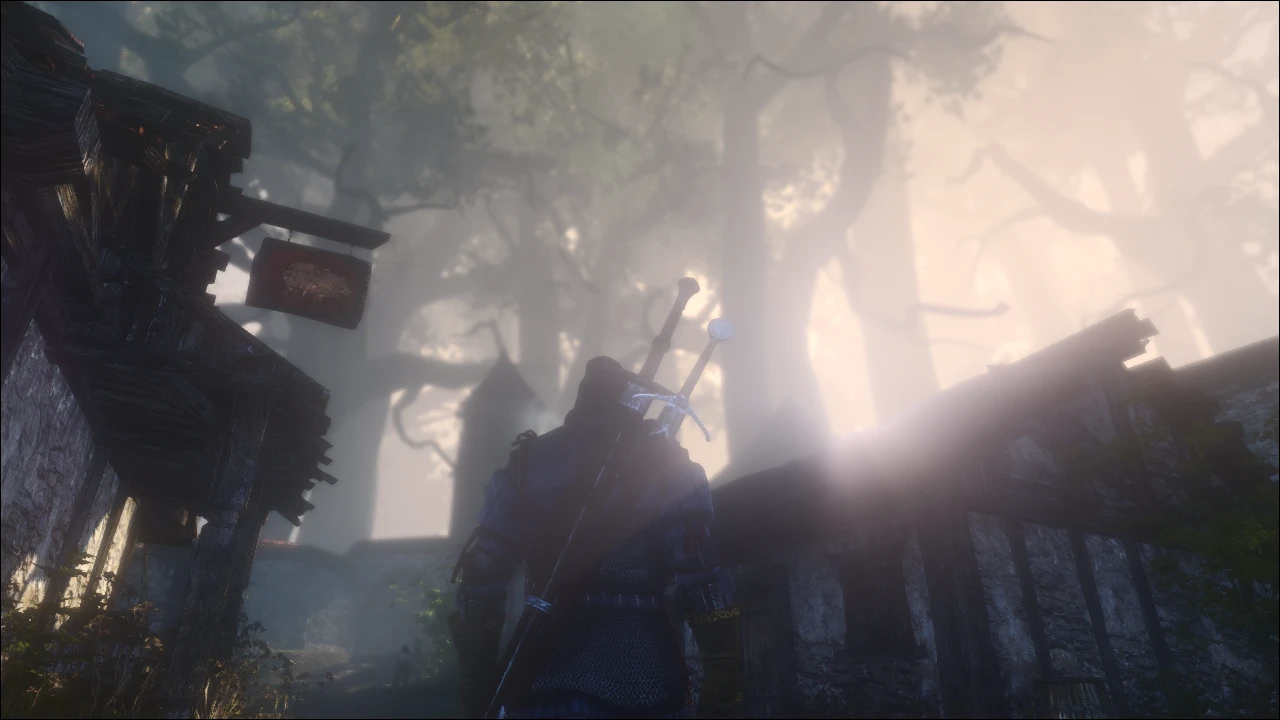
This ENB was created to enhance the overall visuals of The Witcher 2. Yes, the game do sometimes looks amazing at max. However, there are some flaws that I wasn't fond of, so I decided to create this. This ENB is aimed to make a combination of Fantasy and Reality, with a touch of Cinematic experience. There is no where this ENB preset is near "Realistic", more of a "Fantasy-reality" feel to it. Oh and was that enough for a description? Well, let's move on shall we?
+ Better Anti-Aliasing, utilizing SweetFX's LumaSharpen to further improve in-game's AA. + Removed color palletes/tints from certain places/time. + Enhanced and tweaked contrast, vibrancy and saturation. + Better and natural lighting. + Improved interior lighting. + Tweaked for a better and natural color scheme. + All new, handcrafted and tweaked Bloom settings that replaces in-game default Bloom. + Lens flare. + Sharper and softer texture look. + Fantasy-reality look. + Better lighting at different weathers. + Better looking fogs.
Want more impressions of what this ENB does? Visit these two image galleries showcasing what Requiem ENB is capable of!
Requiem ENB - Image Gallery
Default TW2 vs Requiem ENB - Comparison Pictures
INSTALLATION INSTRUCTIONS
1- Firstly,
- Go and download this file:
ENBseries Binary File - The Witcher 2
- After downloading, just extract/place it anywhere on your desktop.
-Then, ONLY COPY d3d9.dll and paste it into
2- Next, download Requiem ENB. Extract it on your desktop as well for convenience.
3- Find the correct folder path/place at where you've installed The Witcher 2's files. Usually its Computer > (D:) >
4- Found that [ The Witcher 2 > bin ] folder path yet? Done? Good. Now copy and paste all the files from Requiem ENB into [ The Witcher 2 > bin ].
5- Launch TW2's launcher. MAKE SURE ANTI-ALIASING IS ON. VIGNETTE IS ON. AND UBERSAMPLING IS OFF. Fai
Requiem ENB is a visual overhaul for The Witcher 2 by Laptop Guy, featuring custom bloom effects, improved anti-aliasing, and a natural color palette. With 1,320 endorsements and 34,279 downloads, it's a popular choice for players wanting a more cinematic look without changing gameplay.
✨ Key Features
📊 Pros & Cons
✅ Pros
- Huge community approval with 1,320 endorsements — one of the top visual mods for The Witcher 2.
- 34,279 downloads since its 2014 release prove it resonated with the player base.
- Custom bloom and AA tweaks that actually improve the base game's visuals.
⚠️ Cons
- Last updated in 2014 — no support for newer game versions or modern GPUs.
- Description is cut off, so there's no install guide or known issues listed.
- No mention of compatibility with the Enhanced Edition or other graphical mods, so conflicts are possible.
For Witcher 2 veterans who think the vanilla look is a bit washed out and want a more natural, cinematic presentation. Perfect for players comfortable with manual file tweaks and ENB setups. Skip if you prefer the original art direction or want a plug-and-play mod with clear instructions.
💡 Beginner Tips
- Back up the original d3d9.dll in the game's bin folder before copying ENB files over it.
- Disable the game's built-in anti-aliasing in the graphics options to let ENB's AA take over cleanly.
- If the game crashes, delete the ENB files and verify game cache to restore vanilla.
📊 Mod Details
- Game
- Witcher2 Mods
- Author
- Laptop Guy
- Version
- 1.0
- Downloads
- 34,279
- Endorsements
- 1,320
- Category
- Visuals and Graphics
- Created
- 8/6/2014
- Updated
- 8/6/2014
🔧 How to Install Witcher2 Mods
Download from Nexus Mods.
📖 Full step-by-step install guide for Witcher2 →
Visit the official mod page for specific installation instructions for this mod.
🎮 Need cheat codes or console commands? Check ur gaming wiki for Witcher2 commands, item IDs, and more.
Keep browsing — more Witcher2 mods await