Better Gamepad Controls
⚪ Last updated 2020Preview
🔍 Analysis
- 👍 5.1% endorsement rate — high engagement, a strong quality signal
- 🏆 #5 of 20 Utilities mods in this game by downloads
📋 About This Mod
Better Gamepad Controls
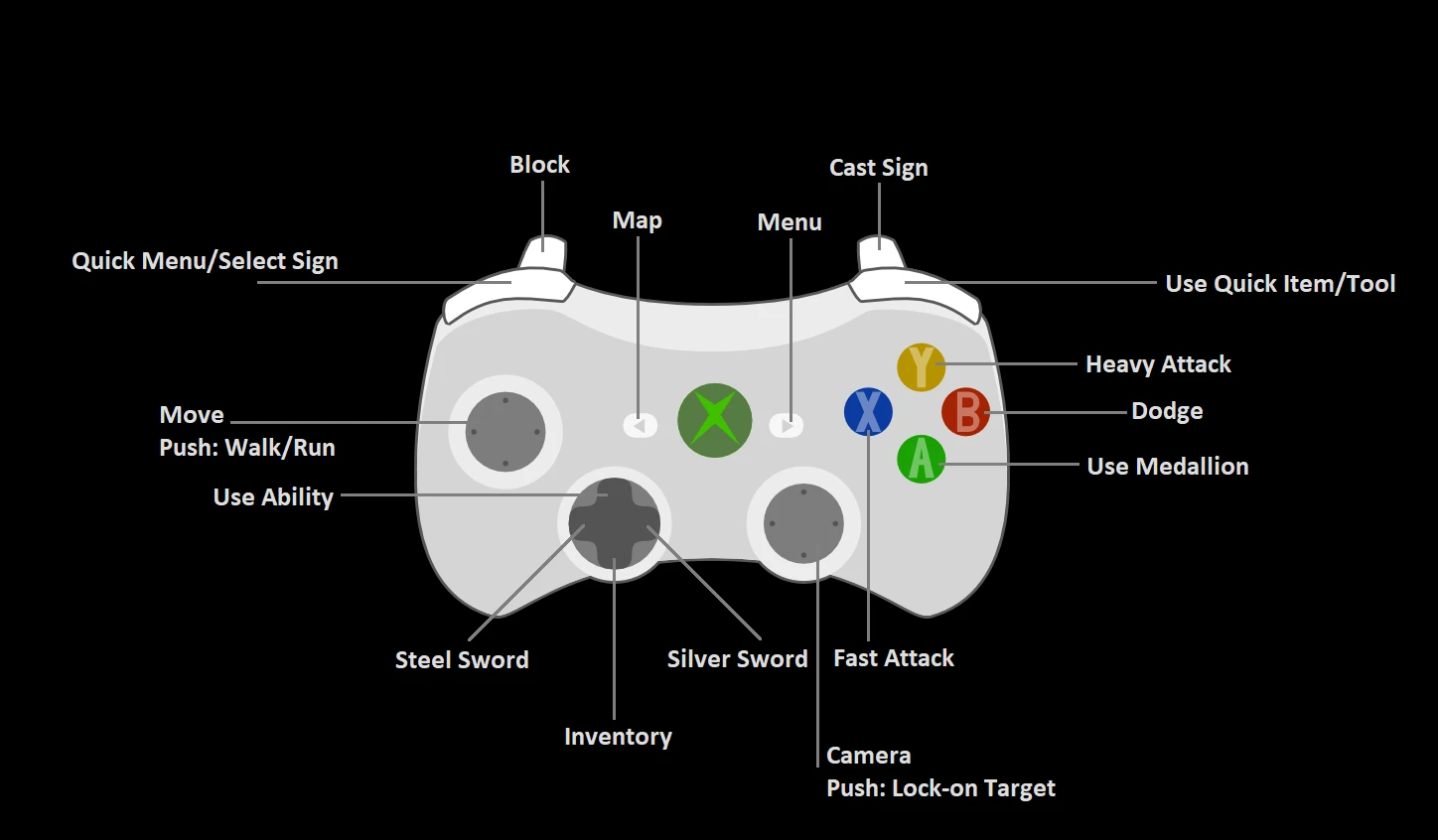
Updates the control scheme for gamepads to be more similar to the Witcher 3, as well as other modern Action-RPGs.Most other gamepad mods heavily modify the control scheme to add more complex actions such as quick-casting signs. If you aren't looking for such a large overhaul and just want some small improvements to give a similar feel to the Witcher 3, this may be perfect for you. This mod simply updates the mapping of existing actions, and adds a few extra bindings to improve quality-of-life (e.g. quick inventory & map buttons).
Installation
Extract and copy 'Input_QWERTY.ini' into /User/Documents/Witcher 2/Config
Recommended: Backup the existing Input_QWERTY file before doing this
To uninstall, delete Input_QWERTY.ini from the directory above and restore the backed-up file.
Better Gamepad Controls remaps The Witcher 2's gamepad layout to mirror The Witcher 3's scheme. Aimed at controller players who want modern muscle memory, it's a straightforward utility with solid community backing (375 endorsements) despite no updates since November 2020.
✨ Key Features
📊 Pros & Cons
✅ Pros
- Community-approved: 375 endorsements from Witcher 2 players who wanted better controls.
- Over 7,300 downloads means this remap has been battle-tested by many.
- Brings Witcher 3 muscle memory straight into Witcher 2, cutting down re-learning time.
⚠️ Cons
- No updates since November 2020, so if the game gets patched this mod could break.
- Only helps gamepad users — keyboard and mouse players get nothing.
- Description is a single sentence; no installation steps or compatibility details are given.
For Witcher 2 players on controller who are coming from Witcher 3 and want the same button layout. Also for anyone who finds the default Witcher 2 gamepad scheme awkward and prefers a more modern setup. Skip if you play with keyboard/mouse or are happy with the original controls.
💡 Beginner Tips
- Back up your original input settings file before replacing it with this mod.
- Disable any other gamepad remapping mods to avoid control conflicts.
- Restart the game after installing and check the controller options to confirm the new mapping is active.
📊 Mod Details
- Game
- Witcher2 Mods
- Author
- Massycraft
- Version
- 1.0
- Downloads
- 7,318
- Endorsements
- 375
- Category
- Utilities
- Created
- 11/4/2020
- Updated
- 11/4/2020
🔧 How to Install Witcher2 Mods
Download from Nexus Mods.
📖 Full step-by-step install guide for Witcher2 →
Visit the official mod page for specific installation instructions for this mod.
🎮 Need cheat codes or console commands? Check ur gaming wiki for Witcher2 commands, item IDs, and more.
Keep browsing — more Witcher2 mods await