Sync Mods
🟡 Updated this yearPreview
🔍 Analysis
- 👍 0.0% endorsement rate
📋 About This Mod
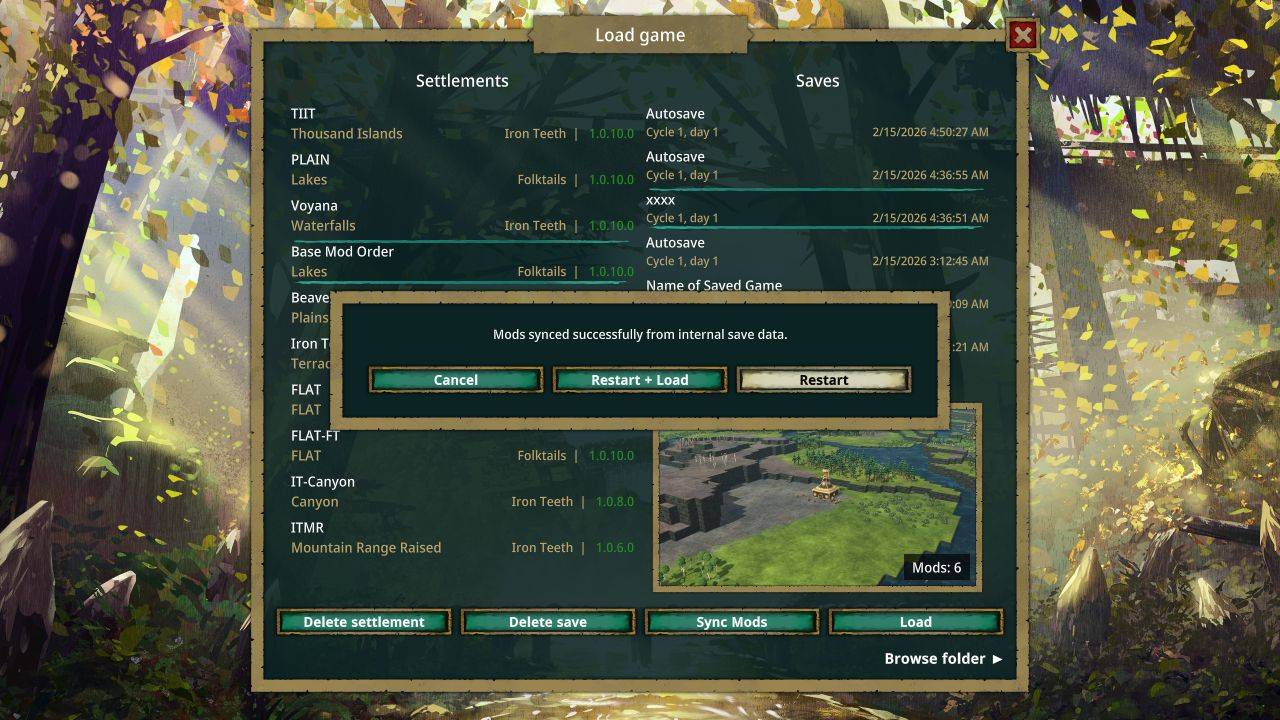
Tired of manually enabling and reordering mods every time you switch save files? This mod adds a "Sync Mods" button to the Load Game screen to automatically match your active mods with the ones used in that specific save. How it Works When you select a save file and click Sync Mods, the mod will enable and reorder your mod list to match that save perfectly. Action Options After syncing, you can choose: Restart + Load: Restarts the game and immediately jumps into your save. Restart: Restarts the game to the main menu with the new mod list active. Cancel: Closes the dialog, allowing you to manually review the changes or add extra mods before restarting. (There is a "Restart game" button in the Main Menu.) Mod Ordering Logic Enabled Mods: Listed first, following the exact order stored in the save file. Disabled Mods: Listed alphabetically after the enabled ones. Local vs Workshop: If you have both a local copy and a workshop subscription for the same mod, the local version will be prioritized/enabled. Mods on Steam Mods on mod-dot-io Mods on Github Mod zip files
📊 Mod Details
- Game
- Timberborn Mods
- Author
- 76561198049208288
- Version
- N/A
- Downloads
- 1,811
- Endorsements
- 0
- Category
- Mod, Update 1.1, Update 1.0, Quality of life, Modding tools, Miscellaneous
- Created
- 2/15/2026
- Updated
- 7/12/2026
🔧 How to Install Timberborn Mods
Subscribe on Steam Workshop. Mods auto-download and install. Launch the game to activate.
📖 Full step-by-step install guide for Timberborn →
Visit the official mod page for specific installation instructions for this mod.
🎮 Need cheat codes or console commands? Check ur gaming wiki for Timberborn commands, item IDs, and more.
Keep browsing — more Timberborn mods await