Configurable Top Bar
🟡 Updated this yearPreview
🔍 Analysis
- 👍 0.0% endorsement rate
📋 About This Mod
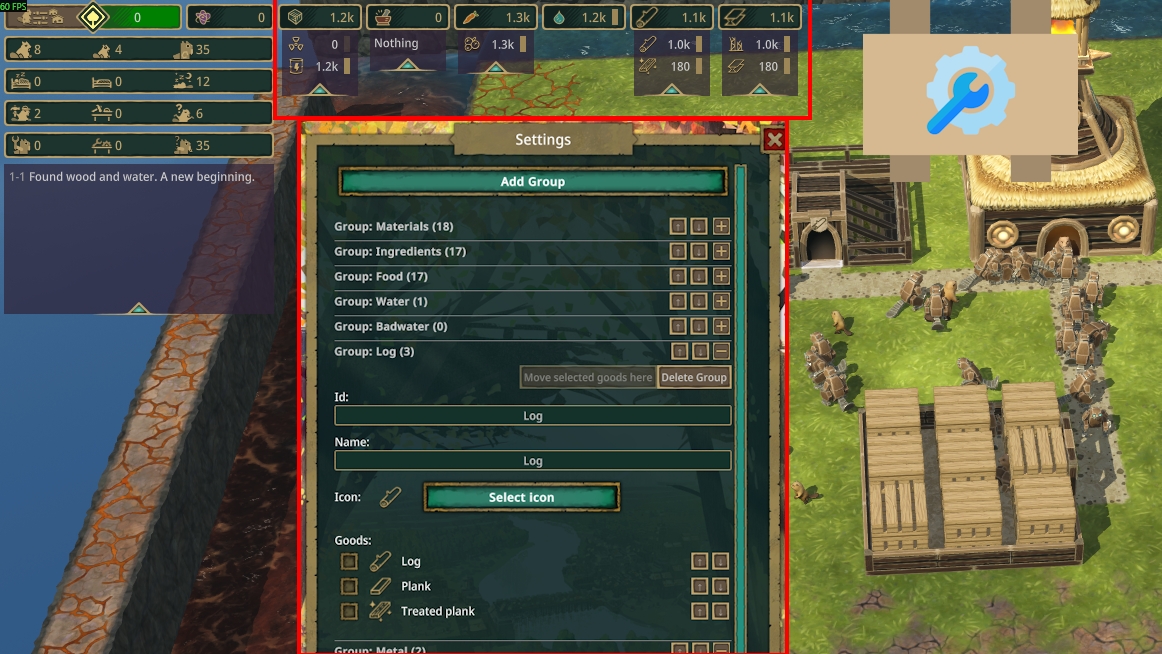
Configurable Top Bar gives you full control over what appears in Timberborn's top-bar resource panel. You can create your own groups, reorder them, choose icons, and decide exactly which goods belong where. No more Badwater owning its own group! From Main Menu -> Mods -> Setting button next to the mod name to customize the top bar. Notes: - Do not give the same ID to multiple groups or you will crash the game. See below if you accidentally do this. - The info is stored at Documents\Timberborn\TopBarConfig.json if you want to share or modify it manually. In case something messed up, just delete the file and it will be recreated with default game values. === Mod source code and donation: https://github.com/datvm/TimberbornMods (feel free to use the code for anything). v10. 0. 3: Using "Move selected goods here" now deselect the moved goods. v10. 0. 2: Should work with Update 1. 0. 5 (Dec 03) v10. 0. 1: Fixed conflict with modded groups. Thanks @trifonius for reporting!
📊 Mod Details
- Game
- Timberborn Mods
- Author
- 76561198010623560
- Version
- N/A
- Downloads
- 607
- Endorsements
- 0
- Category
- Mod, Update 1.0, Quality of life, Visuals, Goods
- Created
- 11/21/2025
- Updated
- 1/20/2026
🔧 How to Install Timberborn Mods
Subscribe on Steam Workshop. Mods auto-download and install. Launch the game to activate.
📖 Full step-by-step install guide for Timberborn →
Visit the official mod page for specific installation instructions for this mod.
🎮 Need cheat codes or console commands? Check ur gaming wiki for Timberborn commands, item IDs, and more.
Keep browsing — more Timberborn mods await