DinoMulT
🟠 Updated over a year agoPreview
🔍 Analysis
- 👍 0.0% endorsement rate
- 🏆 #74 of 653 Skins mods in this game by downloads
📋 About This Mod
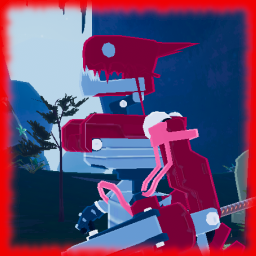
Info An edited version of Mul-T that replaces his head with a more dino/draconic head and gives him a mechanical tail. Also sports a cool red colour scheme! Mostly an excuse to give Mul-T a tail. Screenshots Installation R2modman is recommended. Manual: 1 - Download and install BepInExPack and R2API 2 - Extract the "DinoMulT" dll to your plugins folder 3 - Load up the game and question everything including yourself to play Known Issues None right now, let me know if there are any! Contact You can reach me on twitter! (@Tail__Lover) or on Bluesky! (@taillover.bsky.social) I am always happy to chat with other tail lovers. I stream on twitch as well! (ttv/Mika_TailLover) come check me out! Feel free to reach out to me if you have any issues with the mod as well. Tools and Credits Made with KingEnderBrine's template - Model edited in Blender and Unity Tail made Dynamic using RuneFox's amazing dynamic bone script Head model from Digimon - Copyright Bandai - obtained from models resource Tail model from Latch - Lethal League Blaze - Copyright Reptile Games - Ripped from game Changelog 1.0.0 - Initial release 1.0.1 - Updated to work with anniversary update - removed R2API dependancy 1.0.2 - Update to work with the DLC update 1.0.3 - Enabled Shadows 1.0.4 - Added Dependancy to Dynamic Skin Fix. Updated Images
Mul-T skin changing his base colours, and replacing his head and adding a mechanical tail - has physics
📊 Mod Details
- Game
- Thunderstore Mods
- Author
- TailLover
- Version
- 1.0.4
- Downloads
- 86,194
- Endorsements
- 39
- Category
- Skins
- Created
- 3/21/2021
- Updated
- 7/7/2025
- Tags
- Skins
🔧 How to Install Thunderstore Mods
Use r2modman/Thunderstore Mod Manager. Or manual: install BepInEx, drop mods into plugins folder.
📖 Full step-by-step install guide for Thunderstore →
Visit the official mod page for specific installation instructions for this mod.
🎮 Need cheat codes or console commands? Check ur gaming wiki for Thunderstore commands, item IDs, and more.
Keep browsing — more Thunderstore mods await