DifficultyModifier
⚪ Last updated 2019Preview
🔍 Analysis
- 👍 0.0% endorsement rate
- 🏆 #32 of 414 Mods mods in this game by downloads
📋 About This Mod
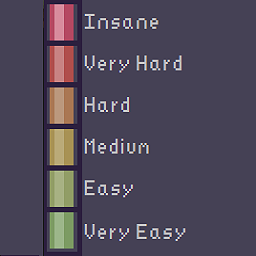
DifficultyModifier This mod allows you to control the difficulty of the game during a run. You can also decide to pause the difficulty momentarily if it becomes too challenging, and then unpause when you've caught up! Controls CTRL + "Numpad +" -> Increase the difficulty CTRL + "Numpad -" -> Decrease the difficulty CTRL + "Numpad *" -> Increases the difficulty step CTRL + "Numpad /" -> Decreases the difficulty step CTRL + "P" -> Pause the difficulty CTRL + "I" -> Check the current debug difficulty settings (coefficients, monster level and total added difficulty). All the debug text is displayed in the Unity console. Press CTRL + ALT + ` to open it. Compatibility This mod should be compatible with any other mods available. If you find one it is not compatible with, please open an issue on GitHub/NewIssue or message me on Discord. This mod has not been tested in Multiplyer yet, so please be aware it might not work or lead to bugs. Planned features Speed up/Slow down the difficulty increase Config file to control the keybinds and the default settings. Change Notes v1.1.0 Added the ability to pause and unpause the difficulty at will! v1.0.1 Added some text to README.md v1.0.0 Initial Release
Alter the game difficulty during a run!
📊 Mod Details
- Game
- Thunderstore Mods
- Author
- Elzheiz
- Version
- 1.1.0
- Downloads
- 4,444
- Endorsements
- 0
- Category
- Mods
- Created
- 4/13/2019
- Updated
- 4/14/2019
- Tags
- Mods
🔧 How to Install Thunderstore Mods
Use r2modman/Thunderstore Mod Manager. Or manual: install BepInEx, drop mods into plugins folder.
📖 Full step-by-step install guide for Thunderstore →
Visit the official mod page for specific installation instructions for this mod.
🎮 Need cheat codes or console commands? Check ur gaming wiki for Thunderstore commands, item IDs, and more.
Keep browsing — more Thunderstore mods await