CustomEmotesAPI
⚪ Last updated 2022Preview
🔍 Analysis
- 🏆 #73 of 76 Server-side mods in this game by downloads
📋 About This Mod
IMPORTANT Reuploaded to Thunderstore with permission from MetrosexualFruitcake. This does nothing on without other mods. Please don't download this on it's own and complain to me unless you really want to. Join the BadAssEmotes/EmotesAPI discord https://discord.gg/3kXkVkNDxs If you are unsure how to do animations, go to Settings->ModSettings->CustomEmotesAPI. From here you can customize your emote wheels and see keybinds. How to implement First off, if you are at all confused about any of this, I made a repo with example implementations. https://github.com/ToastedOven/ExampleEmotePlugin Also BadAssEmotes exists if you want to look at a more complete mod. https://github.com/ToastedOven/BadAssEmotes General Overview Start here if you are lost Create a humanoid animation in unity and import it into your plugin project. In your project, Import the CustomEmotesAPI dll file and include using EmotesAPI; in your cs file. Place CustomEmotesAPI.AddCustomAnimation(AnimationClip, false); somewhere in your awake call. Where AnimationClip is the animation clip you imported from unity. If done correctly, this will load the animation into the list of available emotes. Feel free to change the bool to true and import a looping animation as well. You can also import custom survivors with CustomEmotesAPI.ImportArmature(bodyPrefab, underskeleton) Underskeleton is a copy of the bodyPrefab which is setup as a humanoid skeleton https://youtu.be/c_G3G4RzCFA a walkthrough of importing a bodyprefab into game. All vanilla survivors are already imported, this is for modded characters AddCustomAnimation Params AnimationClip animationClip //Default animation Can also use a non-array here if you just have one animation bool looping //Whether or not animationClip loops string _wwiseEventName = null //Events to post when animation starts consider using Volume_Emotes (0-100, default 50) in your wwise events string _wwiseStopEvent = null //Events to post when animation stops, you should only need one stop event, but just in case of some edge case you get a full array. Make sure to set the same amount of stop events as start events. HumanBodyBones rootBonesToIgnore = null //All bones specified and any child bones will be ignored by the animation HumanBodyBones soloBonesToIgnore = null //All bones specified will be ignored by the animation AnimationClip secondaryAnimation = null //Animation to play after the primary animation. Use this if you have a non-looping-into-looping animation. animationClip.Length must equal secondaryAnimation.Length or else you will have errors. Can also use a non-array here if you just have one animation bool dimWhenClose = false //Create an audio dimming sphere around the emotee which will dim normal music when you approach them bool stopWhenMove = false //Stops the animation if moving bool stopWhenAttack = false //Stops the animation if attacking bool visible = true //Dictates if emote will show up in the normal list. bool syncAnim = false //Dictates if emote will sync the animation. bool syncAudio = false //Dictates if emote will sync audio (requires wwise start and stop events) int startPref = -1 //Determines which spot in the clip arrays a user will always play if they start a syncing animation, -1 is random -2 is sequential int joinPref = -1 //Determines which spot in the clip arrays a user will always play if they join a syncing animation, -1 is random -2 is sequential JoinSpot joinSpots = null //Places join spots will be created when animation is played Regiserting World Props Declare an int to keep track of your world prop's position Call RegisterWorldProp as so: propInt = CustomEmotesAPI.RegisterWorldProp(propGameObject, new JoinSpot { propJoinSpot }); Spawn your world prop with if (NetworkServer.active) { gameObject = CustomEmotesAPI.SpawnWorldProp(propInt); } Spawn your object for all clients with if (NetworkServer.active) { NetworkServer.Spawn(gameObject); } Setting up Emote Spots public struct JoinSpot public string name; public Vector3 position; //these should all be relative to whatever you plan to parent said JoinSpot to public Vector3 rotation; public Vector3 scale; Emote Spot Joined There are two events you can hook into for emote spots, emoteSpotJoined_Prop and emoteSpotJoined_Body. One for world props, the other for survivors and such. Here's an example for joining a prop private void CustomEmotesAPI_emoteSpotJoined_Prop(GameObject emoteSpot, BoneMapper joiner, BoneMapper host) { string emoteSpotName = emoteSpot.name; if (emoteSpotName.StartsWith("VengaBusDoor")) //checking if the emoteSpot is correct { joiner.PlayAnim("vengaBusSit", 0); //playing a sit animation Venga.JoinBus(joiner); //executing code on the prop's end with the joiner in mind. } } Here's an example for joining another player private void CustomEmotesAPI_emoteSpotJoined_Body(GameObject emoteSpot, BoneMapper joiner, BoneMapper host) { string emoteSpotName = emoteSpot.name; if (emoteSpotName == "StandingHereJoinSpot") { joiner.PlayAnim("StandingHere", 0); GameObject g = new GameObject(); g.name = "StandingHereProp"; joiner.props.Add(g); g.transform.SetParent(host.transform); Vector3 scal = host.transform.lossyScale; g.transform.localPosition = new Vector3(0, 0, .75f / scal.z); g.transform.localEulerAngles = new Vector3(0, 140, 0); g.transform.localScale = new Vector3(.8f, .8f, .8f); joiner.AssignParentGameObject(g, true, true, true); //public void AssignParentGameObject(GameObject youAreTheFather, bool lockPosition, bool lockRotation, bool lockScale, bool scaleAsBandit = true, bool disableCollider = true) emoteSpot.GetComponent<EmoteLocation>().SetEmoterAndHideLocation(joiner); // Basically just for hiding emote join spots. Primarily for if any given emote spot only supports one player at a time. } } Just to reiterate, if you need any help with this, feel free to reach out to me on Discord. Examples loops first anim, has a start and stop wwise event, dims audio when close CustomEmotesAPI.AddCustomAnimation(loserAnimClip, true, "Loser", "LoserStop", dimWhenClose: true); doesn't loop first anim, secondary anim which loops CustomEmotesAPI.AddCustomAnimation(spinStartAnimClip, false, secondaryAnimation: spinLoopAnimClip); Creates 2 HumanBodyBone lists for ignoring bones in the animation, doesn't loop first anim, has a start and stop wwise event, includes previously created HumanBodyBone lists HumanBodyBones upperLegs = new HumanBodyBones { HumanBodyBones.LeftUpperLeg, HumanBodyBones.RightUpperLeg }; HumanBodyBones hips = new HumanBodyBones { HumanBodyBones.Hips }; CustomEmotesAPI.AddCustomAnimation(dabAnimClip, false, "Dab", "DabStop", upperLegs, hips); After subscribing to the CustomEmotesAPI.animChanged event, when you play one of your animations, call mapper.props.Add(propGameObject), set propGameObject's transform to mapper.transform.parent, then call mapper.ScaleProps() and mapper.SetAutoWalk(3, true). This will cause the prop that spawns to scale with the survivor and then cause you to auto walk slowly while the animation is playing. If you're still lost, consider srolling up and cloning from the example repo or @ me on Discord @Metrosexual Fruitcake#6969 Changelog Version 1.5.4: Fixed joinspots not always getting deleted, probably fixed audio passing between stages randomly. Version 1.5.3: Actually did it, OOOOOPS Version 1.5.2: Added a BlackListEmote function for mod devs. This is a temporary fix until Rune finishes the UI overhaul, but it prevents an emote from being in random. Version 1.5.1: Updated visuals for JoinSpots Version 1.5.0: Added ability to have emotes be sequential (player 1 gets emoteA, player 2 gets emoteB, player 3 gets emoteC, etc...) You can implement this by having your join/start pref be -2. Added world props as an option. Added join spots as an option when setting up an emote or world props. Added emote rigs for Jinx and Soldier. Version 1.4.0: Fixed errors with upcoming mods. Removed Brass Contraption emote skeleton tempor
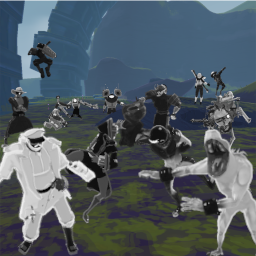
API for adding emotes to survivors, reuploaded with permission
📊 Mod Details
- Game
- Thunderstore Mods
- Author
- Temporary_Team_Name_Please_Ignore
- Version
- 1.5.4
- Downloads
- 369
- Endorsements
- 0
- Category
- Server-side
- Created
- 5/13/2022
- Updated
- 5/13/2022
- Tags
- Server-side, Libraries, Client-side, Emotes
🔧 How to Install Thunderstore Mods
Use r2modman/Thunderstore Mod Manager. Or manual: install BepInEx, drop mods into plugins folder.
📖 Full step-by-step install guide for Thunderstore →
Visit the official mod page for specific installation instructions for this mod.
🎮 Need cheat codes or console commands? Check ur gaming wiki for Thunderstore commands, item IDs, and more.
Keep browsing — more Thunderstore mods await