CamFreeModifiyer
🟡 Updated this yearPreview
🔍 Analysis
- 👍 0.3% endorsement rate
- 🏆 #397 of 632 Tweaks mods in this game by downloads
📋 About This Mod
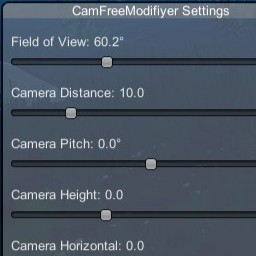
RoR2 CamFreeModifiyer A Risk of Rain 2 mod that lets you customize camera settings during gameplay. Features Field of View (FOV) : Adjust the camera's field of view (30° - 120°) Camera Distance : Change how far the camera is from your character (5 - 30) Camera Pitch : Tilt the camera vertically (-45° to +45°) Camera Height : Adjust the vertical offset of the camera (-5 to +10) Camera Horizontal : Shift the camera left or right (-10 to +10) In-Game Menu : Press F5 (configurable) to open the settings menu Persistent Settings : All settings are saved in the BepInEx config file Example Requirements Risk of Rain 2 BepInEx 5.x Installation For Users Download the latest release Copy CamFreeModifiyer.dll to your BepInEx/plugins/ folder Launch the game For Developers (Building from Source) Clone this repository Copy the following DLLs from your RoR2 installation to the libs/ folder: From Risk of Rain 2/BepInEx/core/ : BepInEx.dll 0Harmony.dll From Risk of Rain 2/Risk of Rain 2_Data/Managed/ : Assembly-CSharp.dll RoR2.dll UnityEngine.dll UnityEngine.CoreModule.dll UnityEngine.InputLegacyModule.dll UnityEngine.IMGUIModule.dll Build the project: dotnet build -c Release The compiled DLL will be in bin/Release/netstandard2.1/ Usage Launch Risk of Rain 2 Press F5 to open the camera settings menu (key is configurable) Adjust the sliders to your preference Close the menu with the "Close" button or press F5 again Configuration Settings are saved in BepInEx/config/com.jpriebe.camfreemodifiyer.cfg You can edit this file manually or use the in-game menu. License MIT License
CamFreeModifier is a mod for Risk of Rain 2 that lets you adjust the camera view during gameplay.
📊 Mod Details
- Game
- Thunderstore Mods
- Author
- JPsFantasySoftware
- Version
- 1.0.4
- Downloads
- 1,078
- Endorsements
- 3
- Category
- Tweaks
- Created
- 2/13/2026
- Updated
- 2/14/2026
- Tags
- Tweaks, Client-side, Mods, Tools
🔧 How to Install Thunderstore Mods
Use r2modman/Thunderstore Mod Manager. Or manual: install BepInEx, drop mods into plugins folder.
📖 Full step-by-step install guide for Thunderstore →
Visit the official mod page for specific installation instructions for this mod.
🎮 Need cheat codes or console commands? Check ur gaming wiki for Thunderstore commands, item IDs, and more.
Keep browsing — more Thunderstore mods await