High School More Classmates
🟠 Updated over a year agoPreview
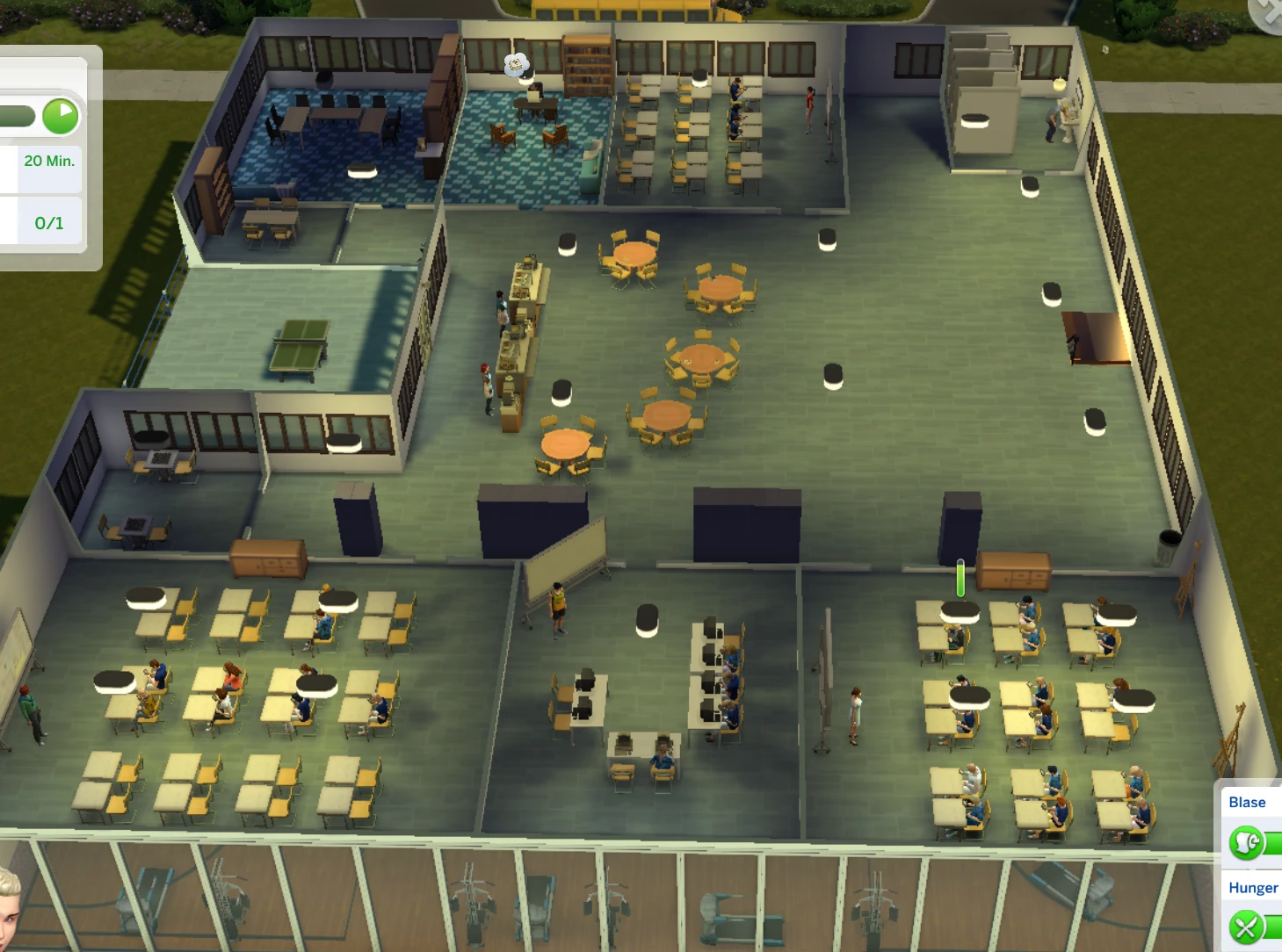
🔍 Analysis
- 👍 0.6% endorsement rate
- 🏆 #4 of 51 Gameplay mods in this game by downloads
📋 About This Mod
More Students for High School, define members of classes, up to 4 classes
Tested with 1. 122. 205 March 17
!!! Please do not upload my mods to other sites. It is also stated in the permissions.
This is the only place where I can support.
I write this at the top before the mod description as I think it is important:
EA has good reasons for having the 20 sims on lot limit.
If you go beyond that your computer has of course more to compute, so increase the number of classmates reasonable.
(For my computer 40 sims on lot is ok, but 50 is starting to lagging and the cooling fan is running all the time).
Maximum sims in Zone for high school lots is set to 100. So in theory you can have about maybe a bit more than 80 students.
(Rough formula for calculation: Number of students + 4 teachers + 4 cafeteria + 1 principal + 1 janitor + 2 firefighters + number of teens in your played household + maybe the Reaper => number of students + 20 should be sufficient)
If this is TLDR, there is a really good tutorial video from KimbaSprite linked at the videos tab.
Increasing number of Class Mates:
You have to choose your classmates, else none will show up at school. (You can go alone to school if you want.)
Click on the mail box of your lot, select "High School Students ..." ( see the first screenshot of the mailbox)
When you do this the first time you will only see "add ..." and "Faculty ..." in the menu.
Add students via "add ..."and the Sim Picker that opens. (Up to 40 at a time, but if you want more simply reopen it a second time)
Then again select "High School Students ...". You should see now the "Classes ..." menu. In there "Class 1 ...", "Class 3 ...", "Class 4 ...".
Add students via "add ..." to them.
Via this you can split your class mates into four classes. Class 1, Class 3 and Class 4. The others will go to Class 2.
(You can build a mailbox on the school lot if you want to reassign your classmates in the breaks for the next lesson.)
Up to 4 classes depending on Whiteboards:
If you add a new teacher to the faculty he will be assigned to all classes.
You can remove them from classes via the faculty -> teachers -> class X -> remove
Multiple teachers per class and multiple classes for a teacher is possible
So you can have for example 3 teachers for class 1, 2 for class 2, and maybe only 1 for class 3 and none for class 4.
If you do not assign a teacher to any class he will be used only for the events like prom etc.
Before you go to school place 2 or more additional Whiteboards on the lot.
After that assign them to class 3 and 4, by clicking on them.
Hint: If you want to reassign the whiteboards, place a fifth one for a triangle exchange,
You can reassign boards if you want a class to go to another room for the next lesson.
For this you need more boards than classes on the lot.
The determination of the white boards is done on zone spin up. Therefore best, if you add whiteboards do this before lessons, then leave the lot
and come back for school start. Also the number of needed teachers to stay on the lot is decided at the start of the school event.
(If you do the edits during the event it is too late. They will be active the next day)
Pranked boards seem not be assignable anymore, simply replace them or do a shift click => reset object on them. (EA issue)
Pranked boards need to be cleaned by the teacher before the students can go to class room. (EA issue)
(To disable pranking by NPCs you can use MCCC -> MC Tuner -> enable autonomy scan. And than click on a whiteboard and disable the
corresponding interaction)
Faculty:
For changing faculty members there is the "Faculty ..." menu. (See above for screenshots of the mailbox).
You can select for each faculty member multiple sims. They are randomized in the morning btw. start of the events.
Teachers are also used for several events. Best select at least 4 for the 4 classes plus 2 for the football and cheerleading event.
(For the initial teacher 2 from the High School package, best remove him once and add him back)
New teachers are not created. So you should assign them via the mailbox menu. Else there will be none.
After adding the teachers to the faculty also ensure that they are assigned to the classes they should teach.
and remove them from the classes they should not.
For example, if you play only with two classes, remove them from class 3 and 4. (also for performance, as sims do not need to search them th
📊 Mod Details
- Game
- Thesims4 Mods
- Author
- Aramiteus
- Version
- 8.1
- Downloads
- 455,038
- Endorsements
- 2,941
- Category
- Gameplay
- Created
- 8/1/2022
- Updated
- 9/9/2025
🔧 How to Install Thesims4 Mods
Download from Nexus Mods.
📖 Full step-by-step install guide for Thesims4 →
Visit the official mod page for specific installation instructions for this mod.
🎮 Need cheat codes or console commands? Check ur gaming wiki for Thesims4 commands, item IDs, and more.
Keep browsing — more Thesims4 mods await