Third-Generation Coordinate Cannon Mk.3
🟡 Updated this yearPreview
🔍 Analysis
- ✅ Updated 107 days after the latest game patch — actively maintained
📋 About This Mod
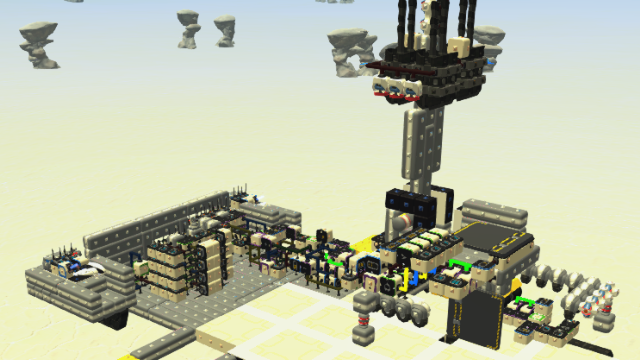
This is an easy-to-understand version of the "Third-Generation Coordinate Cannon" for public release. Setup Instructions - Detonate the separation bolt to separate the main body, cannon, and two error correction controller units. - The cannon will separate two more times. Enter the cannon and detach the legs from the cannon during the first separation. Use Build Mode to insert the cannon's fuel tank into the hole in the main body. (In rare cases, the fuel tank will fit neatly into the hole immediately after separation without using Build Mode. How lucky!) During the second separation, the cannon will separate into its upper and lower halves. At this time, turn on the toggle on the upper cannon and tilt the upper cannon. Also, turn on the toggle on the rear of the lower cannon. - Setup is now complete. How to Use (Read the notes first for easier understanding.) - On the rear left side of the main body, there are input sections for entering your own x,y coordinates and the target's x,y coordinates. Enter your coordinates at the bottom and the target's coordinates at the top. (It's convenient to check your coordinates on the radar and the target's coordinates on the world map.) Toggles are used to enter negative coordinates. Turn them on when negative values are included in each coordinate. - There are red, green, and blue toggles located in the center of the rear of the unit. Turn the red toggle on when the unit is facing due east or due west. Turn it off when facing due north or due south. Turn the green toggle on when you want to move the gun. It's generally turned on after setup, but turning it off is useful if you want to keep the cannon pointed forward for some reason. Turn the blue toggle on when you want to fire. Keeping it on will cause the cannon to continue firing at approximately 5-second intervals. - You can use the arrow keys to correct errors to some extent. This is useful if you don't successfully hit the target after entering coordinates. Notes - The
📊 Mod Details
- Game
- Terratech Mods
- Author
- 76561199189137414
- Version
- N/A
- Downloads
- 122
- Endorsements
- 0
- Category
- Techs, Circuits & Systems
- Created
- 2/7/2026
- Updated
- 2/7/2026
🔧 How to Install TerraTech Mods
Subscribe on Steam Workshop. Mods auto-download and install. Launch the game to activate.
📖 Full step-by-step install guide for TerraTech →
Visit the official mod page for specific installation instructions for this mod.
🎮 Need cheat codes or console commands? Check ur gaming wiki for TerraTech commands, item IDs, and more.
Keep browsing — more TerraTech mods await