OrdinaryTekken - Reshade Preset
⚪ Last updated 2018⚠️ Install Order · 1 step
Install in this order, then this mod last — most mods fail to load without their framework and dependencies in place.
Preview
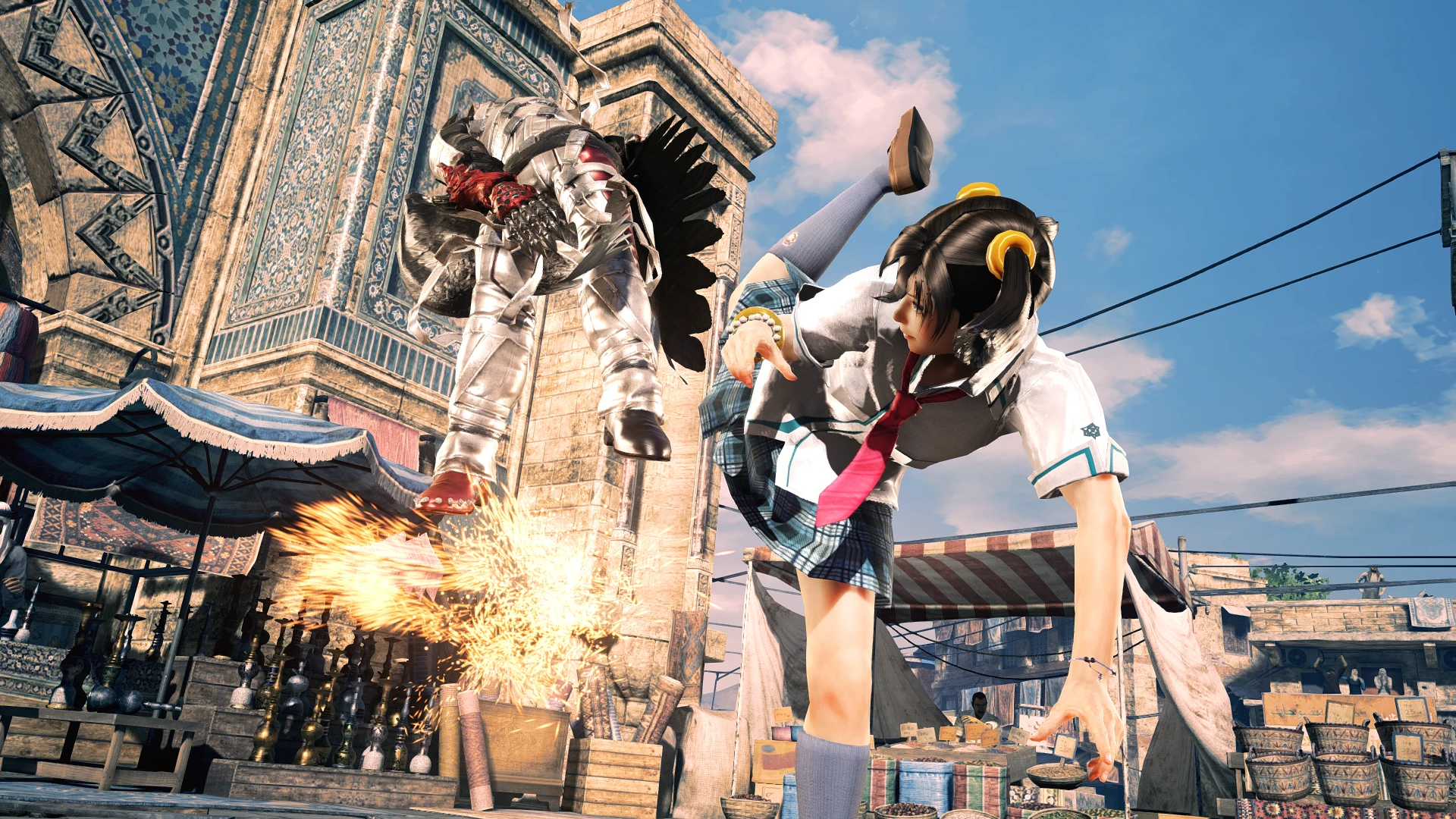
🔍 Analysis
- 👍 2.7% endorsement rate — high engagement, a strong quality signal
- 🏆 #1 of 49 Visuals and Graphics mods in this game by downloads
📋 About This Mod
Version 1. 2 - This mod is currently in its Early Access testing stages.
Images were taken with the Extreme variant of the Preset. 'Standard' and 'Performance' settings may differ in presentation.
-6rMoZl2kVY
Global Trailer
OT (OrdinaryTekken) aims to provide a more cinematic look to the Tekken action, whilst staying true to the original atmosphere trying to be achieved by the developers. The profile features a number of lighting and ini changes other the standard Tekken Experience.
Steam Edition of Tekken 7 (latest version)
Reshade 3. 1. 2
Disclaimers
OrdinaryTekken ReShade is not compatible with Ansel. Although we would love for this to be a thing, it's currently not possible.
-Slight Visual garbage may be present during the game's loading screen for Story Mode I recommend toggling the preset on and off with SHIFT+F3 during cutscenes.
Installing OT onto your Steam copy of Tekken 7 is a simple process.
INSTRUCTIONS:
1. To install OT, download one of the main file versions of Nexusmods in the Files tab, save it into a location that is accessible.
2. Head over to reshade.me and install Reshade 3. 1. 2
3. Follow the installation process and you'll be prompted to install ReShade to a specified location. Navigate to where you've installed Tekken 7 and then locate your binaries folder.
e.g: C:\Program Files (x86)\Steam\steamapps\common\TEKKEN 7\TekkenGame\Binaries\Win64
4. Click on the TekkenGame-Win64-Shipping.exe and select DirectX10+
5. A message will prompt you asking if you want to install shaders. click NO.
6. Open the file with a tool like WinRar or 7zip, you'll be presented with two main folders, place the contents in the "reshade" folder in the Tekken 7 root.
e.g: C:\Program Files (x86)\Steam\steamapps\common\TEKKEN 7 DO NOT PLACE THE FOLDER ITSELF!
7. Once that's placed, ReShade has been successfully installed. it's time to install the ini file!
8. Navigate to C:\Users\<UserName>\AppData\Local\TekkenGame\Saved\Config\WindowsNoEditor
9. Within the WindowsNoEditor folder, there is an Engine.ini folder, replace the ini file with one located in 'ini'.
10. The files are now all installed! Startup Tekken 7.
10b. If prompted with a Tutorial for ReShade, click on the dropdown menu and select OrdinaryTekken.
11. Turn on Performance Mode in the ReSha
OrdinaryTekken is a high-end Reshade Preset for Tekken 7 that enhances visuals with depth-based effects like MXAO ambient occlusion, realistic shadows, lighting, and bloom. It's for players who want a more cinematic look. With 354 endorsements and 13,074 downloads, it's a well-received preset, though it hasn't been updated since 2018.
✨ Key Features
📊 Pros & Cons
✅ Pros
- Community-approved with 354 endorsements and over 13k downloads.
- MXAO and other techniques deliver realistic shadows and lighting.
- Easy to install—just drop the preset into your Reshade folder.
⚠️ Cons
- Last updated in 2018—may not work with the latest Tekken 7 patches or Reshade versions.
- High-end preset may demand a powerful GPU to run smoothly.
For Tekken 7 players who want a more cinematic and realistic look without messing with complex settings. If you're on a low-end PC or prefer the vanilla look, skip this—it's purely visual and may hit performance.
💡 Beginner Tips
- Make sure you have Reshade installed and set up for Tekken 7 before adding this preset.
- If you're using an older Reshade version, you may need to update to the latest to avoid compatibility issues.
- Test the preset in a match to see if your FPS stays playable; if not, consider lowering Reshade's quality settings.
📊 Mod Details
- Game
- Tekken7 Mods
- Author
- Koenji
- Version
- 1.2
- Downloads
- 13,074
- Endorsements
- 354
- Category
- Visuals and Graphics
- Created
- 4/10/2018
- Updated
- 4/11/2018
🔧 How to Install Tekken 7 Mods
Download from Nexus Mods.
📖 Full step-by-step install guide for Tekken 7 →
Visit the official mod page for specific installation instructions for this mod.
🎮 Need cheat codes or console commands? Check ur gaming wiki for Tekken 7 commands, item IDs, and more.
Keep browsing — more Tekken 7 mods await