Dark Tower
⚪ Last updated 2023Preview
🔍 Analysis
- 👍 0.0% endorsement rate
📋 About This Mod
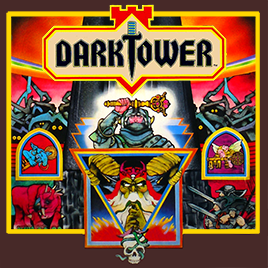
Here it is… this is the big one! Follow your scout, feed your beast, and crank up the 1812 Overture! My Tabletop Simulator mod for February 2017 is none other than Milton Bradley’s 1981 sued-out-existence classic, DARK TOWER! (And all I had to do was teach myself Lua, Blender, and Unity animations and asset bundling… no sweat!) Although the manual has mostly been transcribed into the notebook (edited for changes), Hasbro hosts one here: https://www.hasbro.com/common/instruct/Dark_Tower. PDF Wherever I could, I’ve re-mastered the graphics on the Tower and on the board, and I’ve cleaned up any noise on the sounds. The Dark Tower itself isn’t a perfect re-creation, but I tried to make slight changes to the shape of it to make virtual play a little easier… the keypad is now convex instead of concave, for example. Please try to pick up the Dark Tower only from the bottom flared base; the AssetBundles are connected to it with Joints, which I’ve found to be unpredictable when going from B-to-A rather than A-to-B. The Tower is a OBJ mesh with five Unity AssetBundles joined to it: one sound block, one display core, two LCDs (which I plan on releasing separately in the Workshop for others to use), and one “blink screen” that goes over the LCDs and simulates them blinking. The keypad itself has GUI buttons just below the surface. There are some changes between the actual board game and this Tabletop Simulator version (these are also written in the notebook): In the DARK TOWER board game, the players are P1, P2, P3, and P4. In this TTS version, the players are determined by filled seats, and are represented by R (Red), B (Blue), Y (Yellow), and G (green); the colors of the seats correspond to the colors of the kingdom crests. This allows for drop-in/drop-out play. Because there is no need to select the number of players at the beginning of the game, the level selection phase is followed by a selection of which player should go first (R1, B1, Y1, or G1). The scorecards are no
📊 Mod Details
- Game
- Tabletop Simulator Mods
- Author
- 76561197998217068
- Version
- N/A
- Downloads
- 15,351
- Endorsements
- 0
- Category
- Board Games, 1, 2, Strategy Games, 3, 4, Scripting, 30 minutes, 60 minutes, Game, 90 minutes, Components, Figurines, Sounds, Scripting: Automated, High Complexity, User Interfaces
- Created
- 2/26/2017
- Updated
- 3/5/2023
🔧 How to Install Tabletop Simulator Mods
Subscribe on Steam Workshop. Mods auto-download and install. Launch the game to activate.
📖 Full step-by-step install guide for Tabletop Simulator →
Visit the official mod page for specific installation instructions for this mod.
🎮 Need cheat codes or console commands? Check ur gaming wiki for Tabletop Simulator commands, item IDs, and more.
Keep browsing — more Tabletop Simulator mods await