StoreDelivery
🟠 Updated over a year agoPreview
🔍 Analysis
- 👍 1.2% endorsement rate — high engagement, a strong quality signal
- 🏆 #2 of 19 Storage mods in this game by downloads
📋 About This Mod
StoreDelivery is a mod for Supermarket Simulator which adds an option to place product boxes on racks in storage automatically right after delivery.
This mod use BepInEx not MelonLoader, please follow the installation steps below.
How it works
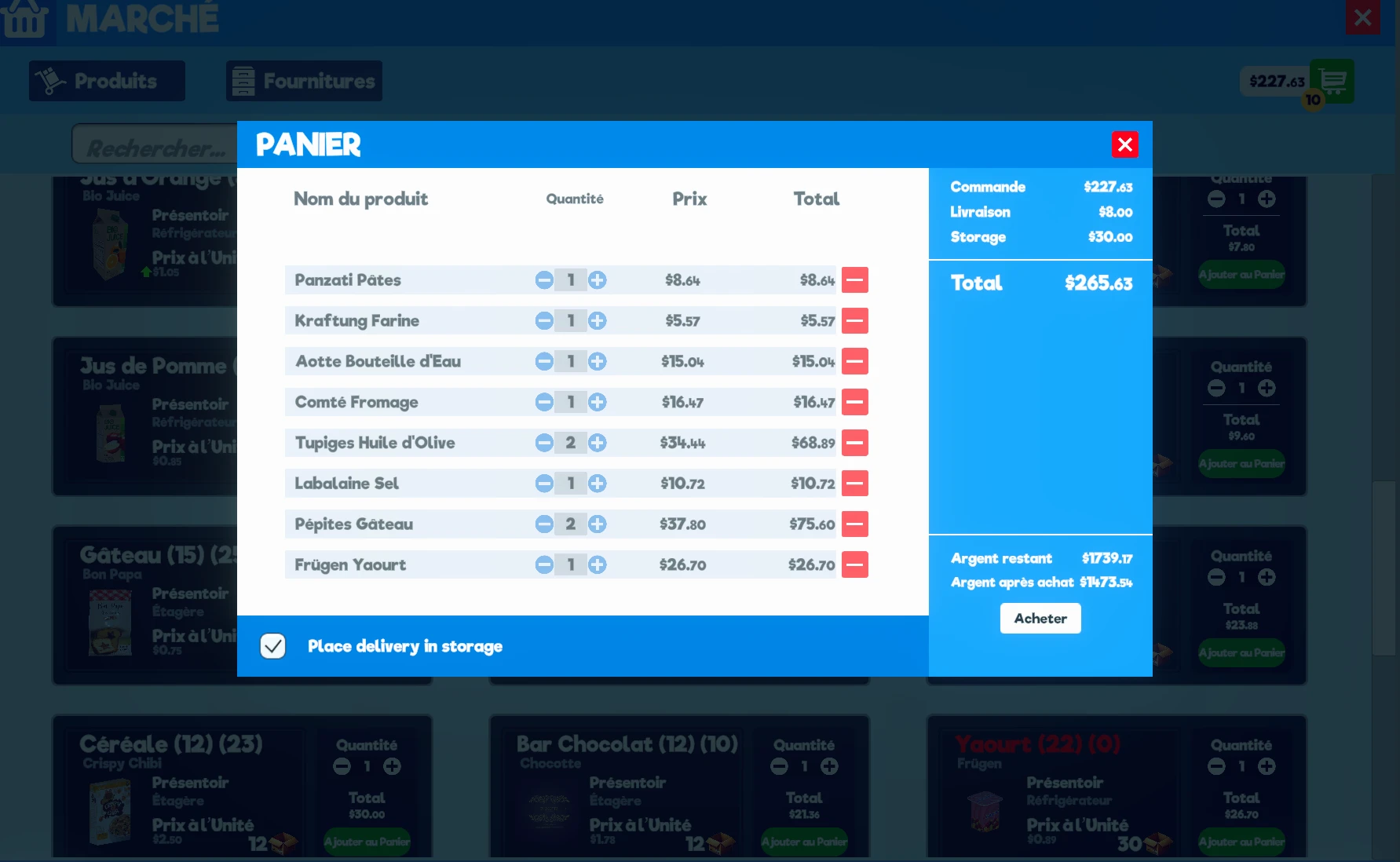
Go on the market app on the store computer, add some products to your cart then click on the cart button to open the purchase window. On the purchase window you have a checkbox with the label Place delivery in storage. If it's checked, additional fees will be applied to your order and all products in your order that can be placed on a rack with a matching label, will be placed on instantly after being delivred.
Fees cost are calculated based on the number of product boxes in your delivery, this can be changed in the mod configuration file.
If a product doesn't have place in storage the box will appear in front of the store as usual but you will still have to pay the fees for this box.
By default, it will place product boxes only on racks with a matching label, this can be changed in the mod configuration file to allow box to be placed on empty racks with or without labels.
Installation
Requirements
- BepInEx 5.x (download Tobey's BepInEx x MelonLoader Pack or official release).
Steps
- Install Tobey's BepInEx x MelonLoader Pack (recommanded) or directly BepInEx 5 on the game if you don't already have it.
(not required if you use pre-configured Tobey's BepInEx x MelonLoader Pack) : Open BepInEx.cfg (%steamapp%\common\Supermarket Simulator\BepInEx\config) and set HideManagerGameObject to true then save and close the file.
- Download the latest release of the mod.
- Extract the archive and copy the BepInEx folder from StoreDelivery-1. 1. 0 folder to the game installation folder at %steamapp%\common\Supermarket Simulator. If it asks you to replaces files, say yes to all.
If you don't find your game installation folder, go on your steam application, right-click on Supermarket Simulator game in your Steam Library then select Properties. Open Installed Files tab, then click on Browse. It will open the game installation folder in your explorer.
- Launch the game, go to the computer > Market application > Open your cart then if you have a checkbox at the bottom of the cart window with the text "Place delivery in storage", the mod is successfully installed.
Configuration
Mod configuration is available in %steamapp%\common\Supermarket Simulator\BepInEx\confi
StoreDelivery adds an option to the market app purchase window that automatically places product boxes on storage racks right after delivery. This quality-of-life mod streamlines inventory management for players who frequently buy goods in bulk. With over 2,400 endorsements and 208k downloads, it's a popular utility for storage-focused players.
✨ Key Features
📊 Pros & Cons
✅ Pros
- Huge community trust with 2,442 endorsements and over 208k downloads.
- Saves you from manually dragging boxes to racks every time you buy stock.
- Simple, focused QoL mod that does exactly what it says.
⚠️ Cons
- Only works for purchases made through the market app—manual pickups still need sorting.
- May conflict with other storage or inventory mods that alter rack behavior.
- No recent updates since October 2024, so compatibility with newer game versions is uncertain.
For players who run shops or bases and buy supplies in bulk, this mod cuts down on tedious box shuffling. If you're a solo survivalist who rarely uses the market, you can skip it. It's a pure convenience tool, not a gameplay overhaul.
💡 Beginner Tips
- Check if your game version is compatible with the mod's last update (October 2024) before installing.
- If you use other storage mods, test them together in a backup save to avoid conflicts.
- Look for the new option in the market app purchase window after installation—it's not automatic by default.
📊 Mod Details
- Game
- Supermarketsimulator Mods
- Author
- Eryux
- Version
- 1.2.0
- Downloads
- 208,681
- Endorsements
- 2,442
- Category
- Storage
- Created
- 3/23/2024
- Updated
- 10/5/2024
🔧 How to Install Supermarket Simulator Mods
Download from Nexus Mods.
📖 Full step-by-step install guide for Supermarket Simulator →
Visit the official mod page for specific installation instructions for this mod.
🎮 Need cheat codes or console commands? Check ur gaming wiki for Supermarket Simulator commands, item IDs, and more.
Keep browsing — more Supermarket Simulator mods await