Annoying Hallway
⚪ Last updated 2021Preview
🔍 Analysis
- 🏆 #81 of 1100 Object mods in this game by downloads
📋 About This Mod
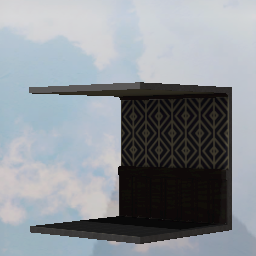
First crack at this - mostly to test the waters. If there's an appetite, I'll do more. My buddy loves puzzle games - I do too but I love creating game assets more. No idea if this is what the devs had in mind for user creation - but it was the first thing I thought of. The idea was to create an environment item - something that could be tiled to give players something else wall-wise to look at besides the prefab stuff available in the editor. It's a very simple model - triangles came in at just under 300. Textures should be 512x1024. It's all my stuff - Blender for the mesh, Substance for the textures. (Caution - this asset may appear kinda dark in-game. I'm still trying to figure out material/shader things here. I'll forgive you if you don't keep it in your subscriptions. But keep an eye out, I'll figure it out. - we're still pretty early on in things here. SO - open technical stuff for anyone who has any thoughts to share. I tried a number of formats for upload, among those that are supported. I'm using Blender 2. 8(9) - the object is hooked up to a principled BSDF shader material. Strikes me that metal/rough should be the way to go - but I got varying results with different formats. If any of you(se) knows the way to get some of these texture types to do what they should, lemme know. Here's what I tried: OBJ worked on first blush, just colours - but no normal mapping, or anything else. FBX worked, colour and normals, (this model is an FBX export) - but it was kinda dark in game, as this asset might be. Most FBX exports with PBR textures - roughness for instance - turned everything black. GLTF/.glb appeared to respect pretty much everything (opacity/emissive/normal/roughness, etc) and looks great. But I was not able to save the item to a collection or upload it to the workshop with this format. :( I could only mess around with them in the editor. Edit: I tried exporting fbx from Clara.io - not with this particular asset, but later. Since Autodesk is Autodesk and ha
📊 Mod Details
- Game
- Superliminal Mods
- Author
- 76561198041935907
- Version
- N/A
- Downloads
- 99
- Endorsements
- 0
- Category
- Object
- Created
- 1/5/2021
- Updated
- 1/5/2021
🔧 How to Install Superliminal Mods
Subscribe on Steam Workshop. Mods auto-download and install. Launch the game to activate.
📖 Full step-by-step install guide for Superliminal →
Visit the official mod page for specific installation instructions for this mod.
🎮 Need cheat codes or console commands? Check ur gaming wiki for Superliminal commands, item IDs, and more.
Keep browsing — more Superliminal mods await