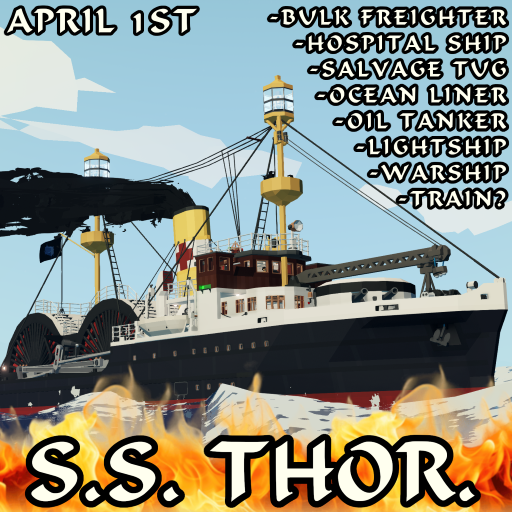
SS Thor | Bulk Freighter/Hospital Ship/Salvage Tug/Ocean Liner/Oil Tanker/ Lightship/Warship/Paddle Steamer
🟡 Updated this yearPreview
🔍 Analysis
- 👍 0.0% endorsement rate
📋 About This Mod
BULK FREIGHTER/HOSPITAL SHIP/SALVAGE TUG/OCEAN LINER/OIL TANKER/LIGHTSHIP/WARSHIP/PADDLE STEAMER/STEAM LOCOMOTIVE? SS THOR (I seriously hope I don't need to tell you that this is fictional) I RAN OUT OF SPACE IN THE DESCRIPTION SO I HAD TO CUT IT DOWN TO JUST THE NECESSARY STUFF BRUH HOW TO START/OPERATE 1. Head down to the boiler room via a hatch in the engine room, next to the electric switchboard. 2. Light boiler 3. Open the water injector valve, ideally at about 51% (it's somewhat hidden behind the uptake on the left side) 4. Open the valves to the dynamo, water injector pump, feed tank pump, and condenser circulating pump (valves with green handles). All valves (in the boiler room) with red handles are purely aesthetic and can be ignored. 5. Once steam pressure is up and the dynamo is running, head up to the engine room and turn on the 'Master Electrical Switch', then all the breakers. 6. From there, you should be good to go. You can control the engine both from a telegraph in the engine room and from the helm at the bridge. OIL TANKS/PUMPS OPERATION - The ship features 4 oil tanks, 2 either side of the forward paddle box, and a pump room between the aft paddle box and the tow winch, with the connections for loading/unloading. In the pump room, there are two electric pumps. Each pump has a separate 3-valve valve chest for suction and dicharge. - The SUCTION valve chest, on the side of the pump, controls where you're pumping oil FROM. - The DISCHARGE valve chest, on top of the pump, controls where you're pumping oil TO. - The light gray 'Suction' and 'Discharge' valves act as a sort of two-step verification, keeping the valve to the pump itself closed while the other valves are switched around. 1. At the oil tanks, open the valve for the tank you want to fill/drain. There is an invisible button above the decorative valve handle. 2. In the pump room, turn on the valves on the valve chests needed for how you want to pump oil. 3. Turn on the pumps. -For pumping oil
📊 Mod Details
- Game
- Stormworks Build And Rescue Mods
- Author
- 76561199211371163
- Version
- N/A
- Downloads
- 5,099
- Endorsements
- 0
- Category
- Vehicle, Rescue, Multi-vehicle, Exploration, Delivery, Technical, Creative, Land, Mechanical, Advanced, Weapons, Train, v1.15.12
- Created
- 4/1/2026
- Updated
- 4/5/2026
🔧 How to Install Stormworks: Build and Rescue Mods
Subscribe on Steam Workshop. Mods auto-download and install. Launch the game to activate.
📖 Full step-by-step install guide for Stormworks: Build and Rescue →
Visit the official mod page for specific installation instructions for this mod.
🎮 Need cheat codes or console commands? Check ur gaming wiki for Stormworks: Build and Rescue commands, item IDs, and more.
Keep browsing — more Stormworks: Build and Rescue mods await