State of Decay 2 Ideal Community Generator
⚪ Last updated 2018This mod may not work until the author updates it. Check for an update, or see the rollback guide.
Preview
🔍 Analysis
- 👍 3.7% endorsement rate — high engagement, a strong quality signal
- 🏆 #9 of 228 Miscellaneous mods in this game by downloads
📋 About This Mod
Read this file carefully before trying to use this utility.
1. 6 changes:
Added BATTLE ROYALE MODE: profiles duke it out for dominance!
1. 5 changes:
moved ocrfixes to separate file, I didn't like them cluttering up the config file
exposed HPFilterVal variable for the high pass filter
changed behavior of the mouse a bit, now it will pause if you manually move the mouse away from the reroll button
renamed MouseMoveWait to MouseEventWait
1. 4 changes:
moved ocr fixes to the end of the config file, rather than being hard-coded, so if you notice a mistake appearing on your specific computer, you can add it
added support for 1280x960 resolution, which is 4:3 for those of you who don't get 16:9 options for whatever reason
added option for people who want to search for skills and don't care about the traits involved
1. 3 changes:
some performance improvements
it tries to automatically move the game window to the corner for you and bring it to front of window stack
removed need to surround trait and skill names with quotes in config file
notice: trait and skill names now have to be exact matches, rather than substrings
example: 'lichen' used to work, but now it has to be 'lichenologist'
added a number of configuration options to the config file, including ability to define parameters for custom game window resolutions
First, you may need to install or update Microsoft Visual C runtime.
I provided a recent copy of their redistributable binary in the folder vc_redist.
Second, you may need to install an updated version of Java
https://java.com/en/download/
Third, you need to modify the SoD2_ideal_community.cfg file. Use Notepad or Wordpad, it's just an ascii text file.
Most of the settings should be fairly obvious, but here's the general idea:
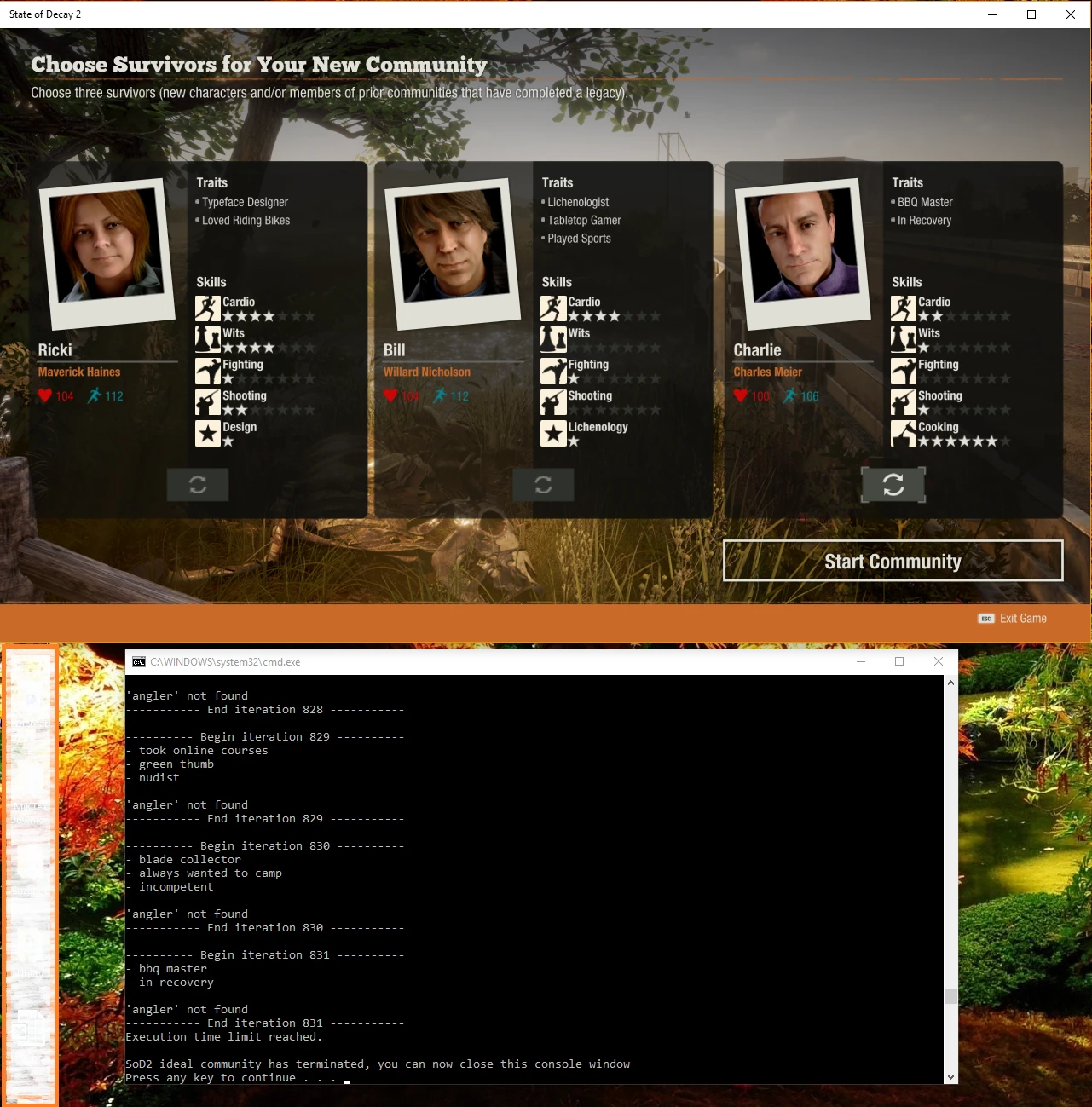
The program runs for (RunMins + RunSecs) and tries to build characters for you to start your community.
The MouseEventWait setting is to make sure that the Windows UI registers the mouse event before the next click attempt.
Too small a number here means mouse clicks will be asynchronous to the OCR functions, and the program won't work right.
ScaleFactor is used by the OCR code to upscale images before trying to do text retrieval. At lower resolutions, this can help improve accuracy.
DoSharpen instructs the program to convolve a sharpen mask over the image before text retrieval. At lower resolutions, this can help improve accuracy.
DoOCRCleanup performs a series of corrections to fix common mistakes and mispellings.
HPFilterVal is the minimum rgb value required for a pixel to be considered "not noise".
DoPromptToContinue will prompt you after the program completes if there are still open character slots.
A standalone utility for State of Decay 2 that lets you generate a custom starting community by selecting desired traits and filtering out unwanted ones. With over 1,500 endorsements, it's a popular tool for players who want to tailor their early game experience.
✨ Key Features
📊 Pros & Cons
✅ Pros
- Community favorite with 1,512 endorsements and 40k downloads.
- Perfect for min-maxers who want the perfect starting crew.
- Also fun for challenge runs if you want a handicap.
⚠️ Cons
- Last updated in 2018, so it may not account for newer game updates or DLC traits.
- External tool, so you'll need to alt-tab or run it on a second monitor.
- No integration with the game itself—you'll have to manually create the survivors in-game.
For State of Decay 2 players who want to min-max their starting community or set up challenge runs. If you prefer to play with whatever survivors you get, this isn't for you.
💡 Beginner Tips
- Use the tool to plan your community before starting a new game, then manually create each survivor.
- If you're on PC, keep the tool open on a second monitor for quick reference.
- Pair this with a trait list from the wiki to understand what each trait does.
📊 Mod Details
- Game
- Stateofdecay2 Mods
- Author
- EvilGrin
- Version
- 1.6
- Downloads
- 40,426
- Endorsements
- 1,512
- Category
- Miscellaneous
- Created
- 6/4/2018
- Updated
- 6/16/2018
🔧 How to Install State of Decay 2 Mods
Download from Nexus Mods.
📖 Full step-by-step install guide for State of Decay 2 →
Visit the official mod page for specific installation instructions for this mod.
🎮 Need cheat codes or console commands? Check ur gaming wiki for State of Decay 2 commands, item IDs, and more.
Keep browsing — more State of Decay 2 mods await