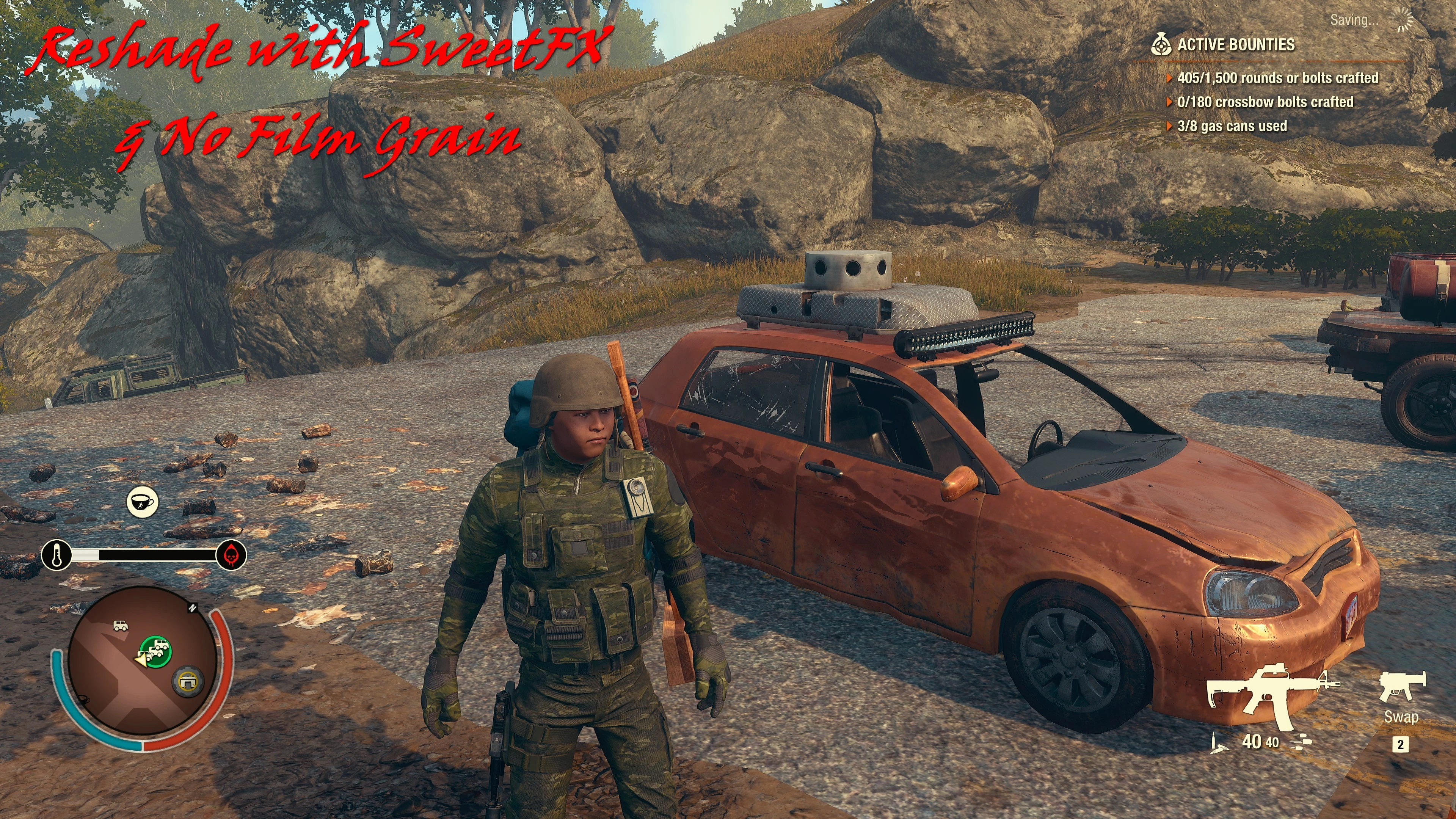
Reshade with SweetFX and No More Film Grain for State of Decay 2
⚪ Last updated 2022Preview
🔍 Analysis
- 👍 2.2% endorsement rate — high engagement, a strong quality signal
- 🏆 #5 of 29 Visuals mods in this game by downloads
📋 About This Mod
A File of the Month
for January 2026
Thanks very much all.
This is meant to enhance the overall games appearance. Bringing out the true colors and definition in the game. Giving you a sharper and clearer picture.
Works alongside any texture or HD Pack also, further enhancing them.
======================================================================================================
Reshade Version
(Newest Release)
After downloading preset file do the following.
-
[]Download the newest Reshade installer from the Official ReShade Website.[/]
[]Run the installer and target your StateOfDecay2-Win64-Shipping.exe file in the game folder.[/]
[] C:\Program Files (x86)\Steam\steamapps\common\StateOfDecay2\StateOfDecay2\Binaries\Win64[/]
[]Select the DirectX 10/11/12 rendering API.[/]
[]When the setup screen asks you to select effect packages to download, check the boxes for:
[]Standard Effects (by crosire)[/]
[]SweetFX (by CeeJayDK)
[]Finish the installation, then drop the downloaded preset file into your (above mentioned) game folder.[/]
[]Open the game, press the Home key to pull up the ReShade overlay, and select the preset from the top drop-down menu.[/]
[]Try it with or without Vibrance by disabling it in the settings to determine which setting best suites your tastes.[/]
======================================================================================================
Rehade with Sweetfx Version
(Older Version)
Download and extract the files to
C:\Program Files (x86)\Steam\steamapps\common\StateOfDecay2\StateOfDecay2\Binaries\Win64
Uninstall
Remove placed files to uninstall.
======================================================================================================
A visual enhancement mod for State of Decay 2 that bundles Reshade with SweetFX to improve the game's appearance, plus an optional ini update to remove film grain. With 209 endorsements and 9,376 downloads, it's a modestly popular choice for players seeking a sharper, cleaner look.
✨ Key Features
📊 Pros & Cons
✅ Pros
- Solid community backing with 209 endorsements and nearly 10k downloads
- Gives you two options: full Reshade with SweetFX or just the film grain removal
- Simple to install—just drop files in and go
⚠️ Cons
- Last updated in December 2022, so it might not be fully compatible with the latest game patches
- Reshade can hit your FPS, especially on lower-end rigs
- SweetFX presets can be hit-or-miss depending on your monitor and taste
For State of Decay 2 players who want a quick visual boost without fiddling with complex ENB-like setups. If you're tired of the default film grain and want a crisper image, this is a solid pick. Skip it if you're on a weak PC or prefer a vanilla look.
💡 Beginner Tips
- Make sure to disable the in-game film grain option as well, if available, to avoid double effects
- If you experience crashes after a game update, reinstall the mod to ensure compatibility
- Test the SweetFX preset in a dark area to see if it suits your taste before committing
📊 Mod Details
- Game
- Stateofdecay2 Mods
- Author
- Carinth
- Version
- 2.01
- Downloads
- 9,376
- Endorsements
- 209
- Category
- Visuals
- Created
- 5/26/2020
- Updated
- 12/31/2022
🔧 How to Install State of Decay 2 Mods
Download from Nexus Mods.
📖 Full step-by-step install guide for State of Decay 2 →
Visit the official mod page for specific installation instructions for this mod.
🎮 Need cheat codes or console commands? Check ur gaming wiki for State of Decay 2 commands, item IDs, and more.
Keep browsing — more State of Decay 2 mods await