Reshade (Better Colours) Profile
⚪ Last updated 2020Preview
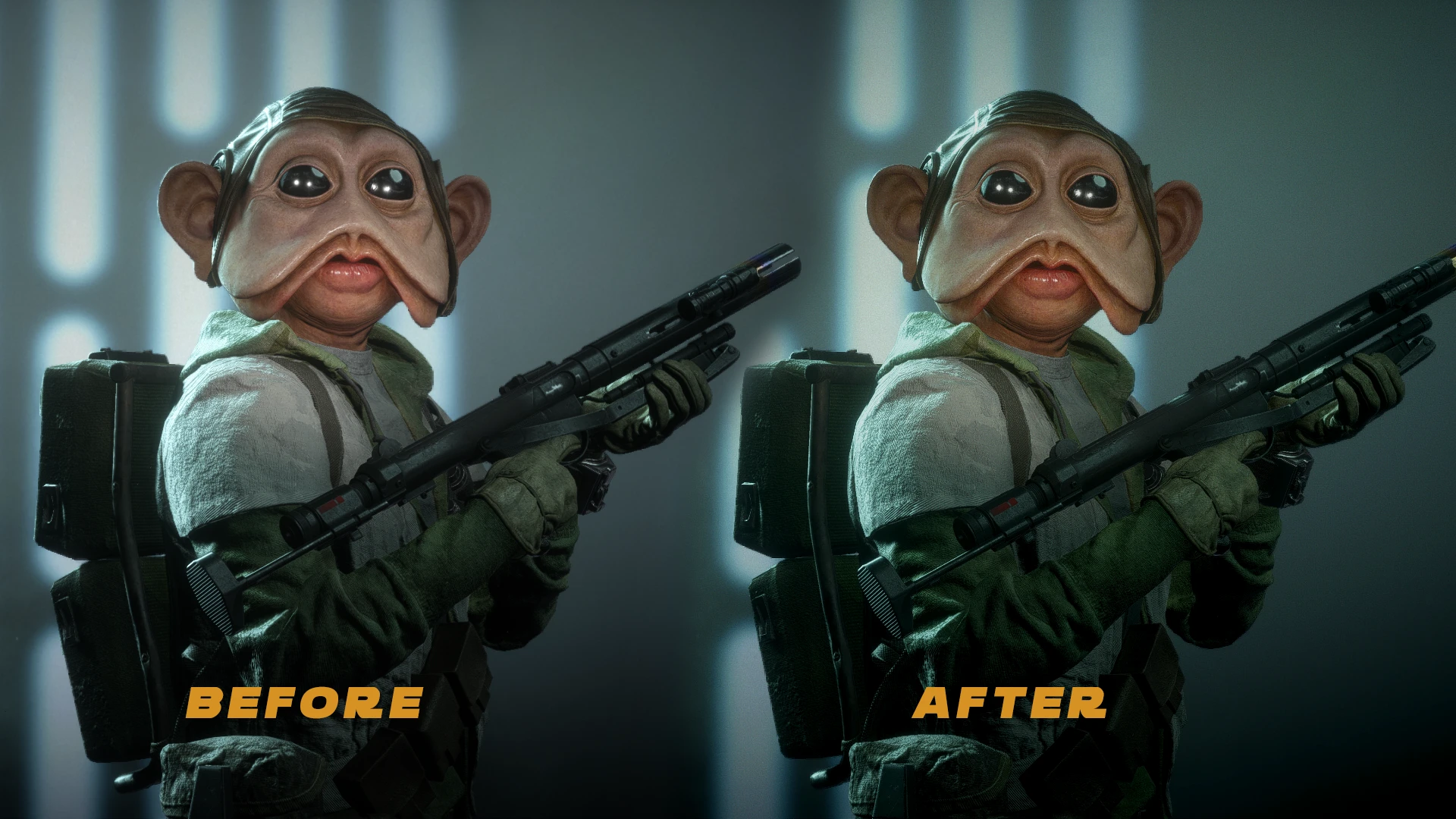
🔍 Analysis
- 👍 3.7% endorsement rate — high engagement, a strong quality signal
- 🏆 #80 of 101 Visuals and Graphics mods in this game by downloads
📋 About This Mod
Reshade preset for better colours for the game.Tint/Levels/Tonemap/Filmgrain Made with Reshade 4.5.4
Reshade preset for better colours for the game.
⛩️ HOW TO USE ⛩️
1️⃣: Launch the game for the first time and set your settings / resolution / and all the others stuffs..
2️⃣: ⚠️ Absolutely check DirectX11 in the settings otherwise reshade wont work at all !
? : Since Reshade 4. 4. 0 "DX12" is now supported but it's a work in progress so i don't garantee it will work without bug and fully optimized.
3️⃣: Quit the game and follow the steps :
⛩️ TO INSTALL RESHADE ⛩️
xIQHNiu5dbQ
*Download Reshade:
LAST : https://reshade.me/#download [ DX12 SUPPORTED ]
4. 5. 4 : https://drive.google.com/open?id=1rIlK2bDb8_Bi-E2ZtS5WaFtcO5rCSJdf
▶️ Execute reshade.exe, search for the game .exe in the Game Folder, check Direct3D 10+ and install the shaders (if you have reshade 4. 3. 0) or ? check Direct3D 10/11/12 (if you have 4. 4.x). (Dont close the app).
▶️ Download the preset from here then rename the file to DefaultPreset.ini and put it in the game folder (if there is, replace the existing one).
▶️ Always in the Game Folder if you see a file named : dxgi.dll, rename it to d3d11.dll or ? rename it to d3d12.dll (if you want to test DX12) !
▶️ On the Reshade app, clik Edit Reshade settings Button, and in the news windows select the ini file that you have placed in the Game folder then check Performance Mode and click the OK button. Under settings you can also set your Overlay key and Effect (on/off) key. I would change that once you have it installed to Overlay = Home key & Effect = Insert key.
▶️ Launch the game and in settings in Video in BF2 , turn off Film Grain and Lens Distortion. Now Enjoy!
▶️ If you didn't install correctly or have issues and want to uninstall
Go to the game's executable folder and delete any of the following files you see:
OPENGL. DLL
then delete any of these additional files:
OPENGL. INI
Along with the following folder:
reshade-shaders
📊 Mod Details
- Game
- Starwarsbattlefront22017 Mods
- Author
- Kenobi
- Version
- 1.0
- Downloads
- 1,330
- Endorsements
- 49
- Category
- Visuals and Graphics
- Created
- 4/24/2020
- Updated
- 5/25/2020
🔧 How to Install Star Wars: Battlefront II Mods
Download from Nexus Mods.
📖 Full step-by-step install guide for Star Wars: Battlefront II →
Visit the official mod page for specific installation instructions for this mod.
🎮 Need cheat codes or console commands? Check ur gaming wiki for Star Wars: Battlefront II commands, item IDs, and more.
Keep browsing — more Star Wars: Battlefront II mods await