YIGH - Your Image Goes Here
⚪ Last updated 2024⚠️ Install Order · 2 steps
Install in this order, then this mod last — most mods fail to load without their framework and dependencies in place.
Preview
🔍 Analysis
- 👍 8.1% endorsement rate — high engagement, a strong quality signal
- 🏆 #19 of 74 Outposts mods in this game by downloads
📋 About This Mod
This mod allows you to add your own images to 30 stand-alone posters you can decorate your outpost with.
Your Image Goes Here (YIGH) adds 30 texture files that you can replace without effecting anything else in the game.
10 are square panels, the next 20 are portrait/poster format.
Installation
1. Use mod manager to install normally or manually extract the plugin to your mod directory
2. Add "yigh.esm" without quotes to your plugins.txt
Requirements
Plugin.txt Enabler
Replacing Textures
I've done the hard bit of making stand-alone meshes that link to these textures so that you can just add your own images.
Textures in the game are stored in the .dds image file format.
You can convert your jpg/png/.. files into a dds file using the NVIDIA Texture Tool Exporter. Just drag & drop your 1024x1024 jpg file into the Tool, save in the location specified below, and you're done! Open the outpost Decorator, look for "Your ImageGH Poster" and select your poster.
The NVIDIA Texture Tool Exporter can be found here:
https://developer.nvidia.com/nvidia-texture-tools-exporter
You'll find a stand-alone version as well as Photoshop plugin. I used the stand-alone version which is trivially easy to use.
I also hear Paint.net handles .dds files natively. (cheers Z3R0B4NG).
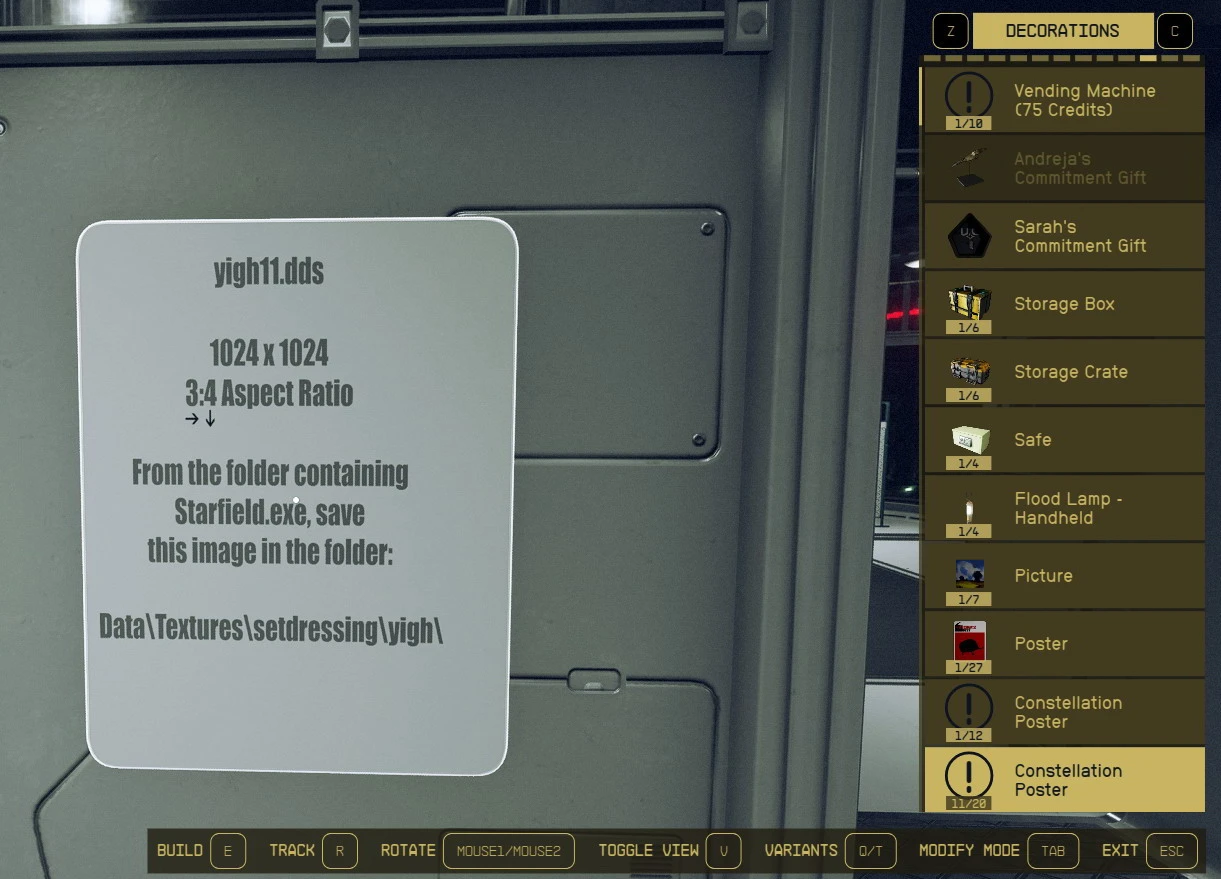
Square images: yigh01.dds - yigh10.dds
Portrait (3:4) images: yigh11.dds - yigh30.dds
All .dds images must be 1024 x 1024 pixels and (from Starfield.exe) go in the Data\Textures\setdressing\yigh\ folder. After installing, go look in there to see the files to replace.
Don't forget that you can move and rescale these posters once placed using console commands.
(eg save first, select item in console - modpos x 0. 2 - modangle z 90 - and setscale 1. 5)
(Better still - Use Fast House and Ship Builder - Object Spawner - Map Editor (SFSE))
See the Youtube Video on how to use:
fF2R1j3nmCM
Do I want to know what images you add? Probably not.
Uninstall
Remove these posters from all outposts (or go thru Unity). If you don't do this Outpost Builder will crash the Yigh-free game when you try to edit an outpost with a yigh poster present. Save & close. Uninstall. Open. "This save relies on content...". OK. Save game. Close to Desktop. Reopen. Done.
Bugs - if you find a problem please submit to the Bugs section & I'll try to address asap. Cheers.
A BIG thankyou to both DarthSidious666 and MaximusMaxy for the article "Custom Material for Starfield". Also to fo76utils for CE2Utils.
Resources:
-
[]Starfield Material Exporter
[
]CE2Utils
📊 Mod Details
- Game
- Starfield Mods
- Author
- Talismancer
- Version
- 1.0
- Downloads
- 763
- Endorsements
- 62
- Category
- Outposts
- Created
- 1/28/2024
- Updated
- 1/30/2024
🔧 How to Install Starfield Mods
Download from Nexus.
📖 Full step-by-step install guide for Starfield →
Visit the official mod page for specific installation instructions for this mod.
🎮 Need cheat codes or console commands? Check ur gaming wiki for Starfield commands, item IDs, and more.
Keep browsing — more Starfield mods await